
Have you ever finished editing your product video, and you’re still… not quite done?
First, it’s off to TikTok, then an Instagram Reel, then a YouTube Short, plus versions for your ads, and why not a LinkedIn one too. Can we just say nobody wants to edit the same video five times?
The key isn’t just to create more – it’s to get more mileage out of what you already have. In this article, we’ll show you how to adapt your product video for every major platform, including format, pacing and even watermarks, using a simple edit!

Why one video doesn’t automatically work everywhere
Doesn’t it sound easy? Film one video of your product and share it across every platform. Not typically the case, however.
Different platforms show your videos to different customers.
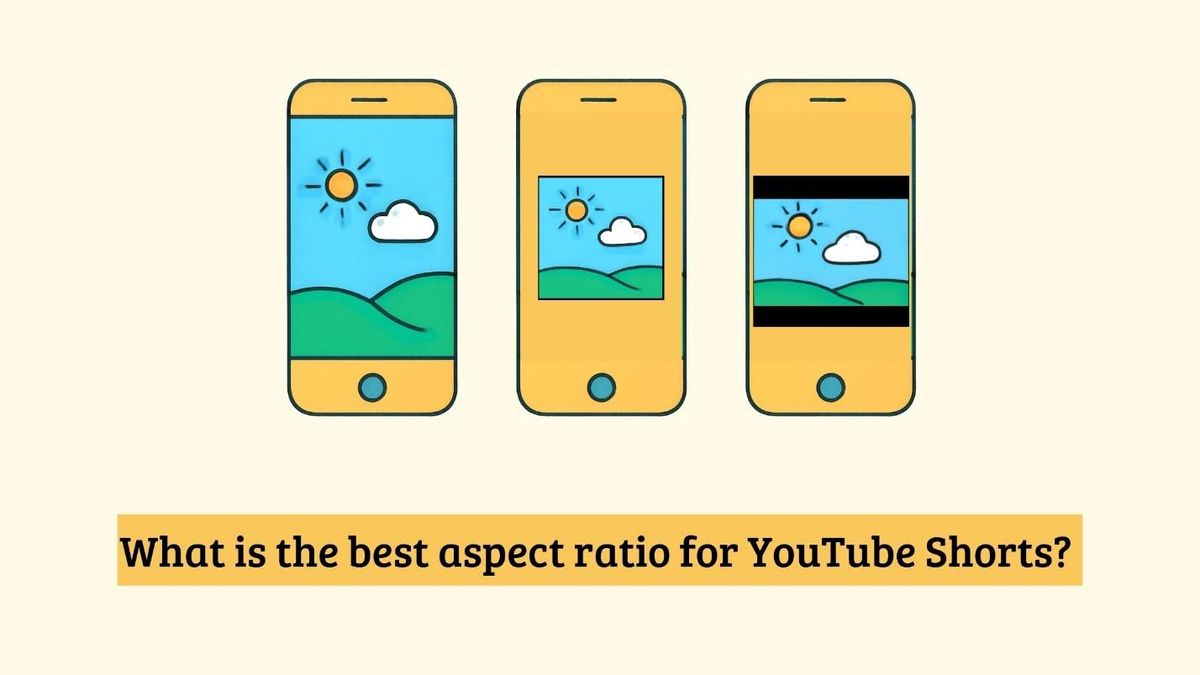
A video that receives hundreds of millions of views on TikTok is often not so profitable on IG Reels or YouTube Shorts. Your aspect ratio matters in a similar way. Vertical videos work well on TikTok, Reels, and Shorts; however, lots of ads as well as posts for LinkedIn operate far better if they are square or landscape.
We engage with videos in different ways depending on the platform, too.
You typically only have 1 to 2 seconds to capture somebody’s attention on TikTok and IG Reels. Advertisements differ, as users need to understand the product as well as see a clear call to action before they scroll away.
| Platforms | Ratio | Ideal length | Style |
| TikTok | 9:16 | 15–30 sec | Fast hook, casual, trend-friendly |
| Instagram Reels | 9:16 | 15–30 sec | Quick, engaging, natural |
| YouTube Shorts | 9:16 | 15–60 sec | Strong story, keeps people watching |
| Paid Ads | 9:16, 1:1, or 16:9 | 15–30 sec | Product-first, clear CTA |
| 1:1 or 16:9 | 30–90 sec | Professional and informative |
What actually happens when you try to DIY this
It sounds easy, right? You pop your video into your editor, crop it for TikTok, export it, repeat for Reels, repeat for Shorts, repeat for ads. You think it’ll take a few minutes. You’ll find yourself editing for a couple of hours.
Common failure points:
The very first issue that will come up is cropping. What was once a beautifully framed shot, the landscape video cut off the bottom of your product when it’s switched over to vertical.
Next, you’re repositioning each clip, you need to redo each text overlay. If you’re reusing older videos or download B-roll, you might realize that a watermark was there that wasn’t apparent until after exporting the video and now is obvious in your ads and branding!
The largest chunk of time eaten up is repeated work. You continue to export, check, edit and fix each video version independently.
At the end of all of that, your videos have slightly changed: logo has moved in a couple of versions, the fonts are different, the colors are slightly dissimilar, etc.
If this sounds familiar, it’s not a problem with you, that is what happens when you attempt to repurpose one video without a process built for that intention! The right process (and tools) can save you several hours.
The real cost of getting this wrong
When you repurpose video for something else, it’s not just time wasted, but results.
- Not to mention, with a cropped ad, your product can be missed, or text could be cut out entirely.
- Or an ad might just not perform well if it doesn’t make sense for the specific video streaming platform.
So, the main point is that it doesn’t matter if you have the best product if your material comes across as amateurish; it kills credibility.
A simple repurposing workflow (one video → five assets)
You don’t want 5 separate videos. All you really want is a single quality master video and an easy process for putting the workflow together.
1. Start with a modular master clip
Think ahead of your shot before you record. Center up your product or your focus with a little bit of space on each side and shoot more of the clip than you think you’ll require. This will enable you to trim the edges later without losing crucial bits.
2. Reframe for each platform’s native ratio
Don’t use the same aspect ratio everywhere. Adjust the video to match where you’re posting it.
- 9:16 – TikTok, Instagram Reels, YouTube Shorts
- 1:1 or 4:5 – Facebook and Instagram feed ads
- 16:9 – YouTube videos and LinkedIn
This helps your content look natural instead of looking like it was stretched or cropped.
3. Re-cut pacing per platform
Every social network requires a different type of viewer approach. If your primary format is TikTok, Reels, and Shorts, be sure to immediately make impact in the first 1-2 seconds of the clip.
Keep the edits quick and remove anything that slows the video down.
4. Clean up footage before reposting
Now that you have all your video clips compiled and ready to go, watch each clip one by one. If you’ve used any stock footage, or video captured from another resource, you will find that some will have a watermark over it. This looks extremely unprofessional.
A shortcut to this problem is to use Vmake AI Video Watermark Remover. This tool is smart enough to auto-recognize and remove watermark from videos in both static and motion, saving you the time to edit frame by frame. The AI recreates a natural-looking background that keeps your product, faces, or other parts perfectly in place. Batch removal is also available to let you save multiple videos in one go without performing the task again.
5. Add platform-native text/captions and CTA overlays.
Do not use identical text content for each platform. Relocate any captions away from beneath app buttons and create specific call-to-action content to fit your platform.
Export at correct specs
Make sure each variant is exported with ideal resolution and file formats to stop fuzzy images post uploading and to prevent needless compression.
Batch-schedule and tag for each platform’s algorithm.
When everything else is prepared and your video content has been adapted to each format, upload them for the appropriate days. Craft captions suitable for your followers, attach appropriate hashtags if required, and monitor your variations in engagement – often small adjustments can lead to massive results.
What changes when you systematize this
What if it took you only one shooting session to generate content for the entire week?
This happens once you stop treating all your social media platforms as separate entities. Rather than taking up 2-3 hours of your day to create slightly varied versions of a single video, you can get all your video production done in 30-60 minutes, freeing you up creating something fresh instead of repeating the same edit.
Imagine this: It’s Monday morning, you shoot one product video, and by that afternoon you’ve already re-edited it to appear on TikTok, Reels, YouTube Shorts, and as paid ads. You get the rest of the week to work on posting, tracking, and developing your business, not editing the same clip repeatedly.
Conclusion
You’re already creating killer videos – you don’t need to do more work to get more attention!
Get more leverage from your content by taking 5 easy steps: shoot a solid master video, transform it for each platform, trim out the distractions, upload, and relax! Stuck with a clip with a pesky platform watermark? Vmake AI Video Watermark Remover can quickly remove them, helping every version look clean, professional, and ready to post.
FAQs
What aspect ratio should I use for TikTok, Reels, and Shorts?
Use 9:16 for TikTok, Instagram Reels, and YouTube Shorts. It’s the native vertical format and fills the entire screen.
Can I use the same video for organic posts and paid ads?
Yes, but it’s best to make small changes. Paid ads usually need a stronger product focus and a clear call to action.
How do I remove a watermark from a video before reposting it?
If your video contains a watermark from stock footage, AI-generated content, or another platform, remove it before reposting. Tools like Vmake AI Video Watermark Remover can automatically detect and remove static or moving watermarks, making your videos look clean and professional without manual editing.
How long should a repurposed product video be for each platform?
For TikTok and Reels, aim for 15–30 seconds. YouTube Shorts can be up to 60 seconds, while most paid ads perform well between 15–30 seconds.
Do I need to reshoot for every platform?
No. If you plan your shots well, one master video can be resized and edited for multiple platforms without filming everything again.