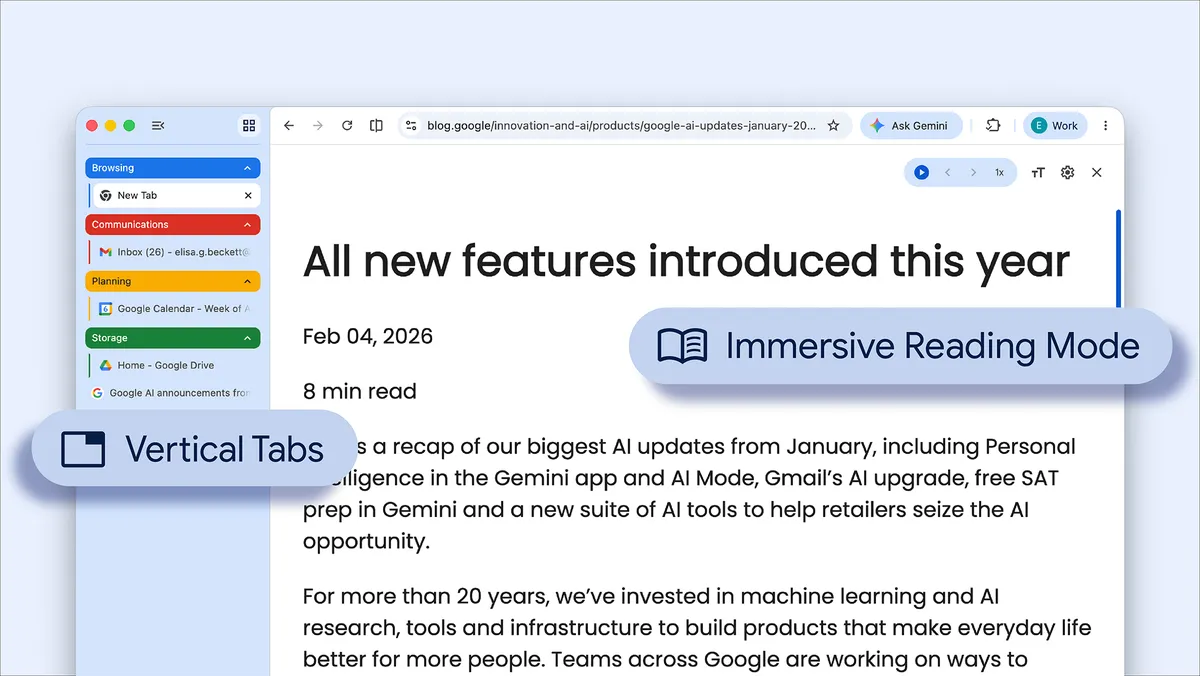

Google has introduced two new features in its Chrome browser aimed at enhancing user experience. The first feature implements a vertical tab layout, moving away from the traditional horizontal arrangement, while the second enhances Chrome’s Reading Mode for a more focused user interface.
The vertical tab feature aligns Chrome with competitors like Microsoft Edge and Mozilla Firefox. Users can activate this feature by right-clicking on any Chrome window and selecting “Show Tabs Vertically.” This design allows users to view full page titles and manage tab groups effectively, particularly useful for those with numerous tabs open.
The updated Reading Mode presents a full-page interface that simplifies webpages by hiding distractions. Users can access this mode by right-clicking on any page and choosing “Open in reading mode.” This adjustment focuses on displaying text, thus improving reading clarity.


Google announced these features through a blog post, accompanied by short video tutorials outlining their functionalities. The rollout of the vertical tab option is anticipated to assist users in multitasking more efficiently by organizing tabs vertically.
Recent months have seen a series of updates for Chrome. Last month, Google launched the Gemini side panel for Indian users, which differs from the U.S. version by lacking the Auto Browse capability. In February, the browser received enhancements including Split View and built-in PDF markup tools.
The company continues to innovate within the Chrome platform, responding to users’ needs while keeping pace with industry trends. The new features reflect Google’s ongoing commitment to improving the browsing experience.