

Today the popular social media platform announced new features, Twitter launches keyword search for DMs.
Twitter introduces keyword search for DMs
Twitter has now made keyword search available for Direct Messages, allowing you to find specific mentions within any DM message and track down past conversations, goods, people mentioned, links provided, and so on.
https://twitter.com/TwitterSupport/status/1506723722824232960



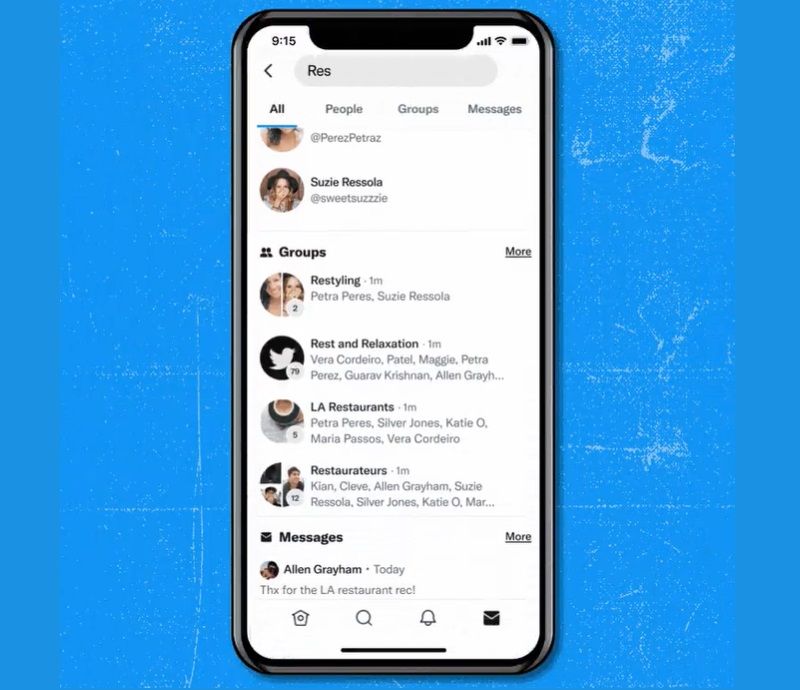
As a result of these changes, your Twitter DM search options now separate your queries into four categories:
- All: The search page displays the results for your query, including username and key term matches.
- People: Using your search query, this highlights relevant usernames.
- Groups: This shows you group conversations that include your search term.
- Messages: Any keyword matches in specific DMs will be shown.
This will help you scan through your DMs more quickly and give greater versatility for using DMs in a variety of ways, especially for customer service and tracking past responses and interactions.
The development of the feature has been underway for over a year, with Debugger reporting last March that Twitter was working on bringing DM keyword search to the platform. You’ve only been able to look up your DMs based on their username thus far; but it doesn’t give you full access to relevant mentions and keywords within your private conversations.
Twitter has attempted to incorporate more complex DM search capabilities in the past, such as looking for shared media and links within a given conversation. But being able to search via message content is undoubtedly the most significant development, so it’s great to have it.
For businesses, one of the most apparent advantages is enhanced customer service response. Giving more search options will help you respond to direct messages more quickly – for example, you may now look up all users who have inquired about a product and provide relevant updates as they become available, or you may go back in time and retrieve past answers to similar questions, saving time in your replies.