


How to create a group chat with an Instagram story? A new type of sticker on Instagram Stories allows you to create group chats. Any user of the popular social network can start group conversations through their Stories, so the followers will be able to join a group together.
How to create a group chat with an Instagram story?
These “Chat Stickers” are available to all users of the application with the last version released. There are also stickers to create surveys, to add a location etc.
- How to know how much time you spend on Instagram?
- How to add a location on Instagram photos or stories?
- How to delete multiple Instagram comments at once?
Create or join group conversations through Instagram Stories
The task is really simple: just add a new Story and, tap on the stickers button on the upper right. Then, select the new option called Chat. It will be possible to give the conversation a title. This way your followers can take the opportunity to join your conversation.


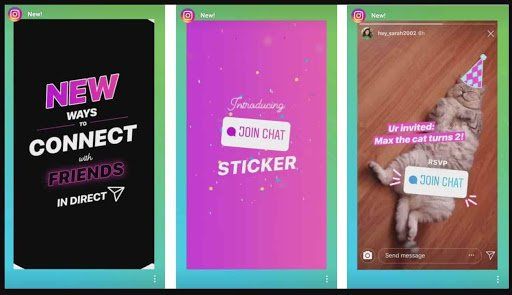
Once the Story is published, the rest of the people will see the Sticker. If they decide so, they will click on it and send a request to join the chat. Therefore, you will be the one who ultimately decides who can, and who not will join that conversation. Of course, the chat will take place through the direct messages of the application.
This way, you learned how to create a group chat with an Instagram story in this article.




