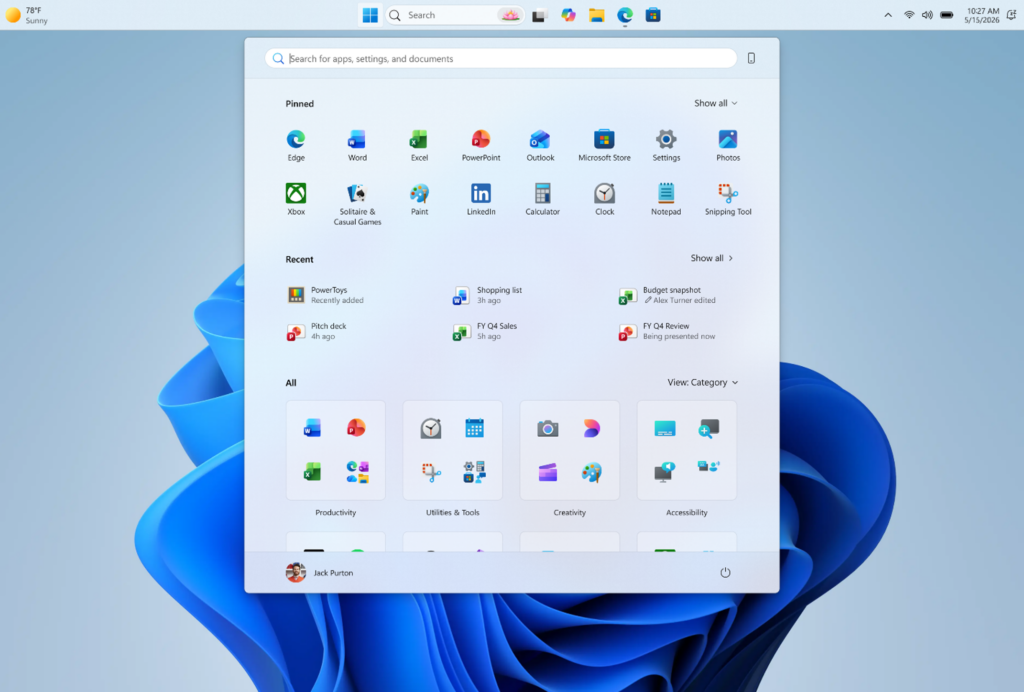

Microsoft is testing new customization options for Windows 11’s Start menu and taskbar. The rollout begins today for Windows Insiders in the Experimental channel and will continue over the coming week.
Users will have the option to choose between Small and Large sizes for the Start menu. This size preference will remain consistent across different displays. The Start menu size had nearly doubled following an update in November last year, prompting Microsoft to acknowledge user feedback regarding the issue.
The new release for Insiders includes section-level toggles for Pinned, Recommended, and All, allowing users to customize which parts of the menu are visible. Users can select to view only pinned apps by disabling the Recommended and All sections. A separate control will also allow users to disable specific file recommendations in the Start menu.


In terms of privacy, users can opt to hide their name and profile picture when using the Start menu, which may be useful during screen sharing or streaming. Additionally, Microsoft will allow the taskbar to be positioned on any edge of the screen, including the top, bottom, left, or right. Users can choose the icon alignment based on the taskbar’s position, with options for top-aligned or centered icons on the left and right edges, and left-aligned or centered icons on the top and bottom edges.
To participate in the Windows Insider program, users must register with a Microsoft account. Insiders can preview the latest Windows builds and provide feedback on experimental features before they are released to the general public.