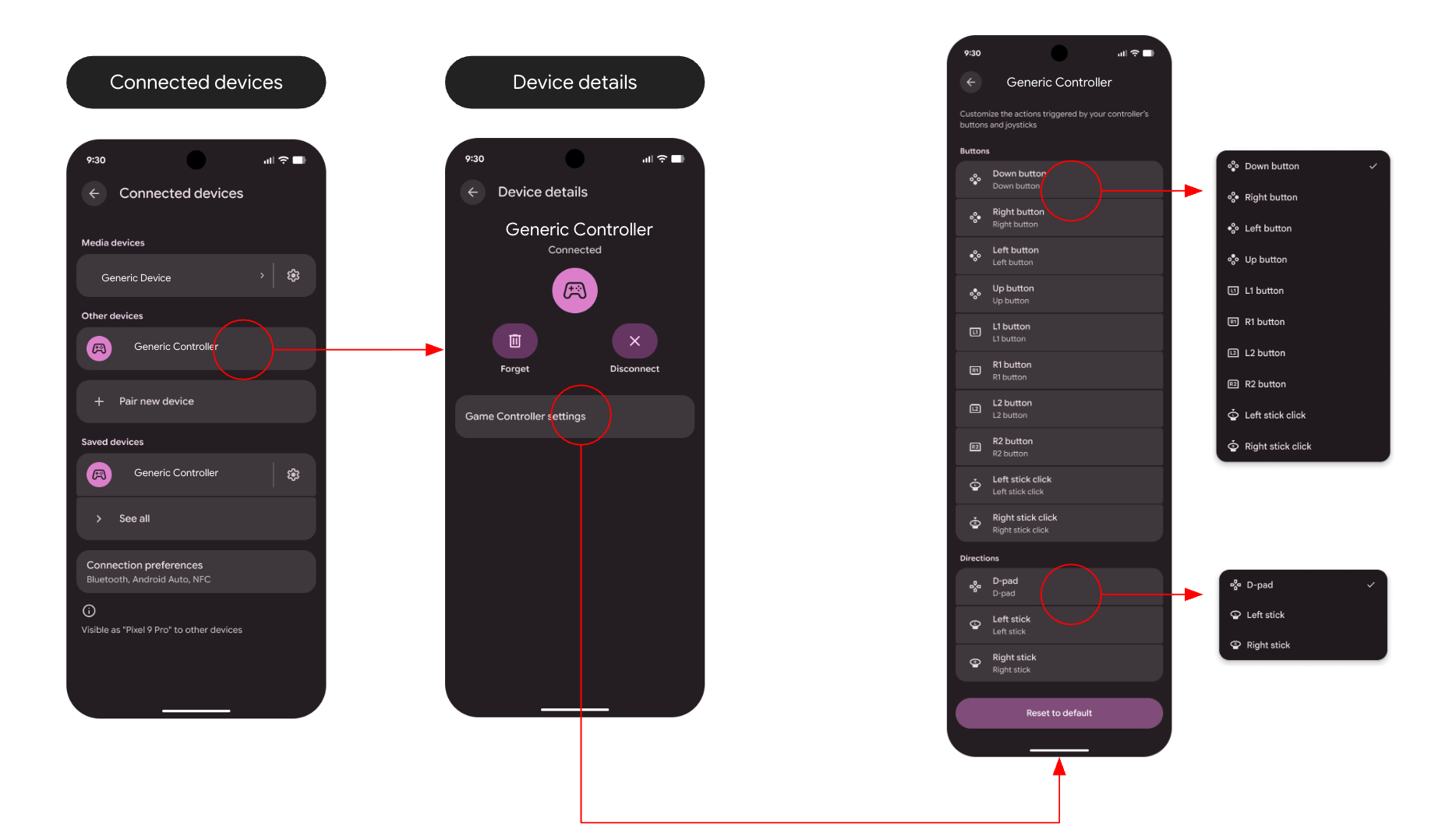

Google has introduced native controller remapping in Android 17 Beta, enabling users to customize gamepad button, stick, and trigger functions across the system.
This feature allows gamers to apply custom button layouts without needing to set them up for each game. Google announced the addition in response to user feedback requesting native controller remapping support.
The implementation works at the system level, contrasting with existing solutions that require per-game setup or third-party applications. Users can remap both wired and Bluetooth controllers, supporting detailed customization.


To access the remapping options, users navigate through a new Game Controller settings menu. For wired gamepads, the path is Settings > System > Game Controller, while Bluetooth gamepad configurations can be found under Settings > Connected devices > Device details.
Within the setting, users can adjust face buttons, triggers, thumbstick clicks, and directional inputs, enabling them to save preferences directly on their devices. Google emphasizes that this feature is designed with accessibility in mind, allowing users to adjust controls based on individual physical needs and muscle memory.
Currently, controller remapping is available only on devices running Android 17 Beta (Beta 2 or later). Google has acknowledged that some issues exist, such as incorrect button glyphs appearing for certain controllers, although functionality remains intact.
As the feature is in its beta phase, Google is actively seeking user feedback before the stable release, suggesting that final adjustments may still be forthcoming.