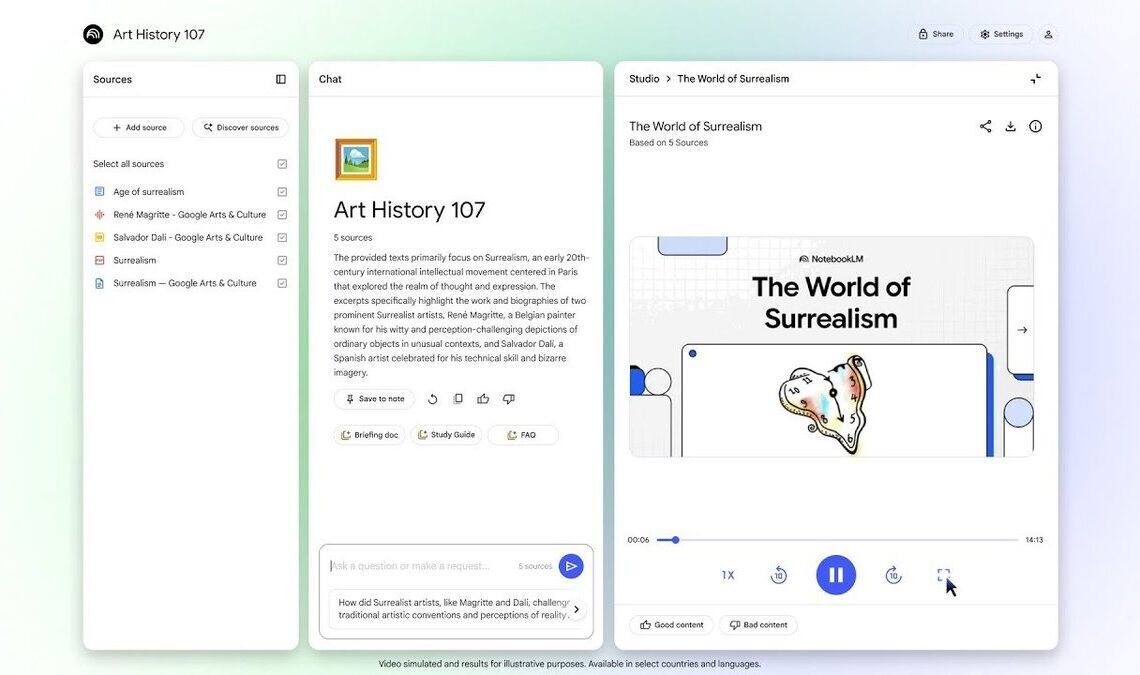

Google has announced the rollout of Video Overviews to NotebookLM, its AI-powered note-taking and research assistant. This new feature, revealed on Tuesday, provides users with the ability to transform multimedia content, including notes, PDFs, and images, into visually engaging presentations.
NotebookLM was initially introduced at Google I/O in May. Prior to Video Overviews, NotebookLM offered Audio Overviews, which generated podcasts featuring AI virtual hosts from uploaded documents, such as legal briefs or course readings. The introduction of Video Overviews signifies a shift towards a more visual approach to understanding complex topics.
According to Google, Video Overviews serve as a visual counterpart to Audio Overviews. This feature generates visuals by extracting images, diagrams, quotes, and numerical data from uploaded documents to provide context and explain the content. Google highlights the feature’s utility in explaining data, illustrating processes, and simplifying complex concepts.


Users have the option to customize Video Overviews by specifying focus topics, learning objectives, and target audience, similar to the customization options available for Audio Overviews. Users can pose general questions, such as requesting a basic overview of a topic, or specific questions tailored to their existing knowledge and team expertise.
Video Overviews are currently being rolled out to all users in English, with plans to include support for additional languages in the future, according to Google.
In addition to Video Overviews, Google is also implementing updates to NotebookLM’s Studio panel. Users can now create and save multiple studio outputs of the same type within a single notebook. The Studio panel now features one-click tiles for creating Audio Overviews, Video Overviews, Mind Maps, and Reports.
Furthermore, the updated Studio panel allows users to multitask. For instance, users can listen to an Audio Overview while simultaneously exploring a Mind Map or reviewing a Study Guide.