The Meta Llama 3.1 405B has been officially announced, making a name for itself before its AI capabilities have even launched. Developed by Meta, this cutting-edge model offers unprecedented flexibility, control, and performance to rival the best closed-source AI models.
Yesterday, some users got an early taste of its potential and today we have official benchmark tests highlighting its impressive capabilities. You can also read more about yesterday’s revelations here.
What is Meta Llama 3.1 405B?
Today here we will learn everything there is to know about Meta Llama 3.1 405B. Llama 3.1 405B is an open-source AI that excels at a variety of tasks such as general knowledge, navigability, math, tool usage, and multilingual translation, while the mid-level 70B and min-level 8B versions also excel in their respective classes. With a 128K context length and support for eight languages, this model is designed to handle complex and diverse applications.



Trained on more than 15 trillion tokens using more than 16 thousand H100 GPUs, Llama 3.1 405B stands out as one of the most powerful and capable AI models available. A lot of energy has gone into this AI. Now we can start getting technical.
Key features of Meta Llama 3.1 405B
Meta Llama 3.1 405B offers several advanced features:
- Extended context length: Supports up to 128K context length, ideal for long-form text summarization and complex conversations.
- Multilingual capabilities: Handles multiple languages, making it versatile for global applications.
- Advanced tool use: Capable of integrating with various tools for enhanced functionality.
- Synthetic data generation: Facilitates the creation of synthetic data for improving and training smaller models.
- Model distillation: Allows for the distillation of large models into smaller, more efficient versions.
Meta has partnered with more than 25 companies to make Meta Llama 3.1 405B easier to use. This ecosystem support makes it more feasible for developers and researchers to work with this powerful model, even without access to massive computational resources.
How to use Meta Llama 3.1 405B
To start using Meta Llama 3.1 405B, follow these steps:
- Access the Model: Visit llama.meta.com or Hugging Face to download the model. These platforms provide the necessary files and documentation to get started.
- Set up your environment: Ensure you have a suitable environment for running the model. This includes having the required hardware, such as GPUs, and software dependencies like Python and PyTorch.
- Load the model: Use the provided code snippets and guidelines to load the model into your application. Meta provides detailed instructions to help you integrate Llama 3.1 405B into your projects.
- Run inference: Start using the model for real-time or batch inference. You can ask the model questions, generate text, or perform translations using its powerful capabilities.
- Fine-tune for specific tasks: If needed, you can fine-tune the model for specific applications using supervised fine-tuning techniques. Meta offers resources and examples to guide you through this process.
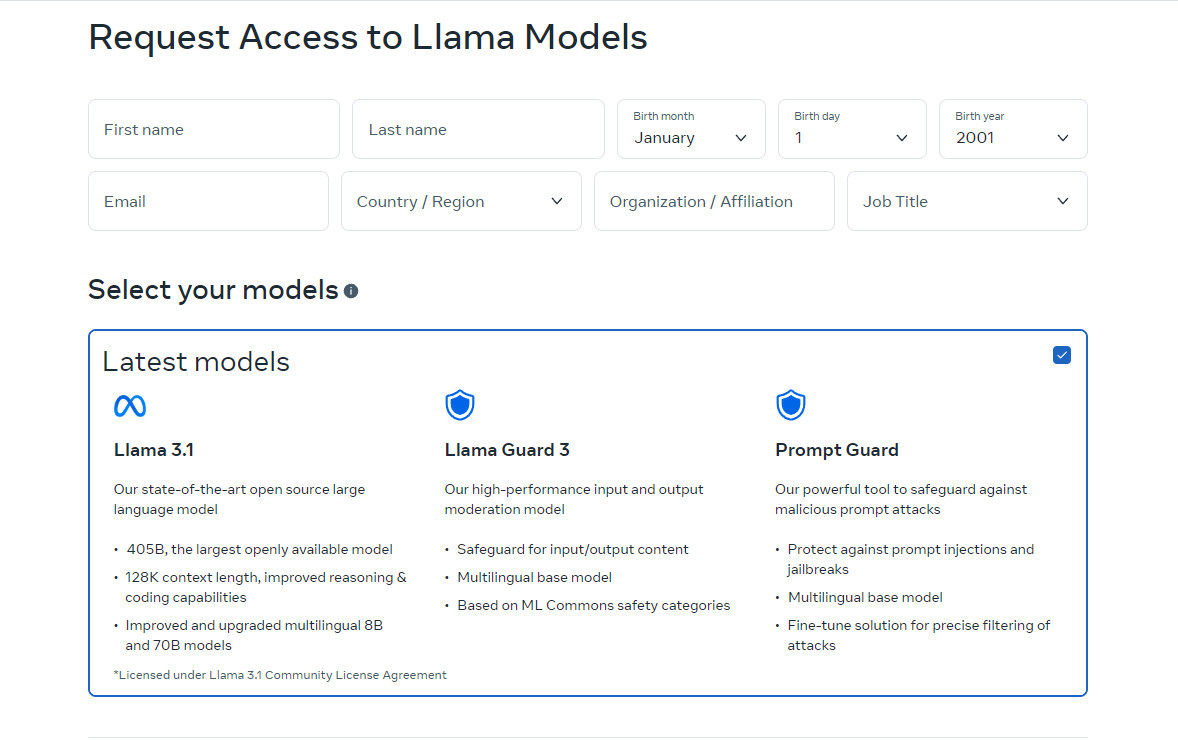
The online version of Llama is currently only available in certain countries. However, you can also use it locally by downloading the open-source codes. Download instructions are available on the sites we direct you to. You can also use Meta Llama 3.1 405B via Grog.
How to Use Meta Llama 3.1 405B on Groq
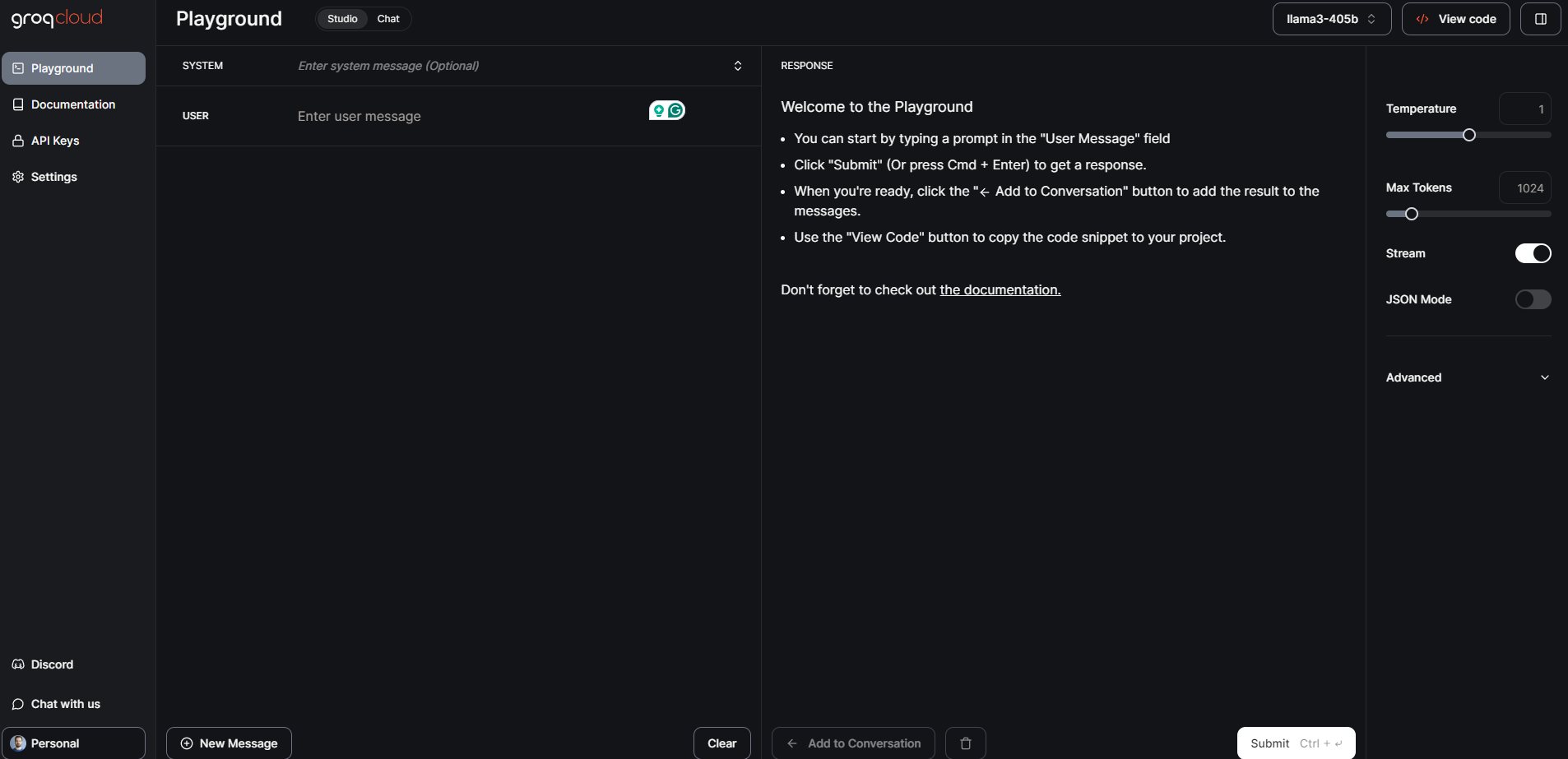
Meta Llama 3.1 405B, the largest and most capable open foundation model to date, is now available on Groq. This guide will walk you through getting started with Meta Llama 3.1 405B on Groq.
Step 1: GroqCloud Dev Console
- Sign Up/Login: Visit the GroqCloud Dev Console and sign up or log in to your account.
- Find Meta Llama 3.1 models: Navigate to the models section and search for Meta Llama 3.1 405B. You will also find the 70B and 8B Instruct models available.
- Get an API key: Obtain a free Groq API key from the console. This key will allow you to interact with the model.

GroqChat
For general public access, you can use GroqChat:
- Visit GroqChat: Go to GroqChat to interact with Meta Llama 3.1 405B directly.
- Explore features: Test the model’s capabilities in real time, such as generating text, translations, or answering queries.
Step 2: Setting up your environment
Hardware and software requirements
- Hardware: Ensure you have suitable hardware, preferably GPUs, to handle the model’s requirements.
- Software: Install necessary software dependencies such as Python and PyTorch. You can find detailed setup instructions on the GroqCloud Dev Console.
Environment configuration
- API Integration: Replace your existing industry standard API key with the Groq API key.
- Set base URL: Configure your application to use Groq’s base URL for API requests.
Step 3: Loading and running the model
Loading the model
- Code snippets: Use the provided code snippets on the GroqCloud Dev Console to load Meta Llama 3.1 405B into your application.
- Initialization: Initialize the model with the API key and set up any necessary parameters for your specific use case.
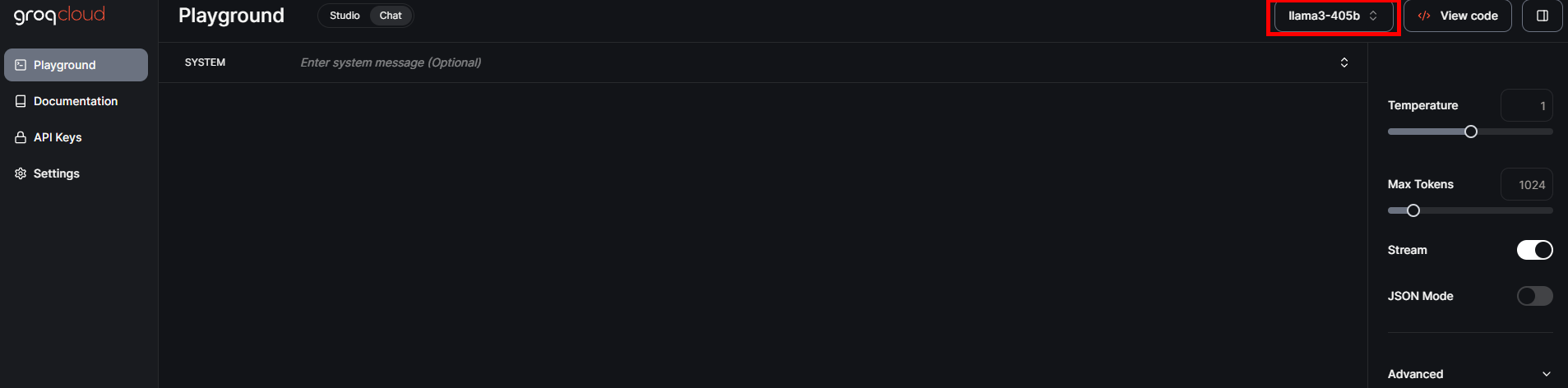
Running inference
- Real-time inference: Start running real-time inference by sending queries to the model and receiving responses.
- Batch processing: For larger tasks, you can use batch processing to handle multiple queries simultaneously.
Step 4: Fine-tuning for specific tasks
- Training data: Prepare your dataset for the specific application you want to fine-tune the model for.
- Fine-tuning process: Follow the detailed instructions provided by Meta and Groq to fine-tune the model using supervised techniques.
- Validation: Validate the fine-tuned model to ensure it meets the desired performance criteria.
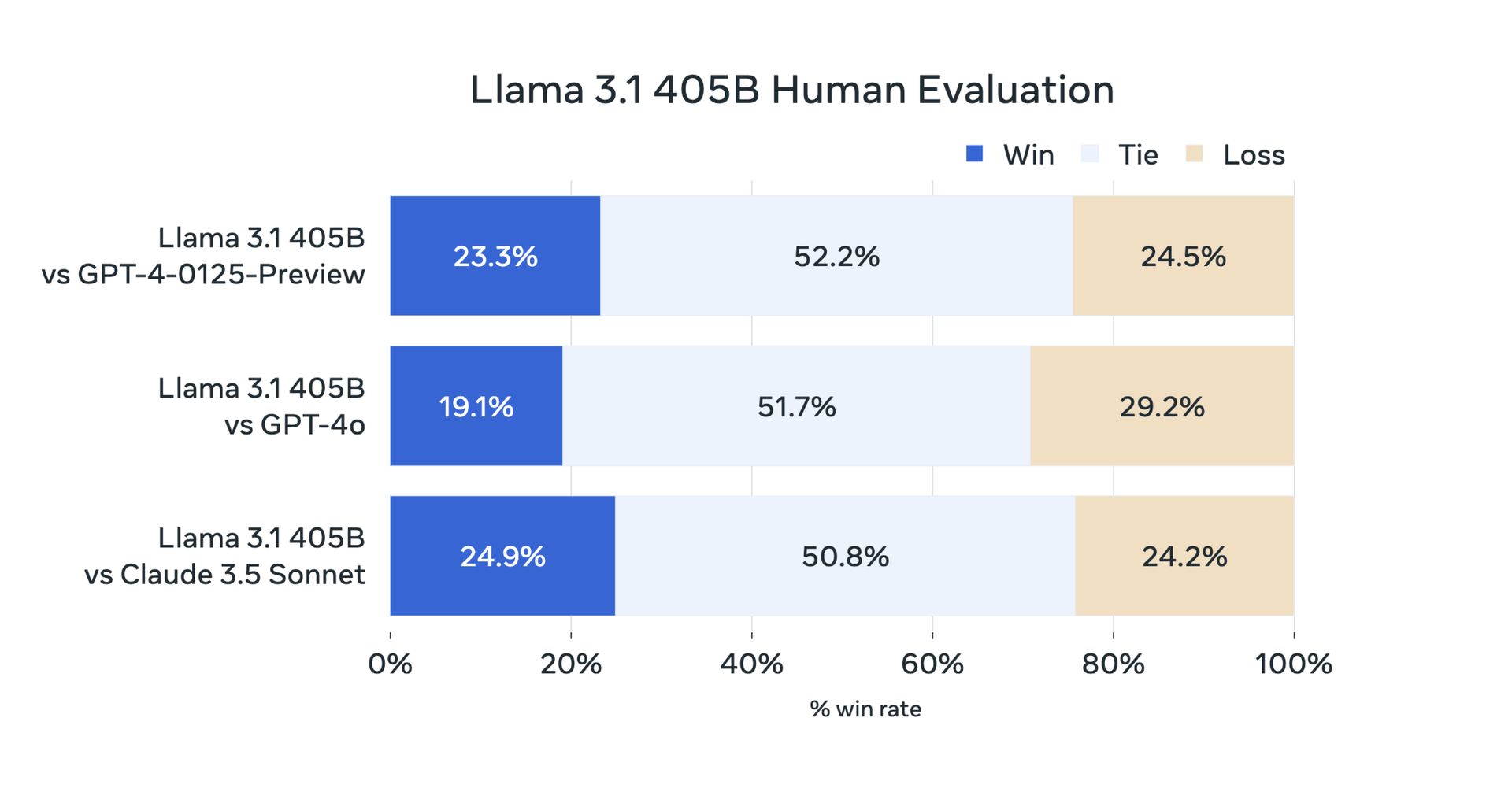
Meta Llama 3.1 405B: Benchmark tests and performance
Yesterday, due to its open-source nature, users did their testing. But now official benchmark tests have confirmed that Meta Llama 3.1 405B performs exceptionally well on a variety of tasks. The model has been evaluated on more than 150 benchmark datasets and compared to leading models such as GPT-4 and Claude 3.5 Sonnet. The results show that Llama 3.1 405B is competitive with these top models and delivers high-quality performance in real-world scenarios.
First of all, here are the Llama 3.1 8B and Llama 3.1 70B benchmarks:
| Category | Benchmark | Llama 3.1 8B | Gemma 2 9B IT | Mistral 7B Instruct | Llama 3.1 70B | Mixtral 8x22B Instruct | GPT 3.5 Turbo |
|---|---|---|---|---|---|---|---|
| General | MMLU (0-shot, CoT) | 73.0 | 72.3 | 60.5 | 86.0 | 79.9 | 69.8 |
| General | MMLU PRO (5-shot, CoT) | 48.3 | – | 36.9 | 66.4 | 56.3 | 49.2 |
| General | IFEval | 80.4 | 73.6 | 57.6 | 87.5 | 72.7 | 69.9 |
| Code | HumanEval (0-shot) | 72.6 | 54.3 | 40.2 | 80.5 | 75.6 | 68.0 |
| Code | MBPP EvalPlus (base) (0-shot) | 72.8 | 71.7 | 49.5 | 86.0 | 78.6 | 82.0 |
| Math | GSM8K (8-shot, CoT) | 84.5 | 76.7 | 53.2 | 95.1 | 88.2 | 81.6 |
| Math | MATH (0-shot, CoT) | 51.9 | 44.3 | 13.0 | 68.0 | 54.1 | 43.1 |
| Reasoning | ARC Challenge (0-shot) | 83.4 | 87.6 | 74.2 | 94.8 | 88.7 | 83.7 |
| Reasoning | GPQA (0-shot, CoT) | 32.8 | – | 28.8 | 46.7 | 33.3 | 30.8 |
| Tool use | BFCL | 76.1 | – | 60.4 | 84.8 | – | 85.9 |
| Tool use | Nexus | 38.5 | 30.0 | 24.7 | 56.7 | 48.5 | 37.2 |
| Long context | ZeroSCROLLS/QuALITY | 81.0 | – | – | 90.5 | – | – |
| Long context | InfiniteBench/En.MC | 65.1 | – | – | 78.2 | – | – |
| Long context | NIH/Multi-needle | 98.8 | – | – | 97.5 | – | – |
| Multilingual | Multilingual MGSM (0-shot) | 68.9 | 53.2 | 29.9 | 86.9 | 71.1 | 51.4 |
And there is a Meta Llama 3.1 405B benchmarks:
| Category | Benchmark | Llama 3.1 405B | Nemotron 4 340B Instruct | GPT-4 (0125) | GPT-4 Omni | Claude 3.5 Sonnet |
|---|---|---|---|---|---|---|
| General | MMLU (0-shot, CoT) | 88.6 | 78.7 (non-CoT) | 85.4 | 88.7 | 88.3 |
| General | MMLU PRO (5-shot, CoT) | 73.3 | 62.7 | 64.8 | 74.0 | 77.0 |
| General | IFEval | 88.6 | 85.1 | 84.3 | 85.6 | 88.0 |
| Code | HumanEval (0-shot) | 89.0 | 73.2 | 86.6 | 90.2 | 92.0 |
| Code | MBPP EvalPlus (base) (0-shot) | 88.6 | 72.8 | 83.6 | 87.8 | 90.5 |
| Math | GSM8K (8-shot, CoT) | 96.8 | 92.3 (0-shot) | 94.2 | 96.1 | 96.4 (0-shot) |
| Math | MATH (0-shot, CoT) | 73.8 | 41.1 | 64.5 | 76.6 | 71.1 |
| Reasoning | ARC Challenge (0-shot) | 96.9 | 94.6 | 96.4 | 96.7 | 96.7 |
| Reasoning | GPQA (0-shot, CoT) | 51.1 | – | 41.4 | 53.6 | 59.4 |
| Tool use | BFCL | 88.5 | 86.5 | 88.3 | 80.5 | 90.2 |
| Tool use | Nexus | 58.7 | – | 50.3 | 56.1 | 45.7 |
| Long context | ZeroSCROLLS/QuALITY | 95.2 | – | – | 90.5 | 90.5 |
| Long context | InfiniteBench/En.MC | 83.4 | – | 72.1 | 82.5 | – |
| Long context | NIH/Multi-needle | 98.1 | – | 100.0 | 100.0 | 90.8 |
| Multilingual | Multilingual MGSM (0-shot) | 91.6 | – | 85.9 | 90.5 | 91.6 |
Meta Llama 3.1 405B represents progress in open-source AI by providing developers and researchers with a powerful tool for a variety of applications. With its advanced features, robust ecosystem, and commitment to responsible development, we hope Llama 3.1 405B will bring innovations to the 70B and 8B AI communities. Here is everything we have prepared for you.
Featured image credit: Meta AI