
TechBriefly
  • Tech
  • Business
  • Crypto
  • Science
  • Geek
  • How to
  • About
    • About TechBriefly
    • Terms and Conditions
    • Privacy Policy
    • Contact Us
    • Languages
      • 中文 (Chinese)
      • Dansk
      • Deutsch
      • Español
      • English
      • Français
      • Nederlands
      • Italiano
      • 日本语 (Japanese)
      • 한국인 (Korean)
      • Norsk
      • Polski
      • Português
      • Pусский (Russian)
      • Suomalainen
      • Svenska
No Result
View All Result
TechBriefly
Home How to
Plastic surgery filter TikTok: How to get and use it?

Plastic surgery filter TikTok: How to get and use it?

On TikTok, a brand-new Plastic Surgery Filter is now trending, and this is where you can get it.

Kerem GülenbyKerem Gülen
8 November 2022
in How to
Reading Time: 3 mins read
Share on FacebookShare on Twitter

Today we are going to show you how to use the plastic surgery filter TikTok. TikTok has evolved into the epicenter of fashion. Let it be TV shows, music, filters, or anything else. The location offers you a variety of amazing and distinctive things to do if you want to weigh in and contribute something new. All you need to do is unleash your imagination and display it in front of the camera. Utilize the lovely 15 seconds to introduce something fresh.

This could brighten your or another person’s day. Consequently, you will get a much-needed audience and increase the popularity of your film. If not, you may potentially discover the distinctive transitions that are popular on the platform and adopt them. There are numerous solutions available right away.

Have you ever wished to examine how cosmetic surgery would alter your appearance?

With the help of the plastic surgery filter TikTok, you can now. It’s currently trending on TikTok, and several celebs have even tried their hand at it.

Do you want to test it? The exact location of the filter is shown below.

Plastic surgery filter TikTok: How to get and use it?

Plastic surgery filter TikTok: What is it?

People are applying a brand-new effect dubbed the Plastic Surgery Filter as part of the most recent significant TikTok craze.

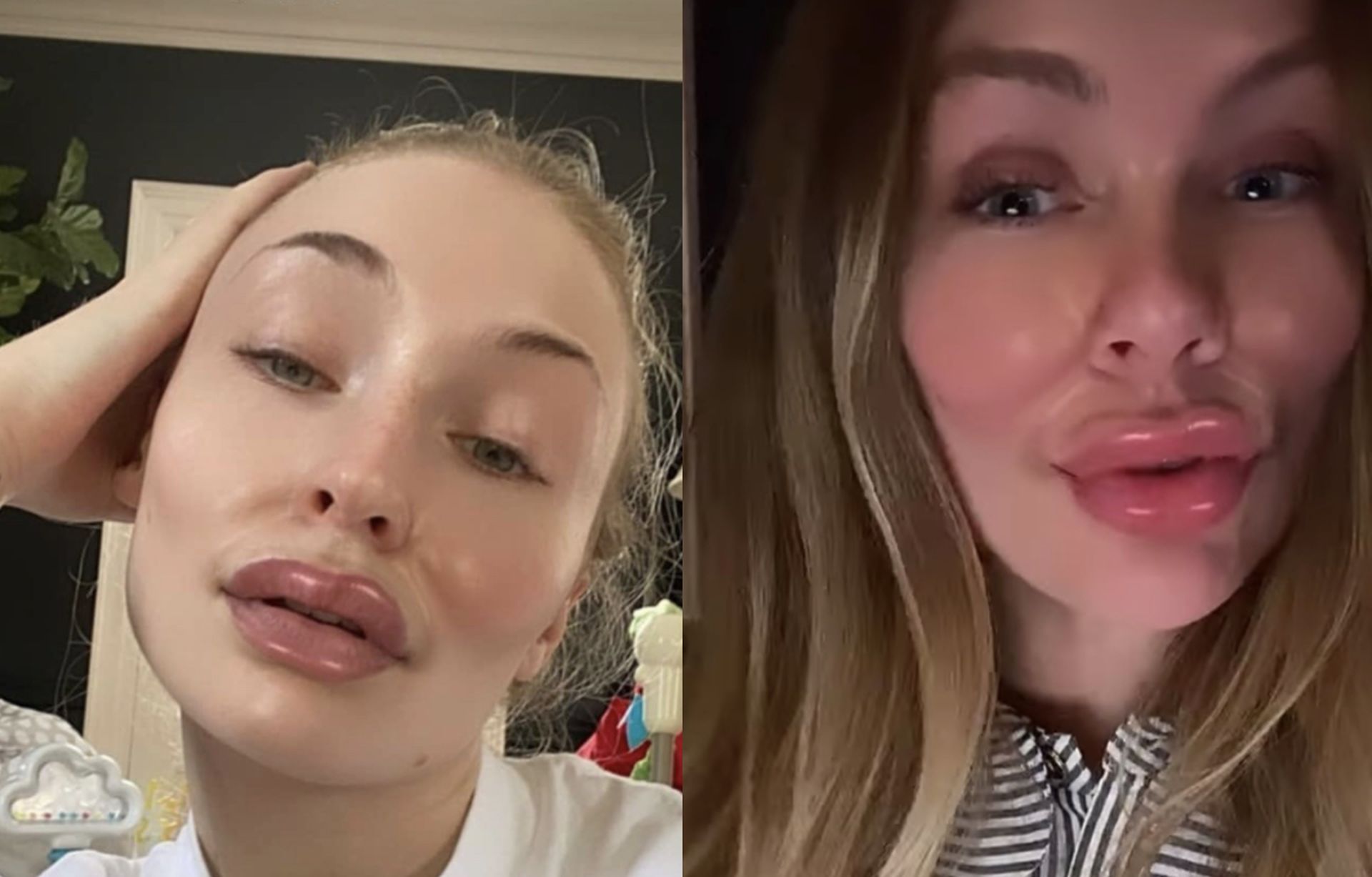
A face-specific plastic surgery filter is the Botox Filter. Some even refer to it by that name or as the large lips filter. It essentially makes your face’s lip area larger. It also softens the appearance of the cheeks all around. Consequently, hiding and emphasizing how your face could appear following plastic surgery.

Plastic surgery filter TikTok simulates the effects of cosmetic surgery and gives the appearance that you have had lip filter and botox. It is also known as the botox filter or big lips filter.

The filter, which is now sweeping social media, tightens and lifts your skin while also plumping up your lips when used.

After a handful of celebs decided to use the filter for fun, it has sort of become a fad. So, if you want to try the filter, here are some simple options and steps you can do. So, join the trend and enter the Tiktok universe with your own video.

Plastic surgery filter TikTok: How to get and use it?

Plastic surgery filter TikTok: How to get and use it?

While TikTok is currently where it’s trending, Instagram is where you can truly locate the filter. Here’s a step-by-step tutorial on how to obtain what is actually called the Pillow Face Filter.

  • Open Instagram and select “Your Story” from the menu at the top of the screen.
  • Pass through each of the bottom filters until you reach the magnifying glass at the very end.
  • To search the filters, click here and then press the second magnifying glass in the top right corner.
  • Enter “Pillow Face” in the search box to locate the filter created by Jhonyaugust.
  • Press “Try it” after selecting the criteria.
  • Put your video through the filter and save it to your camera roll.
  • You can now post it to TikTok.
Plastic surgery filter TikTok: How to get and use it?

Which celebrities used the plastic surgery filter TikTok?

Even celebrities have used the filter because it has become so popular on social media.

Singers Charli XCX and Hayley Williams both used the filter. Sophie Turner, an actress from Game of Thrones, also participated in the trend!

Actress Sophie Benson from Pretty Little Liars also posted a picture of herself using the filter on Instagram and used it to criticize plastic surgery, writing:

Ashley Benson shared an Instagram post with Filter on and said: “Why does everybody look the same nowadays? Let’s be unique And true to ourselves. This is me using a filter lookin like a blowfish tryna fit in w all the LA girls now”

Conclusion

This way you’ve learned how to get and use the plastic surgery filter TikTok. You can also learn how to get the no beard filter, inverted filter, and silhouette challenge filter by visiting our guides!

Tags: filterTikTok
ShareTweet
Kerem Gülen

Kerem Gülen

Kerem from Turkey has an insatiable curiosity for the latest advancements in tech gadgets and a knack for innovative thinking. With 3 years of experience in editorship and a childhood dream of becoming a journalist, Kerem has always been curious about the latest tech gadgets and is constantly seeking new ways to create. As a Master's student in Strategic Communications, Kerem is eager to learn more about the ever-evolving world of technology. His primary focuses are artificial intelligence and digital inclusion, and he delves into the most current and accurate information on these topics.

Related Posts

How to connect a PS4 controller to Steam via USB or Bluetooth

How to connect a PS4 controller to Steam via USB or Bluetooth

24 December 2025
How to connect your phone to Wi-Fi and fix connection issues

How to connect your phone to Wi-Fi and fix connection issues

24 December 2025
The comprehensive guide to resolving Steam account sign-in errors

The comprehensive guide to resolving Steam account sign-in errors

23 December 2025
Simple ways to pair and set up smartwatches with Android devices

Simple ways to pair and set up smartwatches with Android devices

23 December 2025
Please login to join discussion

LATEST

How to connect a PS4 controller to Steam via USB or Bluetooth

How to connect your phone to Wi-Fi and fix connection issues

Apple begins iPhone 18 series production testing in January

EA investigates AI claims in Battlefield 6 cosmetics

Amazon Alexa+ will book your hotels and salons starting in 2026

OpenAI launches Skills in Codex

The comprehensive guide to resolving Steam account sign-in errors

Simple ways to pair and set up smartwatches with Android devices

How to zoom out quickly with shortcuts and gestures on your Mac

Viewing browsing history across Safari, Chrome and Firefox on Mac

TechBriefly

© 2021 TechBriefly is a Linkmedya brand.

  • Tech
  • Business
  • Science
  • Geek
  • How to
  • About
  • Privacy
  • Terms
  • Contact
  • | Network Sites |
  • Digital Report
  • LeaderGamer

Follow Us

No Result
View All Result
  • Tech
  • Business
  • Crypto
  • Science
  • Geek
  • How to
  • About
    • About TechBriefly
    • Terms and Conditions
    • Privacy Policy
    • Contact Us
    • Languages
      • 中文 (Chinese)
      • Dansk
      • Deutsch
      • Español
      • English
      • Français
      • Nederlands
      • Italiano
      • 日本语 (Japanese)
      • 한국인 (Korean)
      • Norsk
      • Polski
      • Português
      • Pусский (Russian)
      • Suomalainen
      • Svenska