

TechBriefly
  • Tech
  • Business
  • Crypto
  • Science
  • Geek
  • How to
  • About
    • About TechBriefly
    • Terms and Conditions
    • Privacy Policy
    • Contact Us
    • Languages
      • 中文 (Chinese)
      • Dansk
      • Deutsch
      • Español
      • English
      • Français
      • Nederlands
      • Italiano
      • 日本语 (Japanese)
      • 한국인 (Korean)
      • Norsk
      • Polski
      • Português
      • Pусский (Russian)
      • Suomalainen
      • Svenska
No Result
View All Result
TechBriefly
Home Tech Software
All users can now run Linux apps with a GUI on Windows 10

All users can now run Linux apps with a GUI on Windows 10

Barış SelmanbyBarış Selman
27 May 2021
in Software, Tech
Reading Time: 2 mins read
Share on FacebookShare on Twitter

This year is being quite interesting as far as Linux applications are concerned, as the companies behind Windows 10 and Chrome OS have been working very hard throughout all these months to bring the support that will allow them to run natively.

And while Chrome OS will bring stable support in a few weeks, as we told you a few days ago, we now find ourselves with the announcement of the official arrival of Windows Subsystem for Linux 2 (WSL2) for all users, as announced by Microsoft at the developer event.

It should be noted that WSL 2 has so far been available in the preview phase, and as its name suggests, it is the sub-system that lives inside Windows 10, which even has its own Linux kernel, to allow the execution of Linux applications with a graphical interface as if it were another native application of the system, where in fact, they will use the same style of windows as native Windows applications.
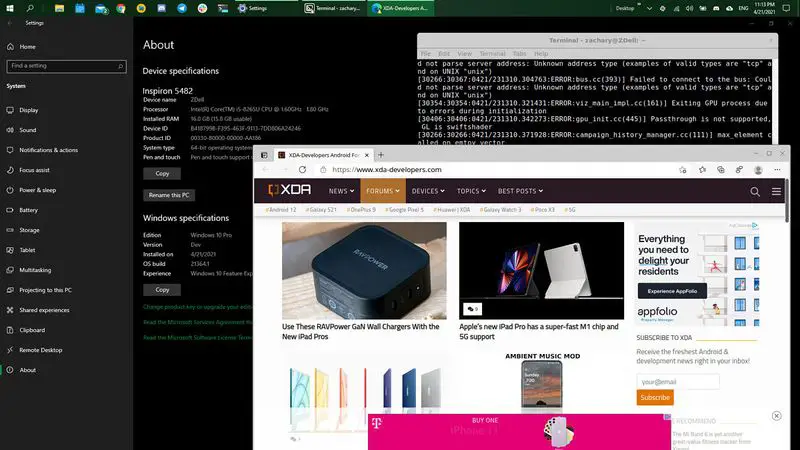
All users can now run Linux apps with a graphical interface on Windows 10

This will allow users to use Windows applications and Linux applications interchangeably within Windows 10, taking advantage of the many applications that already exist for Linux distributions, including those applications that also make use of webcams and microphones for video conferencing and other activities.

What’s interesting here is that users won’t need to install any classic virtualization machines, or any graphics servers, or even configure anything in Windows 10.

What Windows 10 does is launch its internal Linux distribution, called CBL-Mariner, which has everything necessary for running Linux applications with a graphical interface with complete ease, even allowing some complex applications to make use of hardware acceleration with the computer’s GPU.

WSL 2 is now available for all users, so they will be able to choose from now on those Linux applications that they want to use in their daily lives, and that is not natively available for Windows.

Tags: appslinuxsoftwareusersWindows 10
ShareTweet
Barış Selman

Barış Selman

A technology and gaming enthusiast by day, Barış is a passionate composer and black/death metal guitarist by night. He keeps his finger on the pulse of the intersection of art and technology whenever he can from his tours worldwide.

Related Posts

Xiaomi to launch fully self-developed smartphone in 2026

Xiaomi to launch fully self-developed smartphone in 2026

12 January 2026
New WhatsApp parental controls will block strangers

New WhatsApp parental controls will block strangers

12 January 2026
Galaxy Unpacked 2026: S26 Ultra arrives just before MWC

Galaxy Unpacked 2026: S26 Ultra arrives just before MWC

12 January 2026
Meta purges 550,000 Australian accounts to comply with under-16 ban

Meta purges 550,000 Australian accounts to comply with under-16 ban

12 January 2026
Please login to join discussion

LATEST

Xiaomi to launch fully self-developed smartphone in 2026

New WhatsApp parental controls will block strangers

Galaxy Unpacked 2026: S26 Ultra arrives just before MWC

Meta purges 550,000 Australian accounts to comply with under-16 ban

Simple ways to install and remove programs on Ubuntu

A guide to preventing accidental typing on Windows and Mac

Accessing your Google Chrome bookmarks

A guide to installing restricted extensions in Google Chrome

Anthropic launches health features for Claude

Google removes AI Overviews from medical queries

TechBriefly

© 2021 TechBriefly is a Linkmedya brand.

  • Tech
  • Business
  • Science
  • Geek
  • How to
  • About
  • Privacy
  • Terms
  • Contact
  • | Network Sites |
  • Digital Report
  • LeaderGamer

Follow Us

No Result
View All Result
  • Tech
  • Business
  • Crypto
  • Science
  • Geek
  • How to
  • About
    • About TechBriefly
    • Terms and Conditions
    • Privacy Policy
    • Contact Us
    • Languages
      • 中文 (Chinese)
      • Dansk
      • Deutsch
      • Español
      • English
      • Français
      • Nederlands
      • Italiano
      • 日本语 (Japanese)
      • 한국인 (Korean)
      • Norsk
      • Polski
      • Português
      • Pусский (Russian)
      • Suomalainen
      • Svenska