
TechBriefly
  • Tech
  • Business
  • Crypto
  • Science
  • Geek
  • How to
  • About
    • About TechBriefly
    • Terms and Conditions
    • Privacy Policy
    • Contact Us
    • Languages
      • 中文 (Chinese)
      • Dansk
      • Deutsch
      • Español
      • English
      • Français
      • Nederlands
      • Italiano
      • 日本语 (Japanese)
      • 한국인 (Korean)
      • Norsk
      • Polski
      • Português
      • Pусский (Russian)
      • Suomalainen
      • Svenska
No Result
View All Result
TechBriefly
Home Tech Hardware
Logitech Combo Touch Keyboard is now compatible with the new iPad Pro

Logitech Combo Touch Keyboard is now compatible with the new iPad Pro

Kerem GülenbyKerem Gülen
26 April 2021
in Hardware, Tech
Reading Time: 1 min read
Share on FacebookShare on Twitter

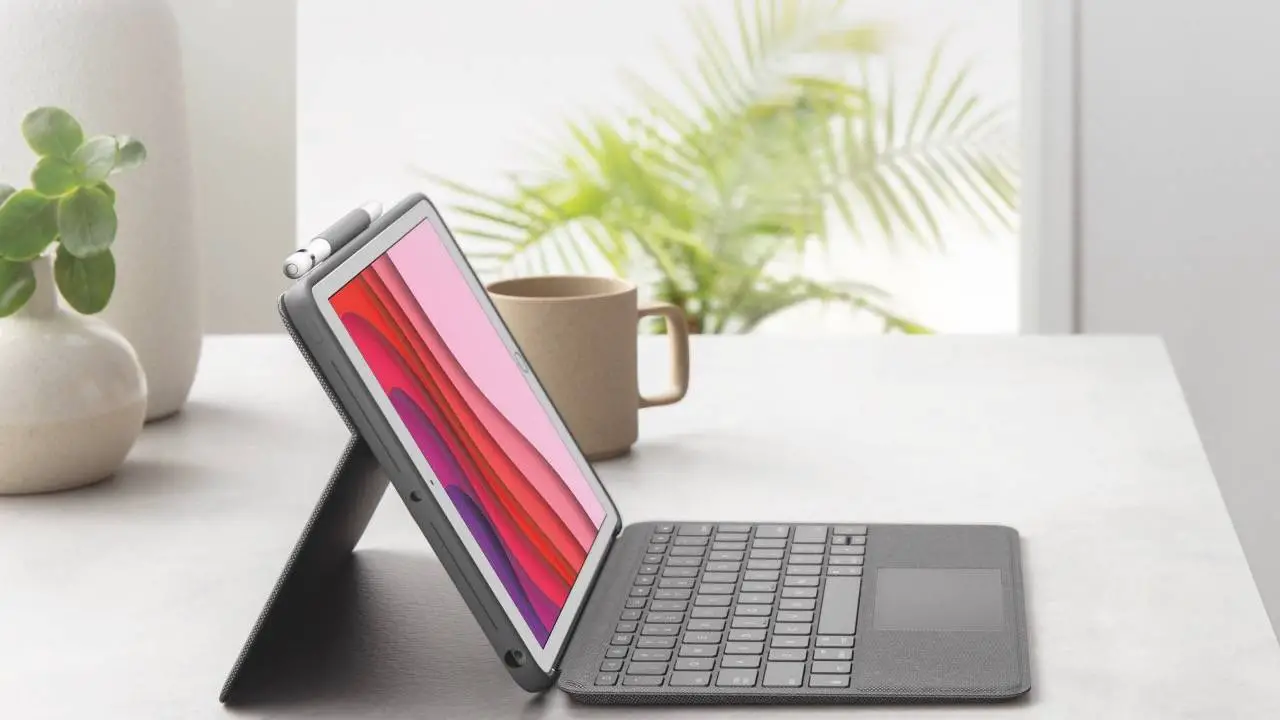
With the arrival of the new iPad Pro range, the guys at Logitech have presented the Combo Touch Keyboard for both models, a case with a backlit keyboard and trackpad that becomes an excellent alternative to the Magic Keyboard of Apple.

The case protects the entire device, includes a stand to place the device in different inclinations, and connects to the iPad through the Smart Connector, so we do not have to worry about charging the battery. This new keyboard is priced at $199 for the 11-inch iPad Pro.

Logitech Combo Touch Keyboard supports Apple iPad Pro

If we consider the Magic Keyboard for the 11-inch iPad Pro (which is also compatible with the 4th generation iPad Air) being really expensive, the option offered by Logitech must be taken into account without a doubt.

The Logitech Combo Touch Keyboard offers 4 modes of use:

  • Writing mode: It allows us to place the keyboard in a vertical position to write emails, notes, documents.
  • Viewing mode: We remove the keyboard and use only the stand to view multimedia content.
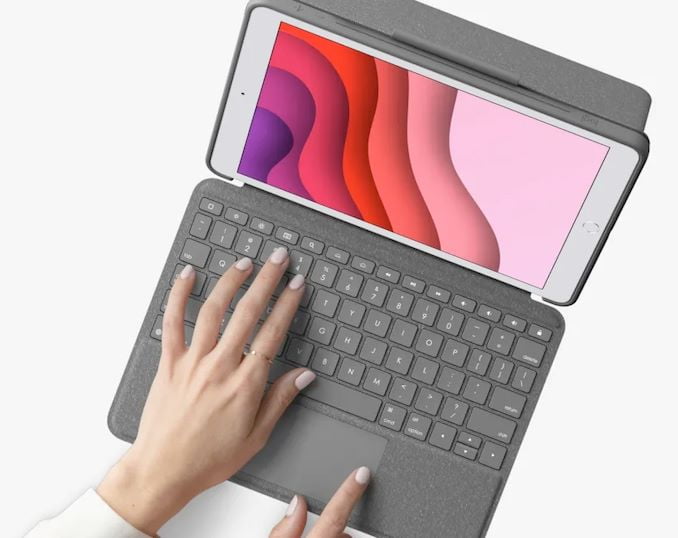
Logitech Combo Touch Keyboard is now compatible with the new iPad Pro
  • Sketch mode: With which we can place the iPad at the perfect angle to take notes and draw with the Apple Pencil.
  • Reading Mode: We remove the keyboard, or we place it on the back to comfortably read books, magazines, etc.

The case for the 11-inch iPad Pro is also compatible with the 1st and 2nd generation models. At the moment, only the 11-inch model can be reserved. To reserve the model for the 12.9-inch iPad Pro we will have to wait a little longer.


Tags: AppleiPadipad proKeyboardlogitechtouch
ShareTweet
Kerem Gülen

Kerem Gülen

Kerem from Turkey has an insatiable curiosity for the latest advancements in tech gadgets and a knack for innovative thinking. With 3 years of experience in editorship and a childhood dream of becoming a journalist, Kerem has always been curious about the latest tech gadgets and is constantly seeking new ways to create. As a Master's student in Strategic Communications, Kerem is eager to learn more about the ever-evolving world of technology. His primary focuses are artificial intelligence and digital inclusion, and he delves into the most current and accurate information on these topics.

Related Posts

Apple begins iPhone 18 series production testing in January

Apple begins iPhone 18 series production testing in January

24 December 2025
EA investigates AI claims in Battlefield 6 cosmetics

EA investigates AI claims in Battlefield 6 cosmetics

24 December 2025
Amazon Alexa+ will book your hotels and salons starting in 2026

Amazon Alexa+ will book your hotels and salons starting in 2026

24 December 2025
OpenAI launches Skills in Codex

OpenAI launches Skills in Codex

24 December 2025
Please login to join discussion

LATEST

How to connect a PS4 controller to Steam via USB or Bluetooth

How to connect your phone to Wi-Fi and fix connection issues

Apple begins iPhone 18 series production testing in January

EA investigates AI claims in Battlefield 6 cosmetics

Amazon Alexa+ will book your hotels and salons starting in 2026

OpenAI launches Skills in Codex

The comprehensive guide to resolving Steam account sign-in errors

Simple ways to pair and set up smartwatches with Android devices

How to zoom out quickly with shortcuts and gestures on your Mac

Viewing browsing history across Safari, Chrome and Firefox on Mac

TechBriefly

© 2021 TechBriefly is a Linkmedya brand.

  • Tech
  • Business
  • Science
  • Geek
  • How to
  • About
  • Privacy
  • Terms
  • Contact
  • | Network Sites |
  • Digital Report
  • LeaderGamer

Follow Us

No Result
View All Result
  • Tech
  • Business
  • Crypto
  • Science
  • Geek
  • How to
  • About
    • About TechBriefly
    • Terms and Conditions
    • Privacy Policy
    • Contact Us
    • Languages
      • 中文 (Chinese)
      • Dansk
      • Deutsch
      • Español
      • English
      • Français
      • Nederlands
      • Italiano
      • 日本语 (Japanese)
      • 한국인 (Korean)
      • Norsk
      • Polski
      • Português
      • Pусский (Russian)
      • Suomalainen
      • Svenska