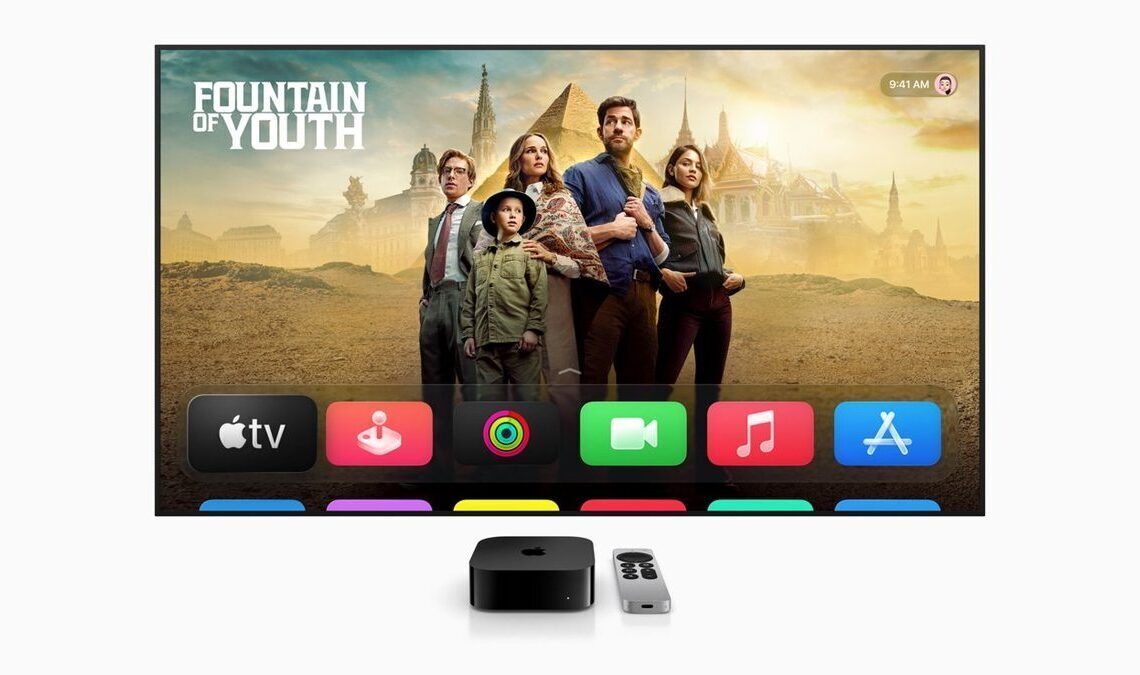

Apple has officially released tvOS 26, the latest software update for its Apple TV devices, bringing a fresh design language, enhanced entertainment features, and improved user interface elements to the living room streaming experience. Announced on September 15, 2025, by tech analyst Benjamin Mayo, the update targets Apple TV 4K and Apple TV HD models, with compatibility extending to any Apple TV released from 2015 onward. While not all features are available on older hardware—such as the advanced visual effects requiring the second-generation Apple TV 4K or later—this release underscores Apple’s ongoing commitment to refining its streaming platform amid a competitive smart TV landscape.
The installation process is straightforward for users eager to upgrade. By navigating to Settings > System > Software Update within the Apple TV interface, owners can download and apply tvOS 26 seamlessly. This accessibility ensures that a broad range of devices can benefit from the enhancements, though Apple notes hardware limitations for certain visual and performance-intensive elements. The update arrives as part of Apple’s broader ecosystem refresh for 2025, aligning tvOS with design evolutions seen across iOS 26 and other platforms.
At the core of tvOS 26 is the introduction of the Liquid Glass redesign, a platform-wide aesthetic overhaul that infuses the interface with realistic light reflections and refractions reminiscent of actual glass materials. This subtle yet sophisticated update enhances the visual appeal without overwhelming the user experience. Key areas affected include the Control Center, which now distorts underlying content with blur and refraction effects for a more dynamic look—particularly striking on OLED televisions. The system video player interface incorporates Liquid Glass as a background for buttons, adding depth and interactivity.

App icons have been refreshed to match their iOS 26 counterparts, ensuring consistency across Apple’s devices. Even the home screen dock receives a sparkling edge treatment, contributing to an overall polished and modern feel. These changes, while not revolutionary, represent a harmonious evolution of tvOS, making it feel more integrated with Apple’s design philosophy. For users with compatible hardware, the Liquid Glass effects elevate everyday interactions, from swiping through menus to pausing videos, into visually engaging moments.
The Apple TV app, central to the device’s streaming capabilities, undergoes its most significant redesign in recent years. Incorporating Liquid Glass elements, the app modernizes its presentation to compete with leading video services. A notable shift is the transition from landscape to portrait-oriented poster artwork for lists of movies and TV shows, providing a cleaner, more vertical browsing experience optimized for the big screen. The Top 10 lists now feature a visually appealing treatment for numbering, drawing attention to popular content without cluttering the interface.
One of the most user-facing changes is in the Continue Watching queue, now displayed as integrated cards that overlay playback progress bars and text descriptions directly onto imagery. This streamlined approach reduces visual noise and makes it easier to pick up where one left off. However, Apple has removed the previous option to use a still frame from the current episode as artwork, opting instead for overall show imagery. This decision may frustrate some users who preferred the personalized touch, but it aligns with the app’s push toward uniformity and efficiency.
Entertainment enthusiasts will appreciate the expansions to Apple Music Sing, Apple’s karaoke feature that turns the Apple TV into a living room performance hub. tvOS 26 introduces a remote karaoke microphone mode, allowing users to pair an iPhone wirelessly with the Apple TV. As a song plays on the TV, vocals captured via the iPhone are routed through the television’s speakers, complete with customizable reverb effects for added flair. This setup fosters social interaction, as connected friends can queue songs from their devices or send emoji reactions to the screen, enhancing group sing-alongs.
Beyond karaoke, Apple Music receives broader lyric enhancements. Supported songs now include translations and pronunciation guides, aiding non-native speakers or language learners in following along. These updates position Apple Music as a more inclusive service on the Apple TV, bridging cultural and linguistic gaps in music enjoyment.
Addressing multi-user households, tvOS 26 streamlines profile switching with a new automatic interface. Upon waking from sleep mode, the Apple TV now prompts users with a dedicated “Who’s watching?” screen, reducing the chance of accessing shared content accidentally. This feature can be enabled or disabled via Settings > Users and Accounts > Who’s watching?, giving users control over the behavior. The legacy account switcher remains accessible from the Control Center for those who prefer manual selection. While third-party app support for multiple profiles is still limited, these changes make the Apple TV more practical as a family device, promoting personalized recommendations and privacy.
In the realm of screensavers, Apple continues its tradition of captivating Aerial videos. tvOS 26 adds a collection showcasing lush landscapes from India, including vibrant terrains and scenic vistas that provide serene downtime during idle periods. Users gain unprecedented customization, with fine-grained controls in Settings to select or exclude specific videos from the rotation. For instance, those annoyed by the recurring jellyfish clip can now opt it out entirely, tailoring the experience to their preferences.
Audio enhancements cater to setups involving AirPlay 2 speakers. Apple TV owners can designate any compatible AirPlay 2 device—beyond just HomePods—as a default audio output. This configuration automatically routes video sound to the chosen speaker whenever content plays on the TV, simplifying multi-room audio without manual intervention each time. While not as fluid as HomePod integration, it broadens compatibility for diverse home entertainment systems.
FaceTime, Apple’s video calling platform, sees incremental improvements tailored for the big screen. Incoming call notifications now appear directly on the Apple TV, allowing users to answer promptly. Calls can be accepted and managed via a paired iPhone or connected HomePod, extending the ecosystem’s reach. Live Captions support has expanded, providing real-time subtitles for better accessibility during conversations. Additionally, the FaceTime app now displays contact posters, adding a personal visual element to calls.