

TechBriefly
  • Tech
  • Business
  • Crypto
  • Science
  • Geek
  • How to
  • About
    • About TechBriefly
    • Terms and Conditions
    • Privacy Policy
    • Contact Us
    • Languages
      • 中文 (Chinese)
      • Dansk
      • Deutsch
      • Español
      • English
      • Français
      • Nederlands
      • Italiano
      • 日本语 (Japanese)
      • 한국인 (Korean)
      • Norsk
      • Polski
      • Português
      • Pусский (Russian)
      • Suomalainen
      • Svenska
No Result
View All Result
TechBriefly
Home Tech Network
This is Huawei’s new solution for WiFi everywhere

This is Huawei’s new solution for WiFi everywhere

Barış SelmanbyBarış Selman
16 February 2021
in Network, Tech
Reading Time: 2 mins read
Share on FacebookShare on Twitter

More and more devices are usually connected wirelessly, although homes and offices do not have the same level of wifi signal in all spaces, being common that being farther away from the router, the signal is weaker, and more if it gets in the way of walls and other elements.

That is why WiFi Mesh networks, or WiFi Mesh, are the solution to have the same level of wifi coverage in all spaces, maintaining the same speed, without connection cuts, and without having to continually change wifi network depending on the space.

With Huawei WiFi Mesh, you can say goodbye to weak signals and connection drops

In this regard, Huawei has just brought to its catalog of devices the new HUAWEI WiFi Mesh, promising the highest level of coverage anywhere, and compatible with any operator.

Huawei offers the possibility of purchasing them in packs of two or three units, depending on the size of homes or offices, noting that a pack of two units is ideal for homes up to 220 square meters.

Each unit has six independent signal boosters and receivers that can capture the signal and send a stronger signal up to 120 square meters, and in combination with several units, the roaming and band steering technology will ensure that users have the best coverage regardless of where they are, staying free of disconnections in their movements.
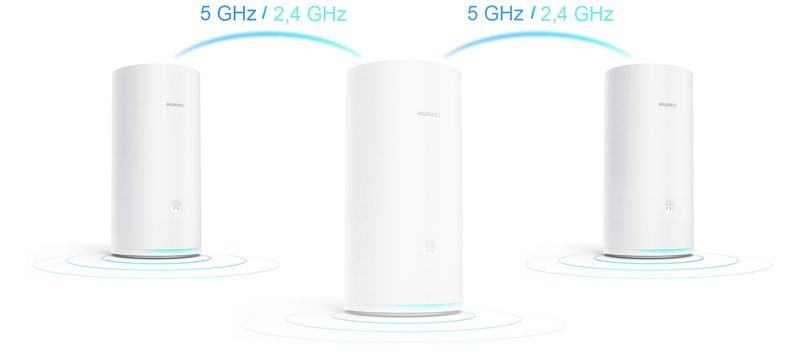
This is Huawei's new solution for WiFi everywhere
This is Huawei’s new solution for WiFi everywhere

It is also a tri-band system divided into a 2.4GHz band and two separate 5GHz bands, although one of these two can also become a dedicated 2.4GHz auxiliary band.

Surprisingly, with Huawei Share technology it allows you to connect an Android phone with NFC by touching a unit, without the need for complex configurations using passwords, although it also carries a companion app called AI Life with which to manage connected devices, being able to set many rules.

HUAWEI HomeSec technology also makes it possible to protect the WiFi network against brute force attacks.

Tags: connectivityhuaweitechnologywifi
ShareTweet
Barış Selman

Barış Selman

A technology and gaming enthusiast by day, Barış is a passionate composer and black/death metal guitarist by night. He keeps his finger on the pulse of the intersection of art and technology whenever he can from his tours worldwide.

Related Posts

New WhatsApp update brings 2026 stickers and video call effects

New WhatsApp update brings 2026 stickers and video call effects

30 December 2025
Leaker reveals Xiaomi plans for high end eSIM device in 2026

Leaker reveals Xiaomi plans for high end eSIM device in 2026

30 December 2025
HP prepares OMEN OLED monitor reveal for CES 2026

HP prepares OMEN OLED monitor reveal for CES 2026

30 December 2025
High RAM costs from AI boom could delay next Xbox and PlayStation

High RAM costs from AI boom could delay next Xbox and PlayStation

30 December 2025
Please login to join discussion

LATEST

New WhatsApp update brings 2026 stickers and video call effects

Leaker reveals Xiaomi plans for high end eSIM device in 2026

HP prepares OMEN OLED monitor reveal for CES 2026

High RAM costs from AI boom could delay next Xbox and PlayStation

LG to unveil its Gallery TV at CES 2026

Bitcoin drops 3% to $87,300 as altcoins decline

How to install mods and custom content in The Sims 2

Running Python files and fixing path errors on Windows

How to boot your PC into Command Prompt for troubleshooting

How to delete a virus using Command Prompt

TechBriefly

© 2021 TechBriefly is a Linkmedya brand.

  • Tech
  • Business
  • Science
  • Geek
  • How to
  • About
  • Privacy
  • Terms
  • Contact
  • | Network Sites |
  • Digital Report
  • LeaderGamer

Follow Us

No Result
View All Result
  • Tech
  • Business
  • Crypto
  • Science
  • Geek
  • How to
  • About
    • About TechBriefly
    • Terms and Conditions
    • Privacy Policy
    • Contact Us
    • Languages
      • 中文 (Chinese)
      • Dansk
      • Deutsch
      • Español
      • English
      • Français
      • Nederlands
      • Italiano
      • 日本语 (Japanese)
      • 한국인 (Korean)
      • Norsk
      • Polski
      • Português
      • Pусский (Russian)
      • Suomalainen
      • Svenska
