
TechBriefly
  • Tech
  • Business
  • Crypto
  • Science
  • Geek
  • How to
  • About
    • About TechBriefly
    • Terms and Conditions
    • Privacy Policy
    • Contact Us
    • Languages
      • 中文 (Chinese)
      • Dansk
      • Deutsch
      • Español
      • English
      • Français
      • Nederlands
      • Italiano
      • 日本语 (Japanese)
      • 한국인 (Korean)
      • Norsk
      • Polski
      • Português
      • Pусский (Russian)
      • Suomalainen
      • Svenska
No Result
View All Result
TechBriefly
Home Tech Smartphones
Huawei’s system, Harmony OS 2.0 beta is based on Android

Huawei’s system, Harmony OS 2.0 beta is based on Android

Barış SelmanbyBarış Selman
26 December 2020
in Smartphones, Tech
Reading Time: 2 mins read
Share on FacebookShare on Twitter

Harmony OS 2.0 beta is based on Android. Huawei officials have long indicated that due to circumstances related to the U.S. veto. They will develop an ecosystem of their own, including a new operating system, called Harmony OS.

The idea was to create an alternative to Android that would be compatible with the apps of this system. But what we did not expect was that the system itself would be based on Android.

Harmony OS 2.0 beta is based on Android

This is what has been seen in the Harmony OS 2.0 emulator that Huawei has put in the hands of the developers. In the following image, we see an error message in Android 4.4 and the same message in Huawei’s system. The only difference in the message is, of course, the name of the operating system.
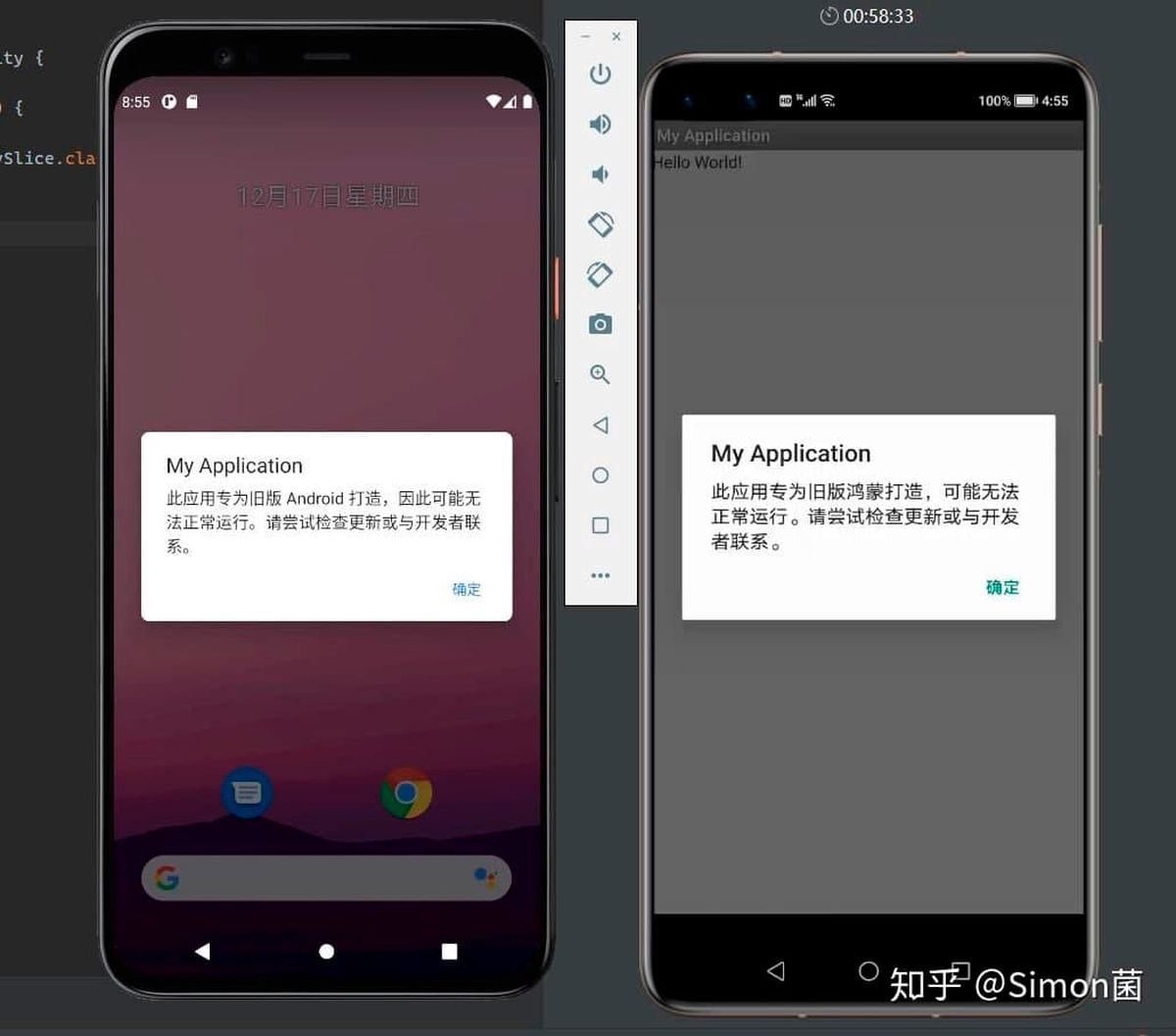
Harmony OS 2.0 beta is based on Android

The point is that Huawei has not indicated that Android AOSP is being used as the basis for Harmony OS.
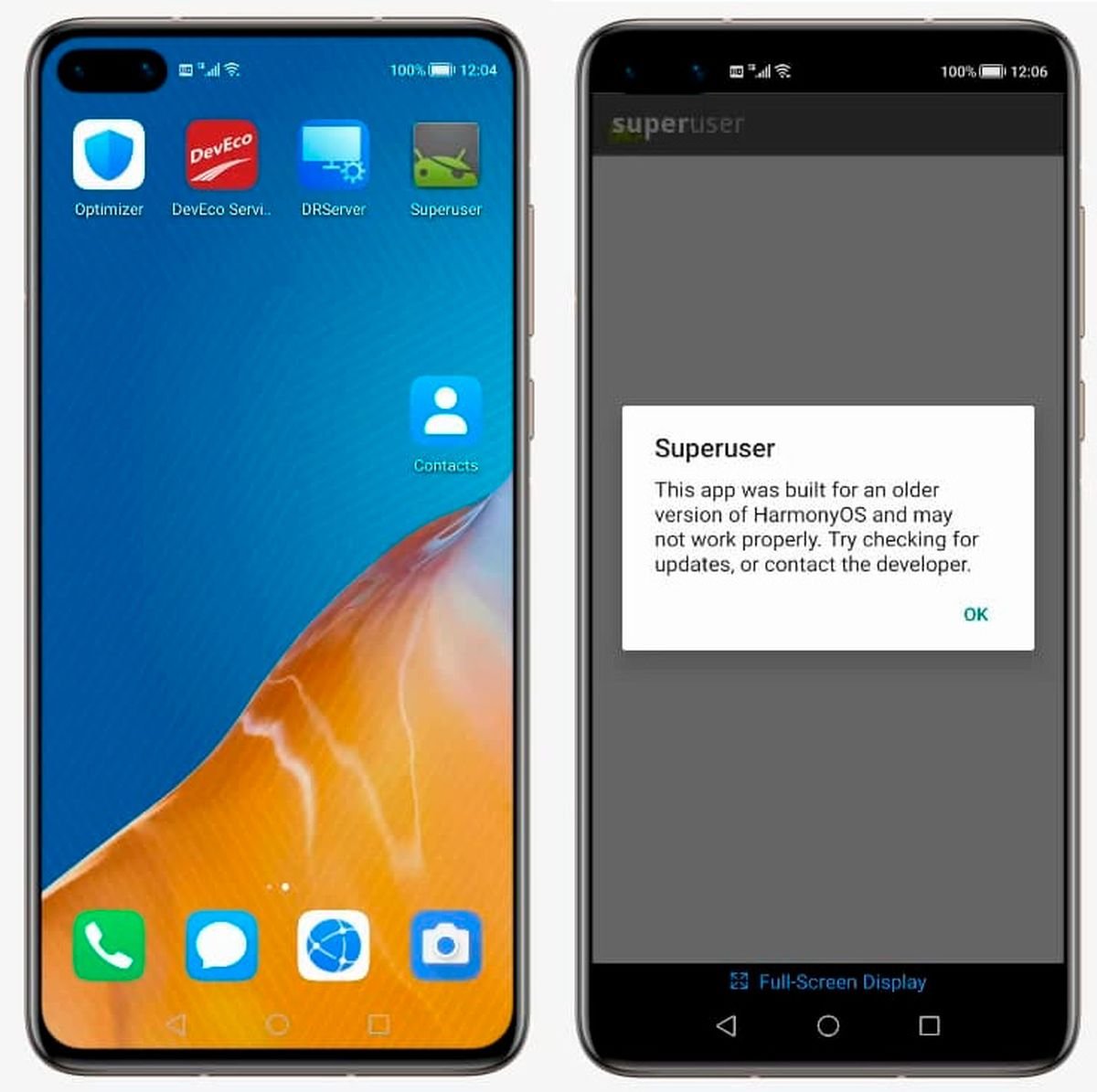
Huawei's system, Harmony OS 2.0 beta is based on Android
Huawei’s system, Harmony OS 2.0 beta is based on Android

The same happens if we try to use an old Android app on Harmony OS, which indicates that the app has been built for an earlier version of Harmony OS. The reality is that Huawei seems to have changed the mentions to Android for mentions to his own system, and that’s it.

Even inside, the system we see remnants of the Android framework, which is illogical unless the system needs it.

This, per se, is not a problem and Huawei may have done this to ensure compatibility of existing applications with Harmony.

In the future, a turnaround using another technology could be seen once applications use the Huawei Mobile Services APIs, at which point it is possible to move away from Android. This would explain why Harmony OS is expected to have a different interface to Android in the future.

At the moment we have neither confirmation nor denial from the company about these images, so we will have to wait.

Tags: AndroidfeaturedHarmony OShuaweiOStechnology
ShareTweet
Barış Selman

Barış Selman

A technology and gaming enthusiast by day, Barış is a passionate composer and black/death metal guitarist by night. He keeps his finger on the pulse of the intersection of art and technology whenever he can from his tours worldwide.

Related Posts

New WhatsApp update brings 2026 stickers and video call effects

New WhatsApp update brings 2026 stickers and video call effects

30 December 2025
Leaker reveals Xiaomi plans for high end eSIM device in 2026

Leaker reveals Xiaomi plans for high end eSIM device in 2026

30 December 2025
HP prepares OMEN OLED monitor reveal for CES 2026

HP prepares OMEN OLED monitor reveal for CES 2026

30 December 2025
High RAM costs from AI boom could delay next Xbox and PlayStation

High RAM costs from AI boom could delay next Xbox and PlayStation

30 December 2025
Please login to join discussion

LATEST

New WhatsApp update brings 2026 stickers and video call effects

Leaker reveals Xiaomi plans for high end eSIM device in 2026

HP prepares OMEN OLED monitor reveal for CES 2026

High RAM costs from AI boom could delay next Xbox and PlayStation

LG to unveil its Gallery TV at CES 2026

Bitcoin drops 3% to $87,300 as altcoins decline

How to install mods and custom content in The Sims 2

Running Python files and fixing path errors on Windows

How to boot your PC into Command Prompt for troubleshooting

How to delete a virus using Command Prompt

TechBriefly

© 2021 TechBriefly is a Linkmedya brand.

  • Tech
  • Business
  • Science
  • Geek
  • How to
  • About
  • Privacy
  • Terms
  • Contact
  • | Network Sites |
  • Digital Report
  • LeaderGamer

Follow Us

No Result
View All Result
  • Tech
  • Business
  • Crypto
  • Science
  • Geek
  • How to
  • About
    • About TechBriefly
    • Terms and Conditions
    • Privacy Policy
    • Contact Us
    • Languages
      • 中文 (Chinese)
      • Dansk
      • Deutsch
      • Español
      • English
      • Français
      • Nederlands
      • Italiano
      • 日本语 (Japanese)
      • 한국인 (Korean)
      • Norsk
      • Polski
      • Português
      • Pусский (Russian)
      • Suomalainen
      • Svenska
