
TechBriefly
  • Tech
  • Business
  • Crypto
  • Science
  • Geek
  • How to
  • About
    • About TechBriefly
    • Terms and Conditions
    • Privacy Policy
    • Contact Us
    • Languages
      • 中文 (Chinese)
      • Dansk
      • Deutsch
      • Español
      • English
      • Français
      • Nederlands
      • Italiano
      • 日本语 (Japanese)
      • 한국인 (Korean)
      • Norsk
      • Polski
      • Português
      • Pусский (Russian)
      • Suomalainen
      • Svenska
No Result
View All Result
TechBriefly
Home Tech Internet
Opera adds Spotify, YouTube and Apple Music to its sidebar

Opera adds Spotify, YouTube and Apple Music to its sidebar

Rafi PrattbyRafi Pratt
19 November 2020
in Internet, Tech
Reading Time: 2 mins read
Share on FacebookShare on Twitter

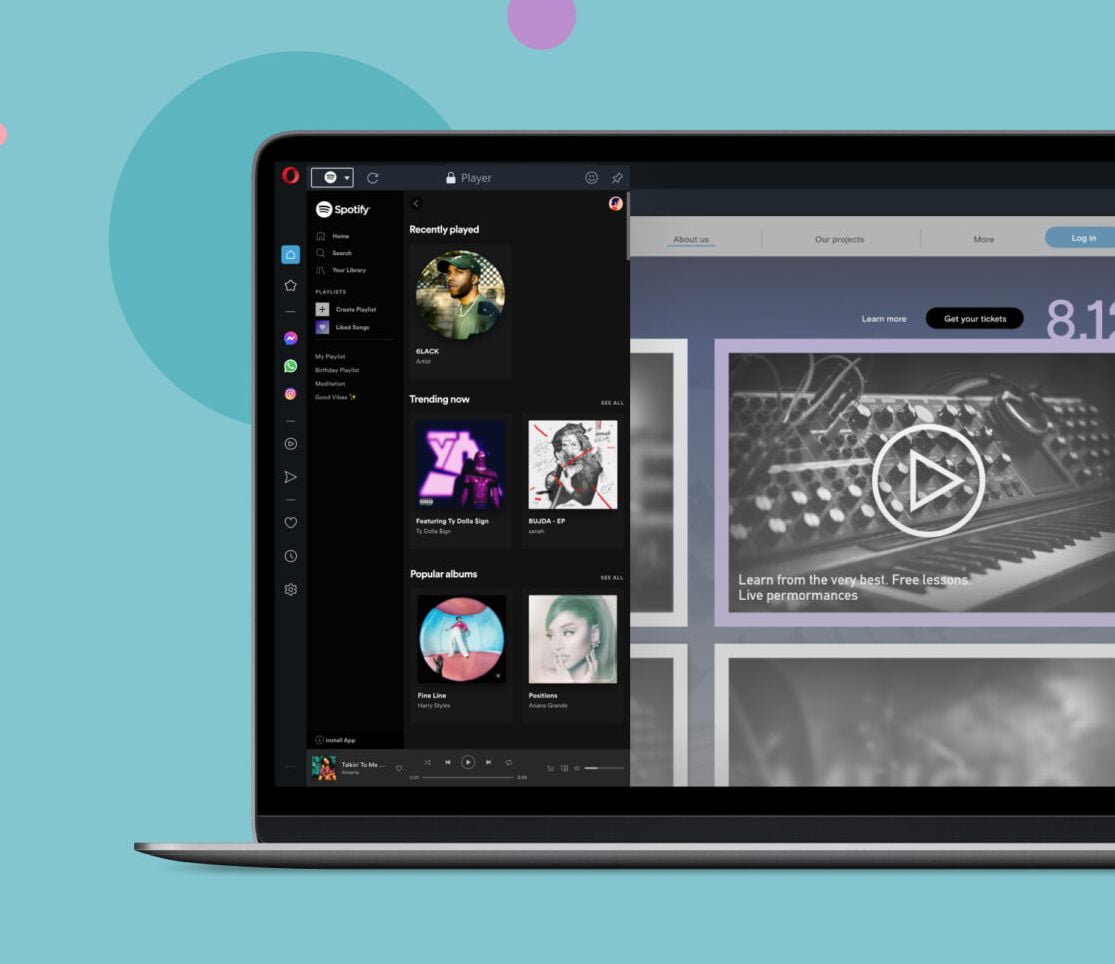
In its latest addition, Opera included Spotify, YouTube Music and Apple Music to its GX browser’s sidebar.

Opera has been, is, and probably will continue to be one of the most innovative browsers on the market. As an example, Opera was the first web browser, the first, to have tabs, the rest followed suit. The browser company keeps enhancing its product continously ever since.

Now, a very important element of Opera GX, a special edition of its browser for gamers, which continues to grow in both users and functions, is its sidebar. Sidebar provides access to multiple functions related to websites and related services. However, the sidebar is not exclusive to the GX version and, as a sign of this, today we received a new Opera update that adds a music player to the sidebar.

A very interesting aspect of this player, which we can read on the browser’s website, is that it is not a player with which you can listen to the music you have on your PC, something for which users already have their reference applications. What this new function allows is to set up Spotify, YouTube and Apple Music accounts, three services that are usually accessed directly from the browser and therefore result in one more open tab.

The function, as you can see in the image, is shown just below the section dedicated to messaging services and, by clicking on its icon, a first selector with the three services will be displayed. Obviously, it is necessary to log in to them, just as you would do on the web or in their respective clients. What Opera offers with this function is a faster and more comfortable access to the services. And this will bring more comfort for people who like to use many tabs open simultaneously.

  • How to use Opera’s free built-in VPN?
  • Google Assistant starts to integrate with third-party apps

It is possible to have several services configured, and you can switch between them quickly. Since the player actually uses the web access of the services and therefore saves the relevant cookies, the sessions are kept started even if you restart the browser and the PC.

Tags: Apple MusicfeaturedOperaSpotifyYouTube Music
ShareTweet
Rafi Pratt

Rafi Pratt

Related Posts

New WhatsApp update brings 2026 stickers and video call effects

New WhatsApp update brings 2026 stickers and video call effects

30 December 2025
Leaker reveals Xiaomi plans for high end eSIM device in 2026

Leaker reveals Xiaomi plans for high end eSIM device in 2026

30 December 2025
HP prepares OMEN OLED monitor reveal for CES 2026

HP prepares OMEN OLED monitor reveal for CES 2026

30 December 2025
High RAM costs from AI boom could delay next Xbox and PlayStation

High RAM costs from AI boom could delay next Xbox and PlayStation

30 December 2025
Please login to join discussion

LATEST

New WhatsApp update brings 2026 stickers and video call effects

Leaker reveals Xiaomi plans for high end eSIM device in 2026

HP prepares OMEN OLED monitor reveal for CES 2026

High RAM costs from AI boom could delay next Xbox and PlayStation

LG to unveil its Gallery TV at CES 2026

Bitcoin drops 3% to $87,300 as altcoins decline

How to install mods and custom content in The Sims 2

Running Python files and fixing path errors on Windows

How to boot your PC into Command Prompt for troubleshooting

How to delete a virus using Command Prompt

TechBriefly

© 2021 TechBriefly is a Linkmedya brand.

  • Tech
  • Business
  • Science
  • Geek
  • How to
  • About
  • Privacy
  • Terms
  • Contact
  • | Network Sites |
  • Digital Report
  • LeaderGamer

Follow Us

No Result
View All Result
  • Tech
  • Business
  • Crypto
  • Science
  • Geek
  • How to
  • About
    • About TechBriefly
    • Terms and Conditions
    • Privacy Policy
    • Contact Us
    • Languages
      • 中文 (Chinese)
      • Dansk
      • Deutsch
      • Español
      • English
      • Français
      • Nederlands
      • Italiano
      • 日本语 (Japanese)
      • 한국인 (Korean)
      • Norsk
      • Polski
      • Português
      • Pусский (Russian)
      • Suomalainen
      • Svenska
