

TechBriefly
  • Tech
  • Business
  • Crypto
  • Science
  • Geek
  • How to
  • About
    • About TechBriefly
    • Terms and Conditions
    • Privacy Policy
    • Contact Us
    • Languages
      • 中文 (Chinese)
      • Dansk
      • Deutsch
      • Español
      • English
      • Français
      • Nederlands
      • Italiano
      • 日本语 (Japanese)
      • 한국인 (Korean)
      • Norsk
      • Polski
      • Português
      • Pусский (Russian)
      • Suomalainen
      • Svenska
No Result
View All Result
TechBriefly
Home How to
How to measure blood oxygen level with Apple Watch?

How to measure blood oxygen level with Apple Watch?

How to measure blood oxygen level with Apple Watch?

Kerem GülenbyKerem Gülen
16 September 2020
in How to
Reading Time: 2 mins read
Share on FacebookShare on Twitter

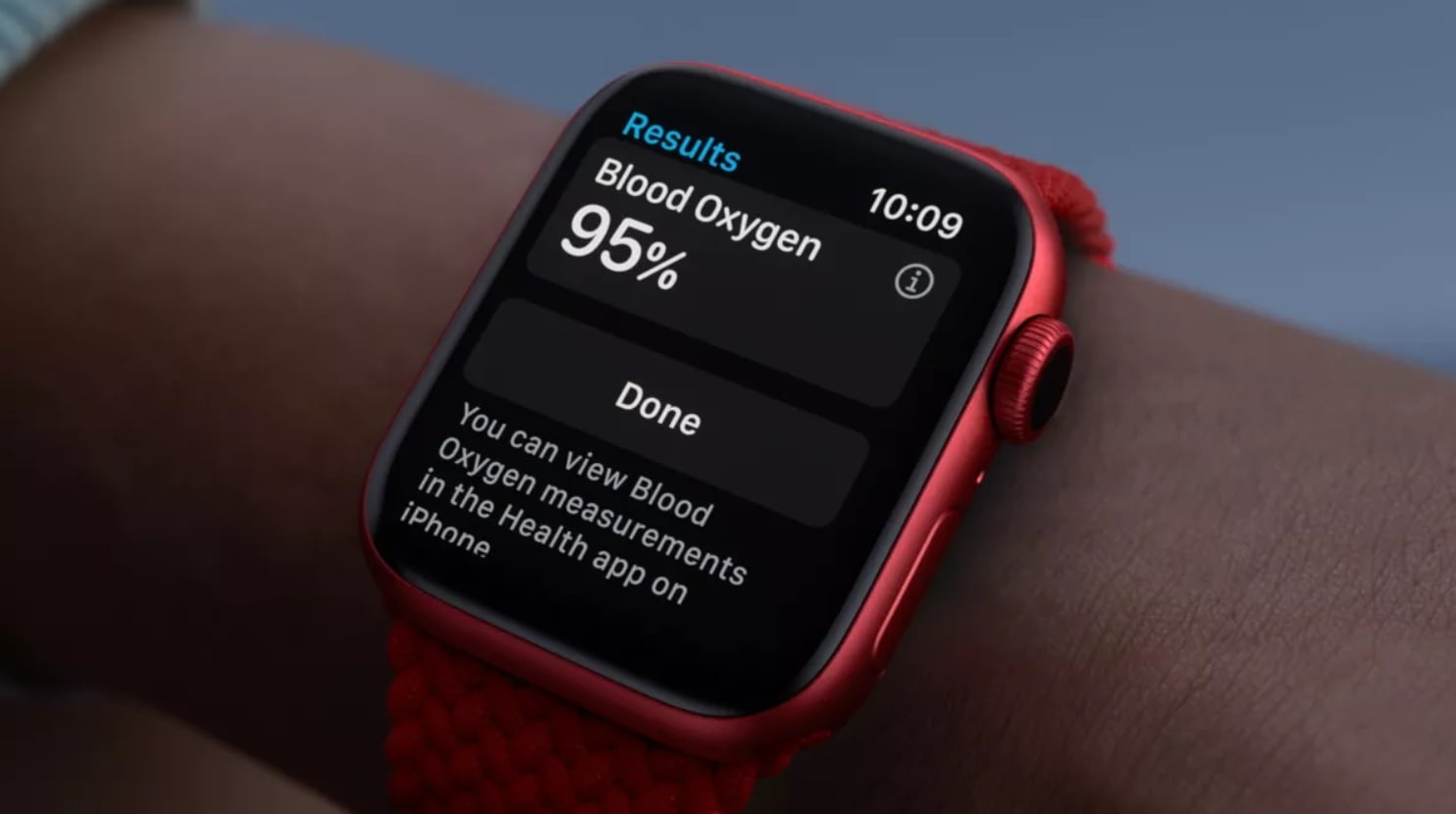
We explained in this article how to measure the oxygen level in the blood (SpO2), which is one of the most important features expected with Apple Watch 6.

Apple Watch Series 6 came with a number of new features for tracking heart and respiratory health. Among these features, there is a sensor and Blood Oxygen application that allows to measure the oxygen level in the blood.

Decreasing oxygen levels in the blood is an important condition associated with COVID-19, as it has been associated with many diseases. Because the disease can be an obstacle to adequate oxygen intake. Doctors monitor SpO2 levels throughout the treatment process to determine the severity of cases such as COVID-19.

  • Apple Watch comparison: Series 6 vs Series 5 vs Series 3 vs SE
  • Apple launched Watch Series 6: price, specs and release date
  • Expected features of Apple Watch Series 6 and SE 2020

It can also occur due to low oxygen levels in the blood, ie hypoxemia, asthma, pneumonia or chronic heart diseases. Apple Watch aims to warn you beforehand against these possible risks of your body with the Blood Oxygen application offered in the Series 6 model.

How is the oxygen level (SpO2) measured in the blood?

The sensor in Apple Watch 6 is placed on the back of the smartwatch is for measuring blood oxygen levels. Using four sets of red, green, and infrared LED lights and four photodiodes that convert light into electric current, the sensor directs the lights into veins on your wrist and measures how much the light bounces back.
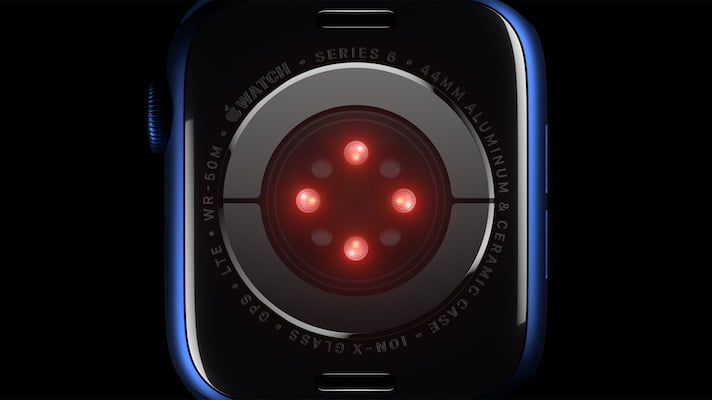
The sensor in Apple Watch 6 is placed on the back of the smartwatch is for measuring blood oxygen levels.

Medical details aside, the sensor is basically based on the different absorption of red and infrared light by blood with high or low oxygen content. With this technique, Apple Watch can determine the color of blood.

When the oxygen level in the blood is measured, the bright red result is considered a high level, while the dark red result means a low SpO2 level. The reason for this is that although oxygen is supplied to organs or muscles, the body cannot get enough oxygen from the same organs and muscles.

How to use Blood Oxygen app?

With Apple Watch 6, it is possible to measure SpO2 at any time. For this, simply open the application and follow the commands on the screen.

Measuring the oxygen level (SpO2) in the blood with Apple Watch takes about 15 seconds, and when complete, you can see the oxygen level as a percentage.

Your smartwatch will also take measurements periodically during the day, whether you are stationary, lying on the sofa or sleeping. Your blood oxygen readings will be synchronized with the Apple Health app.

Tags: apple watchapple watch seblood oxygenhow to
ShareTweet
Kerem Gülen

Kerem Gülen

Kerem from Turkey has an insatiable curiosity for the latest advancements in tech gadgets and a knack for innovative thinking.With 3 years of experience in editorship and a childhood dream of becoming a journalist, Kerem has always been curious about the latest tech gadgets and is constantly seeking new ways to create.As a Master's student in Strategic Communications, Kerem is eager to learn more about the ever-evolving world of technology. His primary focuses are artificial intelligence and digital inclusion, and he delves into the most current and accurate information on these topics.

Related Posts

How to download and migrate your content from Microsoft Stream

How to download and migrate your content from Microsoft Stream

6 January 2026
Easy ways to make a YouTube music video with just pictures

Easy ways to make a YouTube music video with just pictures

6 January 2026
Easy steps to build your own music video for YouTube

Easy steps to build your own music video for YouTube

6 January 2026
How to add videos and movies to compatible iPod models easily

How to add videos and movies to compatible iPod models easily

6 January 2026
Please login to join discussion

LATEST

How to download and migrate your content from Microsoft Stream

Easy ways to make a YouTube music video with just pictures

Easy steps to build your own music video for YouTube

How to add videos and movies to compatible iPod models easily

Narwal unveils Flow 2 with AI pet monitoring at CES 2026

Hyundai reveals Boston Dynamics and DeepMind alliance at CES 2026

Intel unveils Core Ultra Series 3 at CES 2026

Amazon takes Alexa to the web with launch of Alexa.com at CES 2026

Amazon enters lifestyle TV market with $899 Ember Artline

Google previews Gemini AI features for Google TV

TechBriefly

© 2021 TechBriefly is a Linkmedya brand.

  • Tech
  • Business
  • Science
  • Geek
  • How to
  • About
  • Privacy
  • Terms
  • Contact
  • | Network Sites |
  • Digital Report
  • LeaderGamer

Follow Us

No Result
View All Result
  • Tech
  • Business
  • Crypto
  • Science
  • Geek
  • How to
  • About
    • About TechBriefly
    • Terms and Conditions
    • Privacy Policy
    • Contact Us
    • Languages
      • 中文 (Chinese)
      • Dansk
      • Deutsch
      • Español
      • English
      • Français
      • Nederlands
      • Italiano
      • 日本语 (Japanese)
      • 한국인 (Korean)
      • Norsk
      • Polski
      • Português
      • Pусский (Russian)
      • Suomalainen
      • Svenska

