


Instagram now allows users to add multiple audio tracks to Reels, enhancing the creative flexibility for its global user base. The addition is significant as Reels have become a central feature of Instagram, designed to compete with TikTok’s short-form video content. The addition of multitrack audio capabilities signifies a major enhancement for content creators who rely on the platform to share engaging and dynamic videos with their audience.
Instagram’s announcement on Tuesday marks a key milestone in its continuous efforts to improve user experience and provide more sophisticated tools for content creation. Users can now incorporate up to 20 different audio tracks in a single Reel, offering unprecedented creative possibilities. This feature allows for greater experimentation with sound, enabling creators to produce more complex and layered audio experiences.
View this post on Instagram
How to add multiple songs to Instagram Reels
The process of adding multiple audio tracks to a Reel is straightforward. Here is what you need to do:
- Open the Instagram app and go to the Reels section.
- Select the Reel you want to edit or create a new Reel.
- Enter the Reel editor by tapping on the Reel.
- Tap on the “Add to mix” option in the editor.
- Browse through the available audio tracks and select your desired track.
- Add the selected track to your Reel.
- Repeat the process to add additional tracks, up to a maximum of 20.
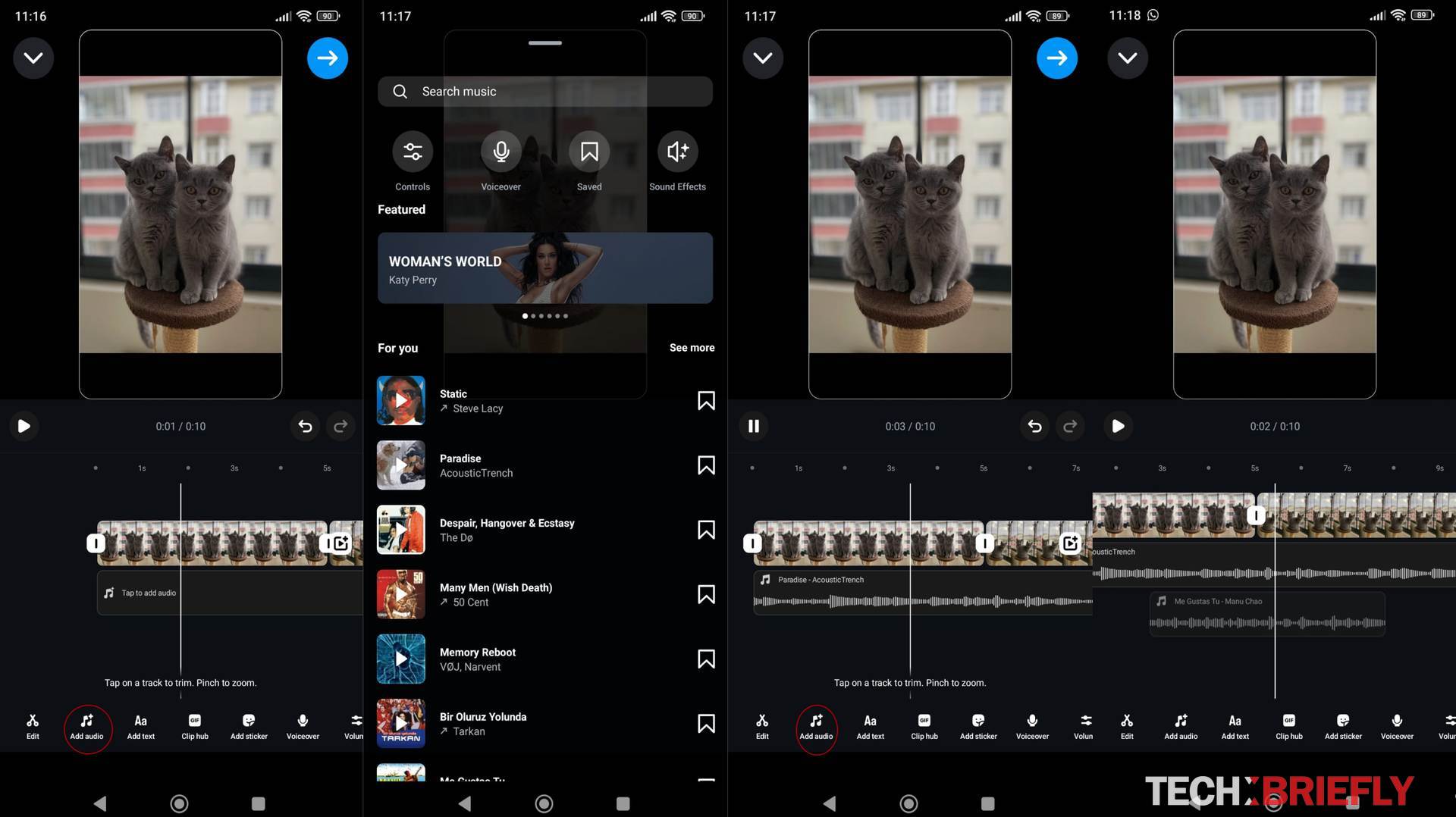
After adding the tracks, users have the option to trim each one, ensuring that only the specific portions they want are included. This level of customization allows for precise control over the audio elements of the Reel, enhancing the overall quality and impact of the content. By enabling the addition of up to 20 tracks, Instagram provides ample flexibility for creators to experiment with different sounds and effects.
The Reel editor also allows users to visually align the audio with other elements in their video. This feature is particularly useful for ensuring that audio cues match up with visual transitions, text overlays, and other on-screen elements.
Instagram’s focus on short-form content
Instagram’s decision to introduce multitrack audio for Reels aligns with its broader emphasis on short-form video content. Adam Mosseri has highlighted the platform’s commitment to connecting people with their friends through short videos, rather than focusing on long-form content. This strategic direction is based on user behavior and engagement patterns, which indicate that short-form videos are more effective at fostering interactions and shares among users.
By concentrating on features like multitrack audio, Instagram is catering to the preferences of its user base while also differentiating itself from competitors. The ability to add multiple audio tracks enhances the creative potential of Reels, making them more engaging and dynamic. This, in turn, supports Instagram’s goal of maintaining high levels of user engagement and interaction.

Instagram’s continuous improvements to Reels demonstrate the platform’s dedication to providing cutting-edge tools for content creators. The introduction of multitrack audio is a testament to Instagram’s ongoing efforts to enhance the user experience and support the diverse needs of its global community. As creators explore the possibilities offered by this new feature, the quality and creativity of content on Instagram are likely to reach new heights.
The ability to add multiple audio tracks to Reels is a welcome addition to Instagram. The feature simplifies the content creation process, encourages creative experimentation, and supports the platform’s focus on short-form video content.
By offering these enhanced capabilities, Instagram continues to solidify its position as a leading platform for creative expression and social interaction.
Featured image credit: Mariia Shalabaieva/Unsplash


