

Welcome to the GTA 5 Online Yeti Hunt, an exhilarating escapade that plunges players into the heart of a chilling mystery. Brace yourselves as we embark on a quest to track down the elusive Yeti, concealed in the snowy peaks and shadowy corners of the game’s sprawling map.
GTA 5 Online Yeti Hunt event challenges both the seasoned and the daring, promising an exclusive reward that will leave players adorned in the mythical Yeti Outfit. Let the hunt begin!”
What is GTA 5 Online Yeti Hunt?
The GTA 5 Online Yeti Hunt is a special, limited-time event within the Grand Theft Auto Online game that introduces players to a mysterious and elusive creature, the Yeti. Taking place in the fictional city of Los Santos, this event is designed to add an element of excitement and challenge for players during the festive season.
So, what is the objective? The primary goal of the Yeti Hunt is to track down the mythical Yeti and, upon successful confrontation, obtain the exclusive Yeti Outfit as a reward. The Yeti is not just casually roaming the streets; players must actively search for clues scattered across a specific game map area.

To start the Yeti Hunt, players must head to a designated area marked on the map, located southwest of Chiliad Mountain State Wilderness. Upon arrival, a white mission circle will appear, signaling the beginning of the quest. However, the Yeti won’t reveal itself until players have discovered five key clues.
GTA 5 Yeti Clue locations: Where is the Yeti in GTA 5 Online Yeti Hunt?
In the GTA 5 Yeti Hunt, players are required to uncover five key clues scattered throughout a specific area to initiate the appearance of the elusive Yeti. Each clue contributes to the unfolding narrative, building suspense and guiding players in their quest. Here’s a breakdown of the GTA 5 Yeti clue locations:
- Bloodied Tent: The first clue is a bloodied tent, creating a chilling atmosphere and setting the tone for the hunt.
- Location: Found up a hill as you enter the designated area from the highway.
- Torn Shirt: Players will discover a torn and bloody shirt, hinting at violence and adding to the mystery surrounding the Yeti.
- Location: Located near a junked car next to the road.
- Body Parts: Human body parts strewn about create a macabre scene, intensifying the intrigue and signaling the Yeti’s presence.
- Location: Scattered near the road, this time around a fallen tree.
- Car Wreck: A car wreck serves as a foreboding sign of the Yeti’s activity, building tension as players progress in the hunt.
- Location: Another clue found near the road, marked by an ominous background track.
- Deer: A dead deer by the river serves as the last piece of the puzzle, adding a final touch to the gruesome scenes players have encountered.
- Location: The final clue is located by the river.
The order in which players collect these clues is flexible, allowing for a personalized experience during the hunt. While exploring these locations, players may notice ominous music playing as they approach each clue, enhancing the atmospheric and suspenseful nature of the Yeti Hunt.
Once all five clues have been successfully collected, players must wait until nighttime and return to the designated area. Exiting their vehicle triggers the Yeti’s spawn, initiating a challenging battle between players and the mythical creature. Successful confrontation leads to the reward of the exclusive Yeti Outfit, marking the culmination of the GTA 5 Yeti Hunt.
How to get the GTA 5 Yeti outfit
Armed with these clues, players must await the cover of darkness. The Yeti, a creature of the night, only emerges during nighttime, adding an element of suspense to the quest.
You need to return to the designated area as night falls, and players exit their vehicles, triggering the spawn of the mythical creature. A red skull icon marks the Yeti’s approach, initiating a fierce battle. Armed with potent weapons such as the Railgun, players must confront the durable Yeti in a challenging showdown.
Victory over the elusive Yeti is rewarded with a unique notification about the Yeti Outfit. Players can then check their in-game wardrobe under the Festive category to find and equip this exclusive attire, marking their triumphant conquest.
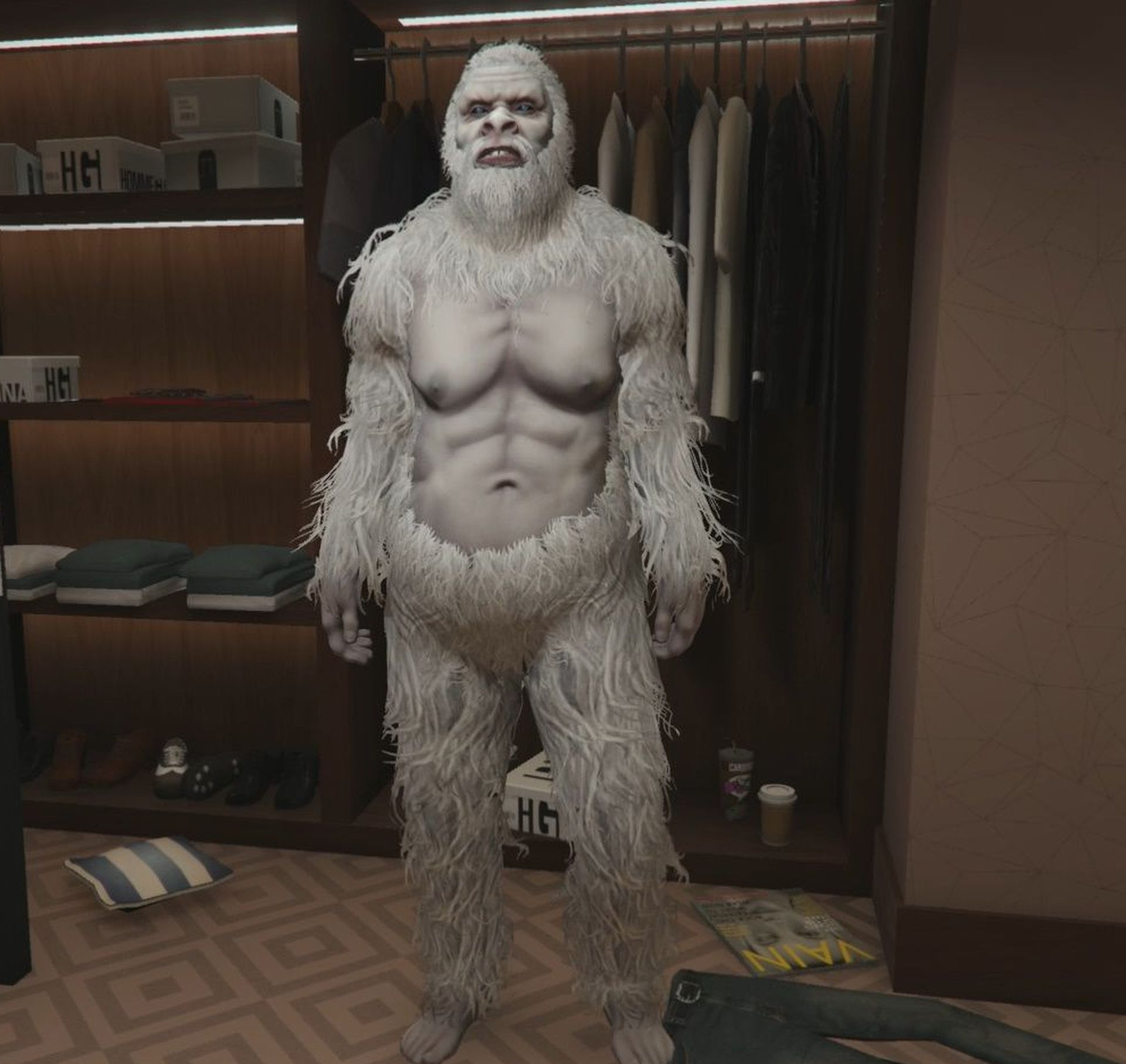
With the Yeti Outfit in hand, players can celebrate their triumph as they roam the streets of Los Santos, showcasing their unique reward. The GTA 5 Yeti Hunt adds a festive twist to the game and provides players with a challenging quest and an exclusive outfit that stands as a testament to their daring and victory over the mythical beast. Happy hunting!
Also, do you know how to pick up snowballs in GTA 5? Visit the related article and learn.
Featured image credit: Rockstar