If you have some questions about an Apple Card Savings account or how to open Apple Savings, this article will help you a lot!
Apple Savings, which was announced months ago, is now available for Apple Card customers to put Daily Cash rewards into a high-yield savings account.
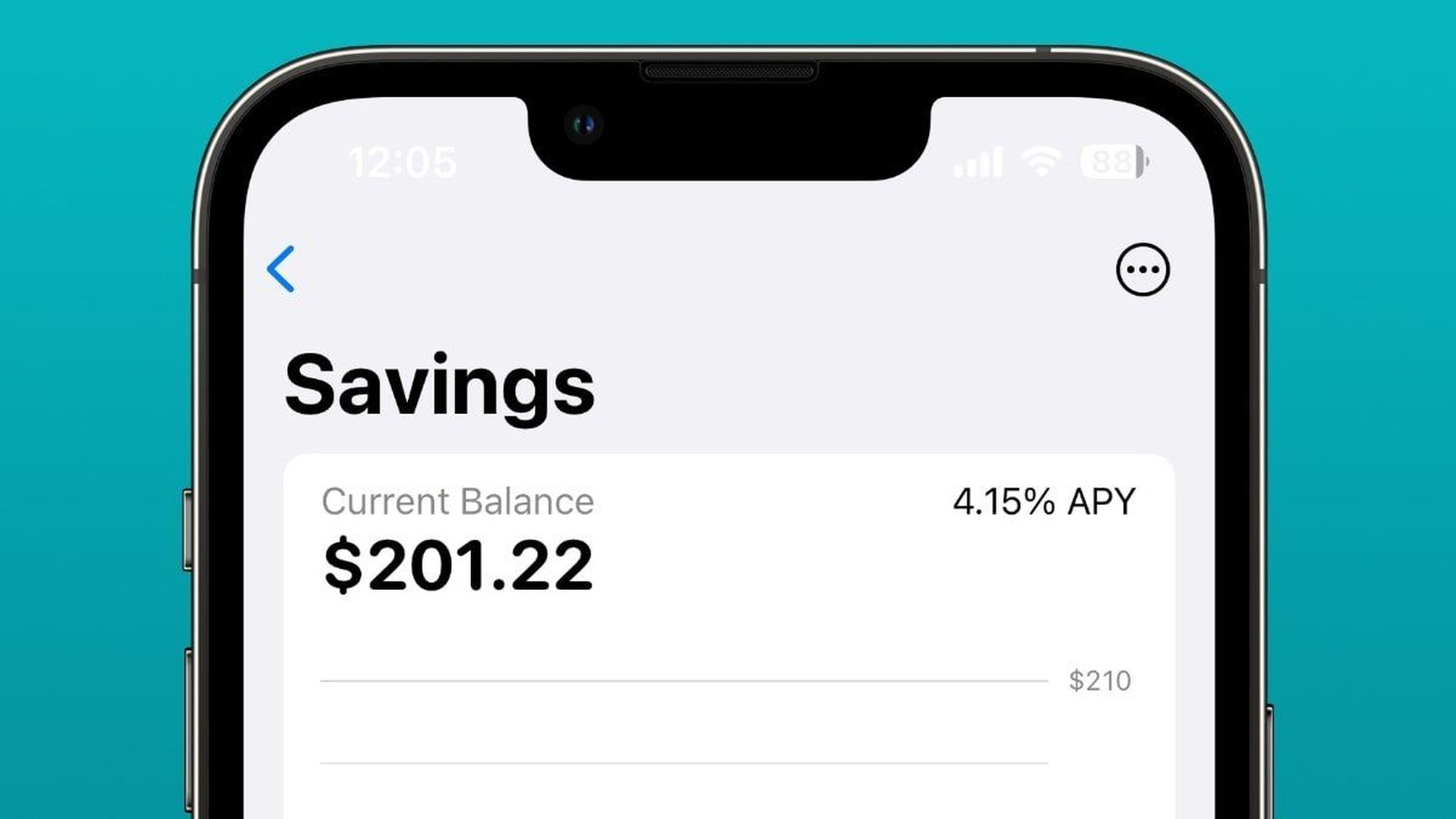
Apple Savings can keep cash-back incentives or money transferred from another bank because there are no fees, minimum deposits, or balance limitations. Goldman Sachs operates a Savings account, which, like the Apple Card, pays a 4.15% APY.
Apple Savings occurs following an announcement in October 2022 and a period of silence until March 2023, when a language addressing Apple Savings was added to the terms and conditions of the Apple Card. When someone examined the coding from Apple’s servers, they uncovered the April 17 launch.
Apple Card savings account
Although users may move money into Apple Savings from another Apple Card savings account, Apple particularly touts the account as a destination for Daily Cash incentives.
Spending money or making purchases in Savings straight from the Apple Card savings account or Apple Pay is not available as a savings account. Users must instead move funds from Savings to Apple Cash or a connected external bank account.
How to open Apple Savings?
Opening and maintaining an Apple Savings account is subject to certain requirements. To open an Apple Card savings account:
- Add Apple Card to your iPhone if you are the owner or co-owner of an active Apple Card account.
- You must be at least 18 years old.
- You must have a social security number or a tax identification number.
- Set up two-factor authentication for your Apple ID and install the most recent iOS version. Savings are only accessible in iOS 16.4 and later.
The Deposit Account Agreement contains additional terms and limitations. For example, while there is no necessary minimum amount to start an account, there is a maximum balance of $250,000.
This is the standard limit for consumers’ funds to be covered by the Federal Deposit Insurance Corporation (FDIC). Furthermore, the Apple Savings account is FDIC-insured.
How to use Apple card?
If you wanna learn how to use Apple card, follow these steps:
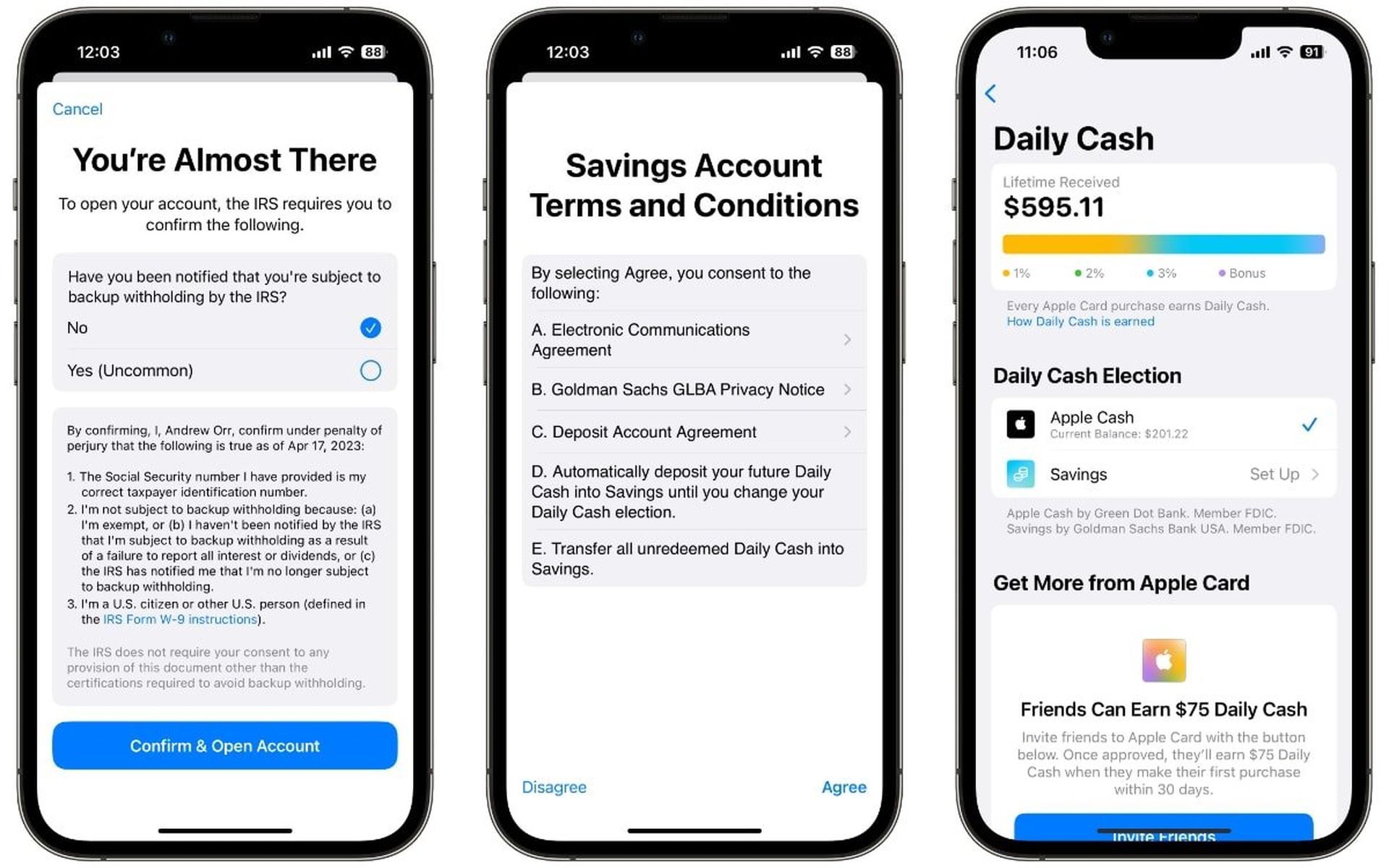
These instructions call for you to provide your entire Social Security number, which Apple does not retain or read, as well as agree to the terms and conditions. Finally, the IRS must determine whether you are subject to backup withholding.
- On an iPhone, launch the Wallet app.
- Select the Apple Card.
- Then, hit the three-dot “More” icon and choose Daily Cash.
- Follow the onscreen prompts after tapping Set Up next to Savings.
A backup withholding is a percentage of tax that the IRS may require a person to withhold from specified payments to disclose them on an information return. It’s a rare event, and most Apple Card users will be able to say “No” when prompted.
Users who open an Apple Savings account will instantly earn additional Daily Cash benefits. Apple Card holders may also return to the Wallet app’s Daily Cash area and change the destination back to Apple Cash if they so wish.
About Apple Savings
When Apple initially introduced the savings account, it did not specify when Apple Card holders would be able to utilize it. Instead, in true Apple fashion, the company just stated that it will be available in “the coming months“.
Following that disclosure, several pieces of information emerged that shed light on some of Goldman Sachs’ financial operations. As an investment bank, the bank has typically served businesses, financial institutions, and governments, therefore it has had some difficulties with its consumer-facing operations.
It collaborated with Apple to establish the Apple Card, a consumer credit card that was also the bank’s first credit card product. Although Goldman CEO David Solomon referred to the cooperation with Apple as “the most successful credit launch ever“, it was not without challenges.
According to a January report, Goldman Sachs lost more than $1.2 billion in the first nine months of 2022, mostly due to loan-loss provisions and the Apple Card. The money was spent on developing a system to facilitate Apple Card transactions, and the bank has yet to see a return on its investment.
The Federal Reserve has also launched an inquiry into Goldman Sachs to see if the bank’s consumer credit business provided enough consumer safeguards. However, that is more about the Marcus savings account and whether or not it had adequate control or management issues.
Also, If you don’t know how to change your default Apple Pay card, we are going to help you out in this guide.