

TechBriefly
  • Tech
  • Business
  • Crypto
  • Science
  • Geek
  • How to
  • About
    • About TechBriefly
    • Terms and Conditions
    • Privacy Policy
    • Contact Us
    • Languages
      • 中文 (Chinese)
      • Dansk
      • Deutsch
      • Español
      • English
      • Français
      • Nederlands
      • Italiano
      • 日本语 (Japanese)
      • 한국인 (Korean)
      • Norsk
      • Polski
      • Português
      • Pусский (Russian)
      • Suomalainen
      • Svenska
No Result
View All Result
TechBriefly
Home Geek Games
Lost Ark server list: How to check Lost Ark server status?

Lost Ark server list: How to check Lost Ark server status?

Eray EliaçıkbyEray Eliaçık
10 February 2022
in Games, Geek
Reading Time: 3 mins read
Share on FacebookShare on Twitter

We gathered the Lost Ark server list for you and explained how to check Lost Ark server status in order to fix Lost Ark 10027 error.

Are you looking for a list of Lost Ark servers? With the impending release of the Korean ARPG-style MMO, you might be wondering how many servers are available in each area. Some will undoubtedly be more active than others, especially at launch. There’s no way to know which servers will be most popular; it’s worthwhile spending a few minutes selecting where to establish your home.

There isn’t much of a difference when it comes to selecting the server you’ll play on, but you should talk with your pals before diving into Arkesia. That isn’t to say you can’t join up for certain group activities if you’re on different servers, but MMO staples like guilds or world bosses are limited to specific worlds. So here’s a list of Lost Ark servers with reset times and how to check whether they’re up.

Lost Ark server list: How to check Lost Ark server status?

The game resets at 1 am server time (or 2 am, depending on Daylight Savings), but the developers have stated that this may vary based on how it performs in the live game.
Lost Ark server list: How to check Lost Ark server status?
SEE ALSO
Lost Ark classes tier list: Best classes in the game

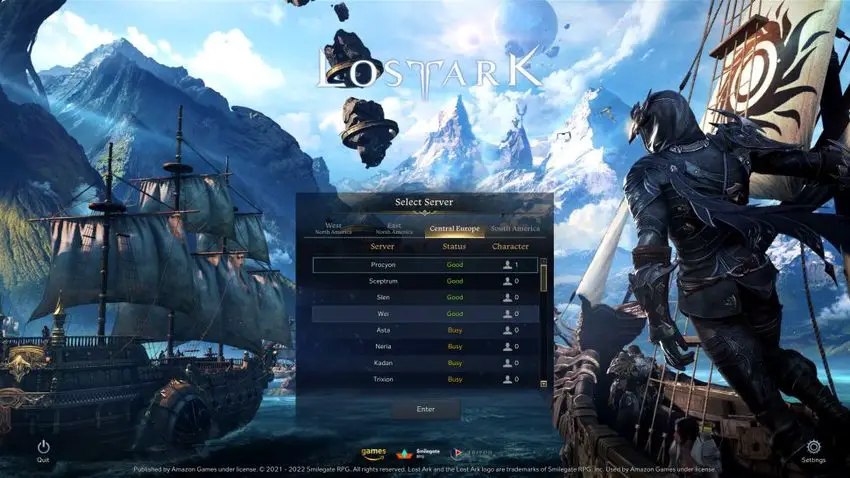
Here’s the current server list:

Central Europe

  • Neria
  • Kadan
  • Trixion
  • Calvasus
  • Thirain
  • Zinnervale
  • Asta
  • Wei
  • Slen
  • Procyon
  • Sceptrum

North America: East

  • Azena
  • Una
  • Regulus
  • Avesta
  • Galatur
  • Karta
  • Ladon
  • Kharmine

North America: West

  • Mari
  • Valtan
  • Enviska
  • Akkan

South America

  • Kazeros
  • Agaton
Lost Ark server list: How to check Lost Ark server status?

Millions of gamers are attempting to join the game and play Lost Ark, as the RPGMMO has generated a considerable amount of interest and millions of people want to play it right from the start. This was an issue long before the game’s F2P release when several of the most popular servers had queues of 10,000 players or more. However, after Lost Ark became free-to-play, the problem has worsened. Players are no longer able to join a queue, instead, they receive the 10027 error followed by the well-known “Cannot Connect Due To Heavy Traffic.” When your servers are full, you will receive an Error 10027 error message. We explained Lost Ark 10027 error.

This implies that the servers are at capacity, and even server queues have been reached, which is why you can’t join a line.

How to check Lost Ark server status?

If you’re having trouble connecting to the game, it might be due to congested servers or even maintenance, especially when it first opens. Fortunately, you can check the server status on the official website, so you won’t have to waste time wondering whether your connection is the issue.

If you can’t access the status page for any reason, check out the Lost Ark Twitter account or Reddit for additional information.

Lost Ark server list: How to check Lost Ark server status?

SEE ALSO
Lost Ark new classes: All unreleased characters

Before you join the Lost Ark server, there are a few things to consider

There are two things that players should consider before joining a Lost Ark server. Players should join the server that has been tailored to their region for improved online performance. If a player picks a server that is too far away in terms of geography, there may be connection or lag issues while playing the game. Second, players should look for a server where their friends are to make teaming up easier. Players should choose the perfect server for them considering both of these factors.

Tags: checkhow toLost ArkLost Ark server statusserver status
ShareTweet
Eray Eliaçık

Eray Eliaçık

Meet Eray, a tech enthusiast passionate about AI, crypto, gaming, and more. Eray is always looking into new developments, exploring unique topics, and keeping up with the latest trends in the industry.

Related Posts

Netflix adds Red Dead Redemption to mobile

Netflix adds Red Dead Redemption to mobile

3 December 2025
Bethesda reportedly continues work on Fallout 3 Remastered

Bethesda reportedly continues work on Fallout 3 Remastered

12 November 2025
Battlefield 6 is adding a free battle royale mode

Battlefield 6 is adding a free battle royale mode

28 October 2025
Ubisoft releases Assassin’s Creed Shadows on Switch 2

Ubisoft releases Assassin’s Creed Shadows on Switch 2

24 October 2025
Please login to join discussion

LATEST

How to install mods and custom content in The Sims 2

Running Python files and fixing path errors on Windows

How to boot your PC into Command Prompt for troubleshooting

How to delete a virus using Command Prompt

How to connect a PS4 controller to Steam via USB or Bluetooth

How to connect your phone to Wi-Fi and fix connection issues

Apple begins iPhone 18 series production testing in January

EA investigates AI claims in Battlefield 6 cosmetics

Amazon Alexa+ will book your hotels and salons starting in 2026

OpenAI launches Skills in Codex

TechBriefly

© 2021 TechBriefly is a Linkmedya brand.

  • Tech
  • Business
  • Science
  • Geek
  • How to
  • About
  • Privacy
  • Terms
  • Contact
  • | Network Sites |
  • Digital Report
  • LeaderGamer

Follow Us

No Result
View All Result
  • Tech
  • Business
  • Crypto
  • Science
  • Geek
  • How to
  • About
    • About TechBriefly
    • Terms and Conditions
    • Privacy Policy
    • Contact Us
    • Languages
      • 中文 (Chinese)
      • Dansk
      • Deutsch
      • Español
      • English
      • Français
      • Nederlands
      • Italiano
      • 日本语 (Japanese)
      • 한국인 (Korean)
      • Norsk
      • Polski
      • Português
      • Pусский (Russian)
      • Suomalainen
      • Svenska