
Today we are going to show you how to grow your YouTube channel with YouTube Creators. If you want to know more about YouTube, how to create your content, earn money or get the most out of your channel, you can use the company’s YouTube Creators Academy service. This service gives users access to awards for milestones, interesting resources, technical assistance and more.
How to grow your YouTube channel with YouTube Creators?
We’ll explain to you about YouTube Creators, what it is and what it has to provide, as well as how you may use the service. One of the most outstanding services is the Academy channel, with updated videos that will help you find your way around the video platform and succeed as a content creator. But there are many more, we will explain it all below.
What is YouTube Creators Academy?
The Creators Academy is a free training program where professionals and companies can learn more about managing their channels to be able to create viral content and make the most of the channel they have created. It provides a collection of courses and resources to help you start and grow your YouTube channel as a content creator.
Because creators are an essential part of the platform, they have thought that the best way to thank them is to help them out. They have even launched the Creators School that was broadcasted live on their channel, among many other video contents that will help you. You can watch these videos now since they are on the Creators Academy. This channel is precisely what a content creator needs.
Resources
Once you enter the service, you will instantly find interesting information to get the most out of YouTube, such as tips and tricks in order to reach out to more viewers. You’ll find resources for learning and connecting such as Academy or NextUp, milestone awards, and the Creators for Change program.
From here you’ll find information on topics such as Getting started on YouTube, Build Your Community, How to Make Money on YouTube, Grow Your Channel, Policies & Guidelines, Programs & Initiatives. Below you will find answers to frequently asked questions such as editing your channel, promoting videos, how the algorithm works, and more. It is a website that is full of interesting content that is complemented by videos from Google’s service.
Academy
On their YouTube Creators channel, they have a wealth of video resources that content creators can turn to for more information on their areas of interest. Inspirational videos, information for newbies, how to make money, catch up with the monthly roundup and more, how to use YouTube Studio, tutorials and best practices for live broadcasts, short films, rules, and more. In 2013, it was created with the idea of offering content creators the information they need to improve their experience on the service.
We recommend that you sign up and thus be aware of the new videos that are emerging while you have time to check all the others, as there are many hours of information in it. You can access it from this page or from their specific informative content, which will take you to their videos.
NextUp
With YouTube NextUp you will be able to create better videos, get more subscribers and go further as it is a contest where the winners will be able to access a virtual camp and get prizes.
The Virtual Camp is a quick course to learn how to produce videos with other creators. Those who complete the learning process will receive a $1,000 voucher to buy new production equipment from selected stores. NextUp initiative is not always active so you need to follow its schedule.
YouTube explains how to join NextUp:
“Entering is super easy. If you think you’re eligible, all you need to do is answer a few short questions to let us know what your channel’s all about. That’s it! Not sure if you qualify? Our checklist will let you know if you do.”

Monthly newsletter
If you want to keep yourself up to date with the latest news for content creators or any other interesting information about the famous video service, you can join the monthly newsletter. If you want to receive a monthly newsletter from YouTube follow these steps:
- Log in to “YouTube.”
- Click on “Settings.”
- Enter “Notifications. “
- Enable “Email Notifications.”
Awards for creators
First, channels are reviewed before awards are given. If your channel is approved, you will receive a notification that you have passed a milestone, in which there is a unique redemption code. You will only have to indicate your channel and shipping address and you will receive your prize within 2 to 4 weeks.
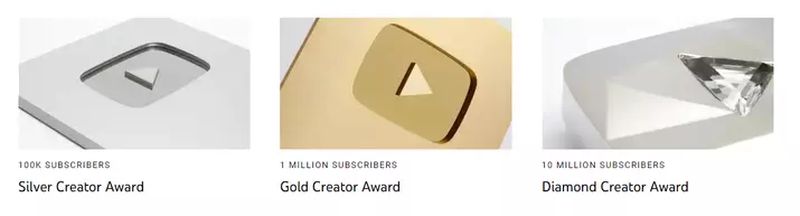
The prizes are as follows:
- Silver Creator (100 thousand subscribers).
- Gold Creator (1 million subscribers).
- Diamond Creator (10 million subscribers).
From here you will be able to redeem your creator award if you have reached the corresponding subscriber milestones. Just follow the corresponding instructions.