TechBriefly
  • Tech
  • Business
  • Crypto
  • Science
  • Geek
  • How to
  • About
    • About TechBriefly
    • Terms and Conditions
    • Privacy Policy
    • Contact Us
    • Languages
      • 中文 (Chinese)
      • Dansk
      • Deutsch
      • Español
      • English
      • Français
      • Nederlands
      • Italiano
      • 日本语 (Japanese)
      • 한국인 (Korean)
      • Norsk
      • Polski
      • Português
      • Pусский (Russian)
      • Suomalainen
      • Svenska
No Result
View All Result
TechBriefly
Home Tech Software
Google launches One Tap, a simpler and faster way to identify yourself on websites and third-party apps

Google launches One Tap, a simpler and faster way to identify yourself on websites and third-party apps

Barış SelmanbyBarış Selman
4 August 2021
in Software, Tech
Reading Time: 2 mins read
Share on FacebookShare on Twitter

The identification on third-party websites with the Google account is something that has been around for years. We use our open Google session (or we open it at the time) to verify our identity and the website, or the app in question uses the token provided by Google to identify us and give us access to the area reserved for users.

But until now, the system was somewhat more complex than expected because we had to go to a second screen owned by Google to perform the process. With ‘One Tap’, Google simplifies this process and now allows us to perform the identification with a single touch on the screen and quickly, easily, and securely. A new feature for ‘Google Identity Services’ that comes along with other new updates and registrations.
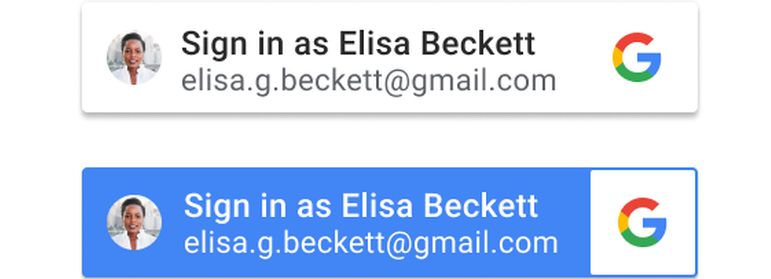
Google launches 'One Tap', a simpler and faster way to identify yourself on websites and third-party apps
Google launches ‘One Tap’, a simpler and faster way to identify yourself on websites and third-party apps

With the new update of the Google ID module, we will be able to see our profile picture and the email address of our account. That will be the proof that our Google session is correctly logged in and that we can use it to identify ourselves elsewhere. We will only need to click on “Continue as”, the button whose text is completed with our first name, for the identification to be complete.

In the identification box, we will also be able to see the text indicating which website or service we are logging into. It can be seen at the top next to the X that will allow us to close the box to continue browsing without identification, or leave the page or app in question. Google is open to modifications in the design of this new quick identification box, perhaps customizable for certain services, websites, or apps.

From the programmers’ side, Google’s new quick login is also associated with a simplification of the implementation process. According to Google, it is designed to require “minimal code” to connect the web to the Google account through a simple SDK. Taking advantage of these modifications, Google has also introduced security changes with shielding against abuse and fraud, as it introduced security for companies months ago. The company also comments that this ‘identify yourself with Google’ allows reducing the number of duplicate and fraudulent accounts.

Tags: GoogleLaunchessoftwarewebsites
ShareTweet
Barış Selman

Barış Selman

A technology and gaming enthusiast by day, Barış is a passionate composer and black/death metal guitarist by night. He keeps his finger on the pulse of the intersection of art and technology whenever he can from his tours worldwide.

Related Posts

Disney+ brings TikTok-style scrolling to its streaming app

Disney+ brings TikTok-style scrolling to its streaming app

9 January 2026
Xbox reveals lineup for next Developer Direct: Fable, Forza and more

Xbox reveals lineup for next Developer Direct: Fable, Forza and more

9 January 2026
FIFA and TikTok partner to stream live World Cup clips

FIFA and TikTok partner to stream live World Cup clips

9 January 2026
YouTube updates search filters to separate Shorts from long videos

YouTube updates search filters to separate Shorts from long videos

9 January 2026
Please login to join discussion

LATEST

How to choose the right reset method for Samsung Galaxy devices

What resetting end-to-end encryption does on iPhone, iPad or Mac

How to easily monitor your AT&T data usage and avoid overages

How to reset your Bosch dishwasher when buttons won’t respond

Disney+ brings TikTok-style scrolling to its streaming app

Xbox reveals lineup for next Developer Direct: Fable, Forza and more

FIFA and TikTok partner to stream live World Cup clips

YouTube updates search filters to separate Shorts from long videos

Google introduces AI Inbox to organize Gmail tasks and updates

Announcements made by Samsung Display at CES 2026

TechBriefly

© 2021 TechBriefly is a Linkmedya brand.

  • Tech
  • Business
  • Science
  • Geek
  • How to
  • About
  • Privacy
  • Terms
  • Contact
  • | Network Sites |
  • Digital Report
  • LeaderGamer

Follow Us

No Result
View All Result
  • Tech
  • Business
  • Crypto
  • Science
  • Geek
  • How to
  • About
    • About TechBriefly
    • Terms and Conditions
    • Privacy Policy
    • Contact Us
    • Languages
      • 中文 (Chinese)
      • Dansk
      • Deutsch
      • Español
      • English
      • Français
      • Nederlands
      • Italiano
      • 日本语 (Japanese)
      • 한국인 (Korean)
      • Norsk
      • Polski
      • Português
      • Pусский (Russian)
      • Suomalainen
      • Svenska