
TechBriefly
  • Tech
  • Business
  • Crypto
  • Science
  • Geek
  • How to
  • About
    • About TechBriefly
    • Terms and Conditions
    • Privacy Policy
    • Contact Us
    • Languages
      • 中文 (Chinese)
      • Dansk
      • Deutsch
      • Español
      • English
      • Français
      • Nederlands
      • Italiano
      • 日本语 (Japanese)
      • 한국인 (Korean)
      • Norsk
      • Polski
      • Português
      • Pусский (Russian)
      • Suomalainen
      • Svenska
No Result
View All Result
TechBriefly
Home Tech Software
Google Meet revamps its interface, adds custom backgrounds and data saving improvements

Google Meet revamps its interface, adds custom backgrounds and data saving improvements

Barış SelmanbyBarış Selman
22 April 2021
in Software, Tech
Reading Time: 2 mins read
Share on FacebookShare on Twitter

Google Meet, one of the IT tools that have exploded during the pandemic, is receiving a new update. Google’s video call service, in addition to updating its interface, adds improvements when it comes to customizing the background we have or the data consumed in each video call.

Google Meet has a new interface

Google Meet currently has a feature called Data Saver. This function, although it saves data, is more focused on the performance of the service. It regulates video and audio quality based on the quality of the connection. In a way this saves data, but it is not its main function.

With the new update, Google Meet Data Saver will limit Google Meet data usage on mobile networks to save data for both the sender and receiver. Google says this is something really important in countries where data costs can be high, such as India or Brazil.

The video calling service has also updated its interface for some aspects such as screen sharing or meetings with many people. The grid is no longer a grid, and you can change the size of the windows or reposition them to your liking. You can even completely hide the user’s video source.
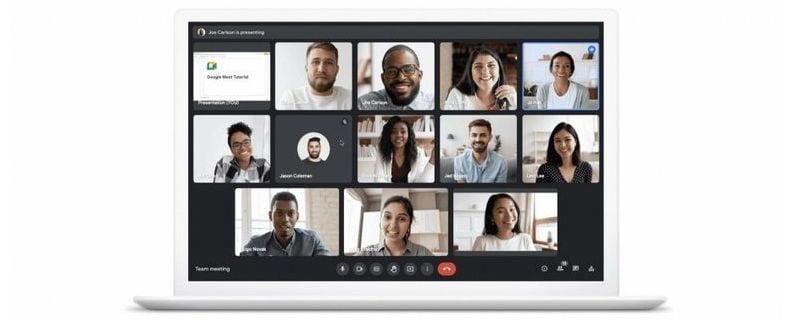
Google Meet revamps its interface, adds custom backgrounds and data saving improvements

Regarding the quality of the video that one broadcasts, Google Meet receives two new improvements. The first of these is the automatic regulation of brightness according to the surrounding light. This makes it possible to counteract the low illumination of a place or reduce it if there is overexposure. This is something that Google already did previously, although only in smartphone apps. Now it is coming to the web as well.

On the other hand, Google Meet finally adds custom backgrounds as well. The user will be able to choose between three different backgrounds: a classroom, a party, or a forest. More backgrounds for video calls are promised to come in the future.

Google Meet revamps its interface, adds custom backgrounds and data saving improvements

The service will be free until July 2021

Google recently announced that it was expanding the free use of the service until July 2021. Recall that Google Meet is a paid service, although for much of 2020 and this 2021 due to the pandemic Google decided to offer it for free and without limitations. Once the free period ends, if Google does not extend it again, its free use will be limited to 60 minutes per day.

Another feature that will soon be limited is Autozoom. This tool will automatically focus on the subject and crop the background so that the user always appears centered. Google says that this feature will be available only to those Google Meet users who pay for the service.

We will have to see what happens with Google Meet after July. In the meantime, there are many other alternatives such as the already established Zoom, Microsoft’s Teams, or open-source alternatives such as Jitsi Meet. Fatigue is also real.

Tags: AddsapplicationscustomdataGooglegoogle meetinterfacesoftware
ShareTweet
Barış Selman

Barış Selman

A technology and gaming enthusiast by day, Barış is a passionate composer and black/death metal guitarist by night. He keeps his finger on the pulse of the intersection of art and technology whenever he can from his tours worldwide.

Related Posts

New WhatsApp update brings 2026 stickers and video call effects

New WhatsApp update brings 2026 stickers and video call effects

30 December 2025
Leaker reveals Xiaomi plans for high end eSIM device in 2026

Leaker reveals Xiaomi plans for high end eSIM device in 2026

30 December 2025
HP prepares OMEN OLED monitor reveal for CES 2026

HP prepares OMEN OLED monitor reveal for CES 2026

30 December 2025
High RAM costs from AI boom could delay next Xbox and PlayStation

High RAM costs from AI boom could delay next Xbox and PlayStation

30 December 2025
Please login to join discussion

LATEST

New WhatsApp update brings 2026 stickers and video call effects

Leaker reveals Xiaomi plans for high end eSIM device in 2026

HP prepares OMEN OLED monitor reveal for CES 2026

High RAM costs from AI boom could delay next Xbox and PlayStation

LG to unveil its Gallery TV at CES 2026

Bitcoin drops 3% to $87,300 as altcoins decline

How to install mods and custom content in The Sims 2

Running Python files and fixing path errors on Windows

How to boot your PC into Command Prompt for troubleshooting

How to delete a virus using Command Prompt

TechBriefly

© 2021 TechBriefly is a Linkmedya brand.

  • Tech
  • Business
  • Science
  • Geek
  • How to
  • About
  • Privacy
  • Terms
  • Contact
  • | Network Sites |
  • Digital Report
  • LeaderGamer

Follow Us

No Result
View All Result
  • Tech
  • Business
  • Crypto
  • Science
  • Geek
  • How to
  • About
    • About TechBriefly
    • Terms and Conditions
    • Privacy Policy
    • Contact Us
    • Languages
      • 中文 (Chinese)
      • Dansk
      • Deutsch
      • Español
      • English
      • Français
      • Nederlands
      • Italiano
      • 日本语 (Japanese)
      • 한국인 (Korean)
      • Norsk
      • Polski
      • Português
      • Pусский (Russian)
      • Suomalainen
      • Svenska
