TechBriefly
  • Tech
  • Business
  • Crypto
  • Science
  • Geek
  • How to
  • About
    • About TechBriefly
    • Terms and Conditions
    • Privacy Policy
    • Contact Us
    • Languages
      • 中文 (Chinese)
      • Dansk
      • Deutsch
      • Español
      • English
      • Français
      • Nederlands
      • Italiano
      • 日本语 (Japanese)
      • 한국인 (Korean)
      • Norsk
      • Polski
      • Português
      • Pусский (Russian)
      • Suomalainen
      • Svenska
No Result
View All Result
TechBriefly
Home How to
How does the Spotify voice assistant work?

How does the Spotify voice assistant work?

Barış SelmanbyBarış Selman
13 April 2021
in How to
Reading Time: 2 mins read
Share on FacebookShare on Twitter

For the time being, the streaming tool, Spotify, will only be available to premium users.

Spotify is one of the most widely used music streaming services today and also allows the use of various voice assistants.

The platform can be used seamlessly with Google Assistant, Alexa, Siri, and others. However, the music playback site has decided to launch its voice assistant.

The streaming service is currently testing its new assistant, but it has two major disadvantages compared to other voice assistants: it can only be used within Spotify.

Why a voice assistant if there are so many?

Creating a voice assistant for the service does not seem to be the most necessary thing to do, because as mentioned before, many can be used with Spotify and the vast majority are compatible with the application.

But the decision to have its assistant, which has been talked about since March last year, is because the application is working on launching its device. It is a car player, as reported by The Verge portal.

This first Spotify car hardware is called Car Thing and will work via Bluetooth.

How does the Spotify voice assistant work?
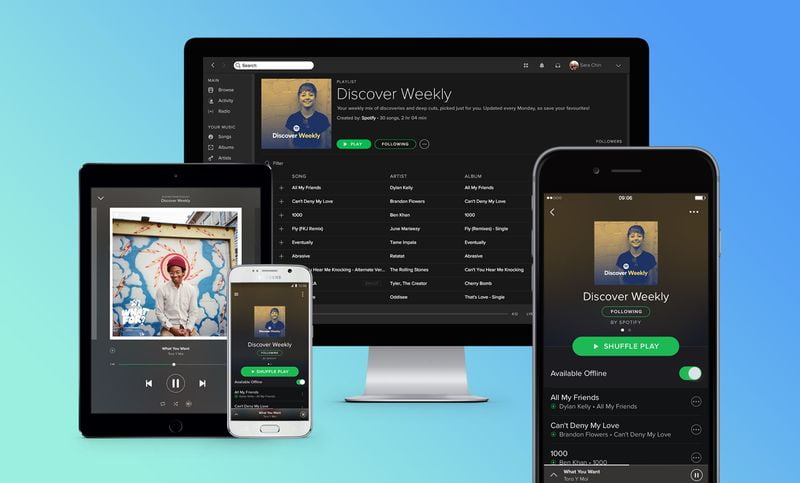
Spotify: How does the application's voice assistant work?
How does the Spotify voice assistant work?

The function is currently only available to some users, who are premium and are notified by notification of the new tool.

To use it, it is necessary to be inside the platform and have the screen turned on, otherwise, it will not work.

Through the voice command “Hey, Spotify”, the search of all the content you have on the platform will be activated.

The tool will be available for both Android and iOS devices.

Spotify Assistant with Alexa

Compatible devices

  • Amazon Echo
  • Amazon Echo Dot
  • Facebook Portal / Portal+
  • All Sonos players

Pair Spotify with Alexa

  • Download and open the Alexa app.
  • Go to the menu on the top left.
  • Select Settings and then Music.
  • Select Spotify and then select Link account with Alexa.
  • Sign in to your account
Tags: applicationassistanthow tomusic appsoftwareSpotifystreamingtechnologyvoice assistant
ShareTweet
Barış Selman

Barış Selman

A technology and gaming enthusiast by day, Barış is a passionate composer and black/death metal guitarist by night. He keeps his finger on the pulse of the intersection of art and technology whenever he can from his tours worldwide.

Related Posts

How to install mods and custom content in The Sims 2

How to install mods and custom content in The Sims 2

26 December 2025
Running Python files and fixing path errors on Windows

Running Python files and fixing path errors on Windows

26 December 2025
How to boot your PC into Command Prompt for troubleshooting

How to boot your PC into Command Prompt for troubleshooting

26 December 2025
How to delete a virus using Command Prompt

How to delete a virus using Command Prompt

26 December 2025
Please login to join discussion

LATEST

New Punkt MC03 features split OS for better privacy control

Samsung reveals brighter Freestyle+ projector ahead of CES 2026

OpenAI explores prioritized ads for ChatGPT responses

Apple teases something big for Fitness+ in 2026

Samsung SDI rumored to test massive 20000mAh battery

Honor sells over 71 million smartphones in 2025

New WhatsApp update brings 2026 stickers and video call effects

Leaker reveals Xiaomi plans for high end eSIM device in 2026

HP prepares OMEN OLED monitor reveal for CES 2026

High RAM costs from AI boom could delay next Xbox and PlayStation

TechBriefly

© 2021 TechBriefly is a Linkmedya brand.

  • Tech
  • Business
  • Science
  • Geek
  • How to
  • About
  • Privacy
  • Terms
  • Contact
  • | Network Sites |
  • Digital Report
  • LeaderGamer

Follow Us

No Result
View All Result
  • Tech
  • Business
  • Crypto
  • Science
  • Geek
  • How to
  • About
    • About TechBriefly
    • Terms and Conditions
    • Privacy Policy
    • Contact Us
    • Languages
      • 中文 (Chinese)
      • Dansk
      • Deutsch
      • Español
      • English
      • Français
      • Nederlands
      • Italiano
      • 日本语 (Japanese)
      • 한국인 (Korean)
      • Norsk
      • Polski
      • Português
      • Pусский (Russian)
      • Suomalainen
      • Svenska