TechBriefly
  • Tech
  • Business
  • Crypto
  • Science
  • Geek
  • How to
  • About
    • About TechBriefly
    • Terms and Conditions
    • Privacy Policy
    • Contact Us
    • Languages
      • 中文 (Chinese)
      • Dansk
      • Deutsch
      • Español
      • English
      • Français
      • Nederlands
      • Italiano
      • 日本语 (Japanese)
      • 한국인 (Korean)
      • Norsk
      • Polski
      • Português
      • Pусский (Russian)
      • Suomalainen
      • Svenska
No Result
View All Result
TechBriefly
Home Tech Hardware
MSI adds Resizable-BAR technology on its Intel 400 Series motherboards

MSI adds Resizable-BAR technology on its Intel 400 Series motherboards

Barış SelmanbyBarış Selman
4 December 2020
in Hardware, Tech
Reading Time: 1 min read
Share on FacebookShare on Twitter

MSI introduced Resizable-BAR technology on its Intel 400 Series motherboards, just after ASUS did so.

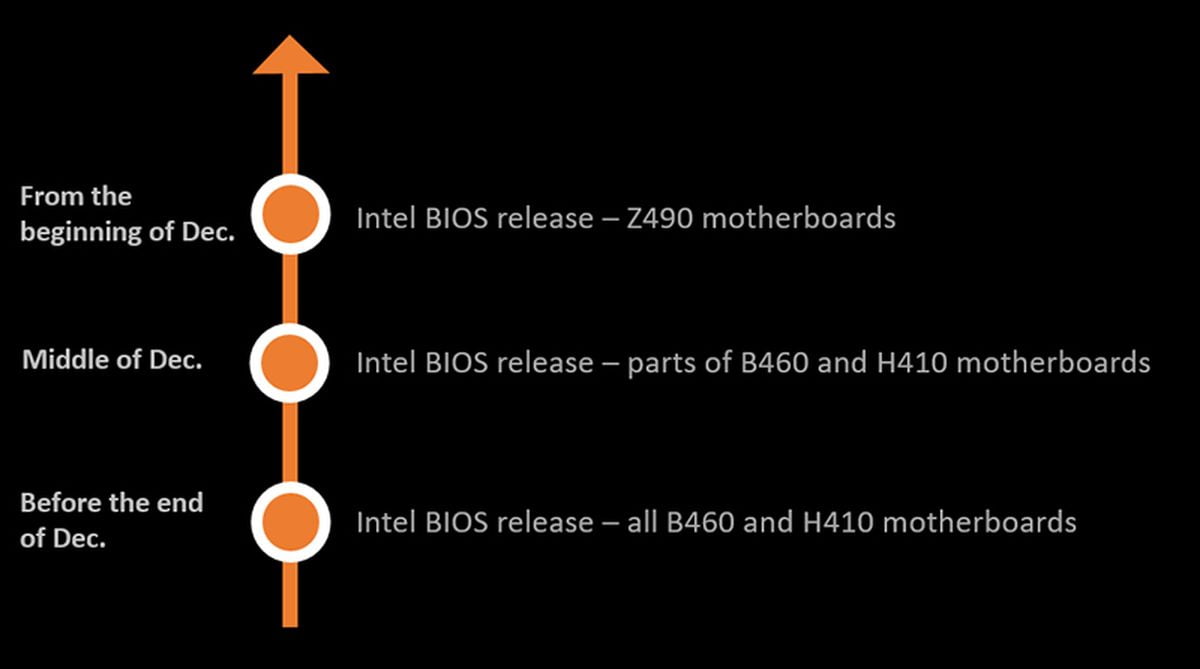
The company told that they now have their new BIOS which can access to the Resizable Base-Address Register technology (Resizable-BAR / Smart Access Memory in AMD). This applies to all their Intel Z490 motherboards. Also in the next two weeks, the MSI motherboards based on the Intel B460 and H410 chipsets will receive the same support.

BIOS update for Resizable-BAR can improve system memory

On the other hand, the company also announced a new BIOS for AMD 400 Series motherboards, which promises a memory-related performance improvement.
MSI adds Resizable-BAR technology on its Intel 400 Series motherboards

The key function of this BIOS update is to support Re-Size BAR. Re-Size BAR is a platform approach for increased performance. It can improve the system by accessing the VRAM memory of the graphics cards and using its full capacity. The picture above shows the timeline for the updates bu MSI.

The AMD AGESA COMBO PI V2 1.1.0.0 BIOS also helps to increase performance

For AMD platforms, MSI has upgraded its BIOS to AGESA version 1.1.0.0 for AMD 400 Series motherboards. With the BIOS upgrade, the system memory used on AMD 400 Series motherboards can achieve higher performance, and users will definitely have a better experience.

Tags: AMDIntelmotherboardsMSItechnology
ShareTweet
Barış Selman

Barış Selman

A technology and gaming enthusiast by day, Barış is a passionate composer and black/death metal guitarist by night. He keeps his finger on the pulse of the intersection of art and technology whenever he can from his tours worldwide.

Related Posts

Meta purges 550,000 Australian accounts to comply with under-16 ban

Meta purges 550,000 Australian accounts to comply with under-16 ban

12 January 2026
Anthropic launches health features for Claude

Anthropic launches health features for Claude

12 January 2026
Google removes AI Overviews from medical queries

Google removes AI Overviews from medical queries

12 January 2026
Instagram disputes Malwarebytes’ claim of massive data theft

Instagram disputes Malwarebytes’ claim of massive data theft

12 January 2026
Please login to join discussion

LATEST

Meta purges 550,000 Australian accounts to comply with under-16 ban

Simple ways to install and remove programs on Ubuntu

A guide to preventing accidental typing on Windows and Mac

Accessing your Google Chrome bookmarks

A guide to installing restricted extensions in Google Chrome

Anthropic launches health features for Claude

Google removes AI Overviews from medical queries

Instagram disputes Malwarebytes’ claim of massive data theft

X to open-source new recommendation algorithm in 7 days

How to choose the right reset method for Samsung Galaxy devices

TechBriefly

© 2021 TechBriefly is a Linkmedya brand.

  • Tech
  • Business
  • Science
  • Geek
  • How to
  • About
  • Privacy
  • Terms
  • Contact
  • | Network Sites |
  • Digital Report
  • LeaderGamer

Follow Us

No Result
View All Result
  • Tech
  • Business
  • Crypto
  • Science
  • Geek
  • How to
  • About
    • About TechBriefly
    • Terms and Conditions
    • Privacy Policy
    • Contact Us
    • Languages
      • 中文 (Chinese)
      • Dansk
      • Deutsch
      • Español
      • English
      • Français
      • Nederlands
      • Italiano
      • 日本语 (Japanese)
      • 한국인 (Korean)
      • Norsk
      • Polski
      • Português
      • Pусский (Russian)
      • Suomalainen
      • Svenska