TechBriefly
  • Tech
  • Business
  • Crypto
  • Science
  • Geek
  • How to
  • About
    • About TechBriefly
    • Terms and Conditions
    • Privacy Policy
    • Contact Us
    • Languages
      • 中文 (Chinese)
      • Dansk
      • Deutsch
      • Español
      • English
      • Français
      • Nederlands
      • Italiano
      • 日本语 (Japanese)
      • 한국인 (Korean)
      • Norsk
      • Polski
      • Português
      • Pусский (Russian)
      • Suomalainen
      • Svenska
No Result
View All Result
TechBriefly
Home Tech Software
Microsoft put ads in the Wordpad app on Windows 10

Microsoft put ads in the Wordpad app on Windows 10

Emilis DelgadobyEmilis Delgado
22 January 2020
in Software, Tech
Reading Time: 1 min read
Share on FacebookShare on Twitter

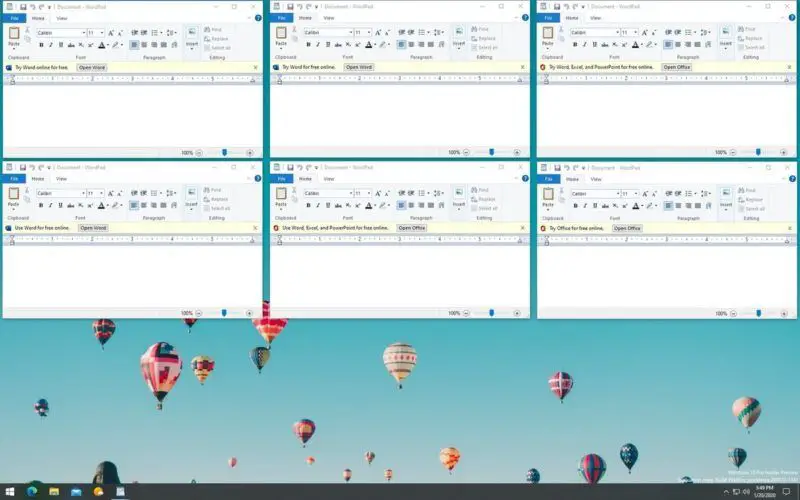
Rafael Rivera, an engineer tweeted about some experimental Windows 10 features that he discovered in the Insider versions of the system, showing the old WordPad has just become a “recommendation” ads space for Microsoft Office Online.

It is an app of those classic Windows that is still included year after year, decade after decade, and that almost nobody uses it much, but they remain for a reason and sometimes they can get us out of trouble when there are no Office software installed. It seems that Microsoft considers it ideal to suggest its free version of the Office pack that you can use online from any browser to do the same as WordPad does, but better.

If there is something that came to apparently keep in Windows 10, it is advertising. We have seen ads from the lock screen to recommended applications that are added to the start menu without anyone asking for it.

But not only the Candy Crush Saga nightmare will haunt us every time we update Windows 10, there are also smaller details that appear in unexpected places, such as the new Office ads in WordPad.

Microsoft Office Online is a very basic version with reduced features compared to the Office 365, but it is free. These ads are currently experimental and were discovered within the Build 19546 of Windows 10, we may see them in the stable version one day or maybe not, and with the small ad sizes on Wordpad, it might not be as annoying as other apps that show ads.

Tags: adsappInsiderMicrosoftOffice 365
ShareTweet
Emilis Delgado

Emilis Delgado

Related Posts

Disney+ brings TikTok-style scrolling to its streaming app

Disney+ brings TikTok-style scrolling to its streaming app

9 January 2026
Xbox reveals lineup for next Developer Direct: Fable, Forza and more

Xbox reveals lineup for next Developer Direct: Fable, Forza and more

9 January 2026
FIFA and TikTok partner to stream live World Cup clips

FIFA and TikTok partner to stream live World Cup clips

9 January 2026
YouTube updates search filters to separate Shorts from long videos

YouTube updates search filters to separate Shorts from long videos

9 January 2026
Please login to join discussion

LATEST

How to choose the right reset method for Samsung Galaxy devices

What resetting end-to-end encryption does on iPhone, iPad or Mac

How to easily monitor your AT&T data usage and avoid overages

How to reset your Bosch dishwasher when buttons won’t respond

Disney+ brings TikTok-style scrolling to its streaming app

Xbox reveals lineup for next Developer Direct: Fable, Forza and more

FIFA and TikTok partner to stream live World Cup clips

YouTube updates search filters to separate Shorts from long videos

Google introduces AI Inbox to organize Gmail tasks and updates

Announcements made by Samsung Display at CES 2026

TechBriefly

© 2021 TechBriefly is a Linkmedya brand.

  • Tech
  • Business
  • Science
  • Geek
  • How to
  • About
  • Privacy
  • Terms
  • Contact
  • | Network Sites |
  • Digital Report
  • LeaderGamer

Follow Us

No Result
View All Result
  • Tech
  • Business
  • Crypto
  • Science
  • Geek
  • How to
  • About
    • About TechBriefly
    • Terms and Conditions
    • Privacy Policy
    • Contact Us
    • Languages
      • 中文 (Chinese)
      • Dansk
      • Deutsch
      • Español
      • English
      • Français
      • Nederlands
      • Italiano
      • 日本语 (Japanese)
      • 한국인 (Korean)
      • Norsk
      • Polski
      • Português
      • Pусский (Russian)
      • Suomalainen
      • Svenska