


TechBriefly
  • Tech
  • Business
  • Crypto
  • Science
  • Geek
  • How to
  • About
    • About TechBriefly
    • Terms and Conditions
    • Privacy Policy
    • Contact Us
    • Languages
      • 中文 (Chinese)
      • Dansk
      • Deutsch
      • Español
      • English
      • Français
      • Nederlands
      • Italiano
      • 日本语 (Japanese)
      • 한국인 (Korean)
      • Norsk
      • Polski
      • Português
      • Pусский (Russian)
      • Suomalainen
      • Svenska
No Result
View All Result
TechBriefly
Home How to
How to create Spotify pie chart?

How to create Spotify pie chart?

If you are wondering how to create Spotify pie chart, we've got you covered.

Eray EliaçıkbyEray Eliaçık
7 June 2022
in How to
Reading Time: 2 mins read
Share on FacebookShare on Twitter

Do you want to create your Spotify pie chart? A new feature on the music and podcast streaming platform has caused a stir among Spotify devotees.

Use the new online tool to view your Spotify listening habits and present your findings in pie form.

Darren Huang, a UCLA student, created the third-party feature.

Music lovers have been posting their favorite playlists and amusing reactions on social media, just like they do every year when Spotify Wrapped is published. Meanwhile, did you check Apple WWDC 2022 announcements?

How to create Spotify Pie Chart?

Users can “bake” their own “Monthly Genre Pie” with the app known as Spotfy Pie, which is a genre-specific software.
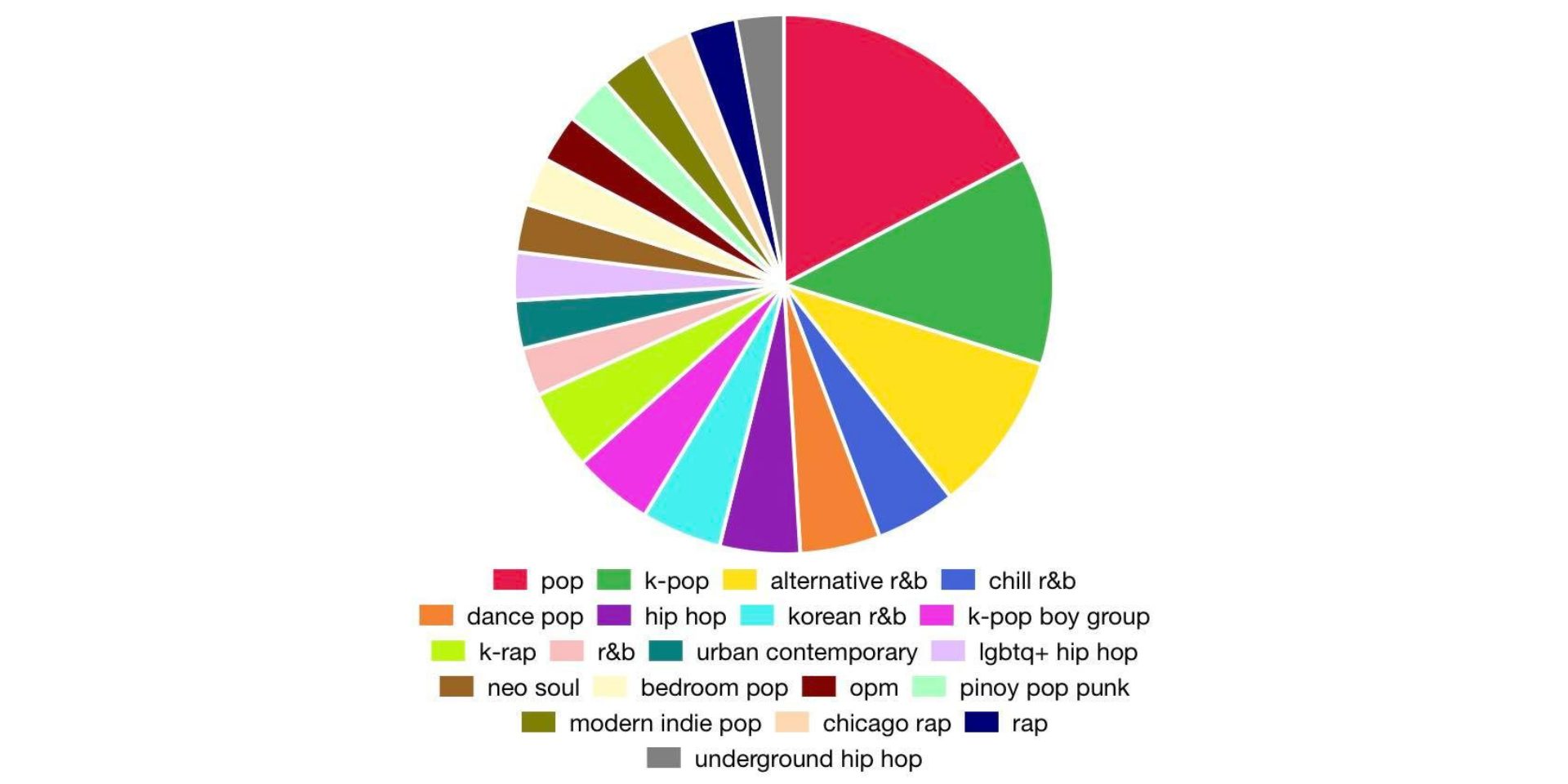
How to create Spotify pie charts?

The new feature, which has become increasingly popular, shows your listening habits by genre based on your most played songs.

The genres are experimental, independent rock, dream pop, K-pop, emo rap, and many more.

You may test it out for yourself by going to Huang’s website.

All you need to do is log into your Spotify account through Huang’s genre app – enjoy!

Simply log into your Spotify account through Huang’s genre app and share the results.

We hope that you enjoyed this article on how to create Spotify pie chart. If you did, you might also like to check out what is Spotify color palette and how to get it, or Icebergify: How to use Spotify iceberg chart generator.

Tags: how toSpotify
ShareTweet
Eray Eliaçık

Eray Eliaçık

Meet Eray, a tech enthusiast passionate about AI, crypto, gaming, and more. Eray is always looking into new developments, exploring unique topics, and keeping up with the latest trends in the industry.

Related Posts

How to install mods and custom content in The Sims 2

How to install mods and custom content in The Sims 2

26 December 2025
Running Python files and fixing path errors on Windows

Running Python files and fixing path errors on Windows

26 December 2025
How to boot your PC into Command Prompt for troubleshooting

How to boot your PC into Command Prompt for troubleshooting

26 December 2025
How to delete a virus using Command Prompt

How to delete a virus using Command Prompt

26 December 2025

LATEST

New WhatsApp update brings 2026 stickers and video call effects

Leaker reveals Xiaomi plans for high end eSIM device in 2026

HP prepares OMEN OLED monitor reveal for CES 2026

High RAM costs from AI boom could delay next Xbox and PlayStation

LG to unveil its Gallery TV at CES 2026

Bitcoin drops 3% to $87,300 as altcoins decline

How to install mods and custom content in The Sims 2

Running Python files and fixing path errors on Windows

How to boot your PC into Command Prompt for troubleshooting

How to delete a virus using Command Prompt

TechBriefly

© 2021 TechBriefly is a Linkmedya brand.

  • Tech
  • Business
  • Science
  • Geek
  • How to
  • About
  • Privacy
  • Terms
  • Contact
  • | Network Sites |
  • Digital Report
  • LeaderGamer

Follow Us

No Result
View All Result
  • Tech
  • Business
  • Crypto
  • Science
  • Geek
  • How to
  • About
    • About TechBriefly
    • Terms and Conditions
    • Privacy Policy
    • Contact Us
    • Languages
      • 中文 (Chinese)
      • Dansk
      • Deutsch
      • Español
      • English
      • Français
      • Nederlands
      • Italiano
      • 日本语 (Japanese)
      • 한국인 (Korean)
      • Norsk
      • Polski
      • Português
      • Pусский (Russian)
      • Suomalainen
      • Svenska