TechBriefly
  • Tech
  • Business
  • Crypto
  • Science
  • Geek
  • How to
  • About
    • About TechBriefly
    • Terms and Conditions
    • Privacy Policy
    • Contact Us
    • Languages
      • 中文 (Chinese)
      • Dansk
      • Deutsch
      • Español
      • English
      • Français
      • Nederlands
      • Italiano
      • 日本语 (Japanese)
      • 한국인 (Korean)
      • Norsk
      • Polski
      • Português
      • Pусский (Russian)
      • Suomalainen
      • Svenska
No Result
View All Result
TechBriefly
Home How to
How to turn off/on Microsoft Viva Insights

Microsoft Viva Insights

How to turn off/on Microsoft Viva Insights

Do you know how you can turn Microsoft Viva on or off?

Aykut GökerbyAykut Göker
12 May 2022
in How to
Reading Time: 2 mins read
Share on FacebookShare on Twitter

You can learn How to turn off/on Microsoft Viva Insights with this article. Microsoft Viva is an employee experience platform that brings together communications, information, learning, resources and insights. Primarily Microsoft 365 veteran and powered by Microsoft Teams, Viva provides a culture where people and teams are empowered in the best way possible.

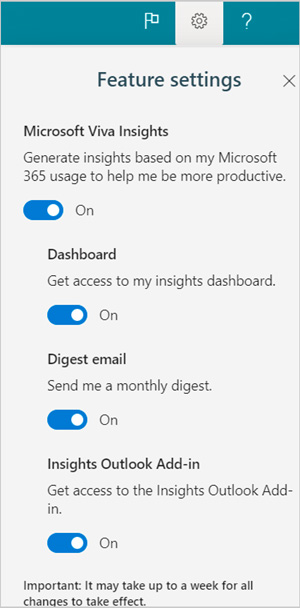
Microsoft Viva Insights opt in or out of features

Do the following to opt in or our of features in Feature settings:

  • Open your Viva Insights Home page.
  • Select the Settings (gear) icon at the top-right of the page.
  • To opt out of Microsoft Viva Insights, go to the Settings menu and select Configure. Then, under Microsoft Viva Insights, deselect to enable features. To disable this page, for example, turn off the Dashboard.
  • Select Save to save your changes.
How to turn off/on Microsoft Viva Insights?

Do you know Microsoft Bug Bounty prices increased up to $26,000?

With Microsoft Viva Insights, you can:

  • Plan focus time – Plan this week’s focus time, or enroll in a devised focus plan, by reading and evaluating the material.
  • Manage your network – Shows all the folks you’ve interacted with internally and externally lately, such as meetings, emails, chats, or phone conversations.
  • Personal insights – Provides tips for boosting productivity and well-being, which are drawn from a variety of sources, including academic and industry research. This part is updated on a regular basis to reflect your present working habits.
  • Set your working hours – The app utilizes the Work week settings in Settings to generate your personalized insights.
  • Enable Delay Delivery – When you turn on Delay Delivery in Settings, the app uses it to schedule email delivery at a time that is convenient for the recipients.
ShareTweet
Aykut Göker

Aykut Göker

Related Posts

How to enable cross platform play in Minecraft Bedrock Edition

How to enable cross platform play in Minecraft Bedrock Edition

14 January 2026
How to allow your Android to install apps from unknown sources

How to allow your Android to install apps from unknown sources

14 January 2026
How to connect a PS3 controller to a rooted Android device

How to connect a PS3 controller to a rooted Android device

14 January 2026
How to charge a JUUL using a phone charger hack

How to charge a JUUL using a phone charger hack

14 January 2026

LATEST

Lego launches first-ever Pokémon sets with pre-orders up to $650

Capcom confirms 12-minute Resident Evil Showcase for tomorrow

China keeps market door half-shut for Nvidia despite US export approvals

Instagram co-founder Mike Krieger moves to Anthropic Labs

Netflix prepares all-cash offer for the Warner Bros. deal

Google rolls out automatic room check-in to Workspace users

Tesla launched 2026 Model Y with a seven-seat version

Battlefield 6 Season 2 delayed to February as EA addresses player backlash

Meta halts Quest successor plans as 1,000 Reality Labs jobs are cut

Roblox’s new AI age check is confusing adults for children

TechBriefly

© 2021 TechBriefly is a Linkmedya brand.

  • Tech
  • Business
  • Science
  • Geek
  • How to
  • About
  • Privacy
  • Terms
  • Contact
  • | Network Sites |
  • Digital Report
  • LeaderGamer

Follow Us

No Result
View All Result
  • Tech
  • Business
  • Crypto
  • Science
  • Geek
  • How to
  • About
    • About TechBriefly
    • Terms and Conditions
    • Privacy Policy
    • Contact Us
    • Languages
      • 中文 (Chinese)
      • Dansk
      • Deutsch
      • Español
      • English
      • Français
      • Nederlands
      • Italiano
      • 日本语 (Japanese)
      • 한국인 (Korean)
      • Norsk
      • Polski
      • Português
      • Pусский (Russian)
      • Suomalainen
      • Svenska