


Google Firebase is a platform for building iOS, Android, and Web apps that use the Google Play services package. Here’s why it’s useful. Firebase is a versatile backend development platform that comes packaged with some very useful features. It cuts down on the time and effort it takes to produce new apps. Firebase is easy to use, lightweight, pleasant, and widely accepted. Tired of typing uninteresting code for your backend, or just don’t know how to program? Try using Google Firebase. So, what exactly is Google Firebase and why should you use it in your app?
What is Google Firebase?
Google Firebase is a platform that offers active backend as a service (BaaS) for building dynamic web and mobile apps, which was launched in 2011 as a chat API and acquired by Google in 2014. The idea behind Firebase is rather straightforward. When you create a client-side app in JavaScript or any other framework, for example, Google Firebase can rapidly turn it into a serverless application. It also takes care of databases for you.
As a result, incorporating Google Firebase into your client code means adding a pre-made backend. It ultimately eliminates the need to write original backend code and provides you with a fully functional one instead. It also contains explicitly specified security rules, making it a trusted data and server handler in terms of security.
What is Firebase used for?
For dynamic applications, Google Firebase is a less technical and time-saving alternative to full-fledged backend code. If you plan on hosting and managing your app in the cloud, Firebase is a good option. Because Firebase is serverless, you won’t have to worry about technicalities related to cloud server configuration.

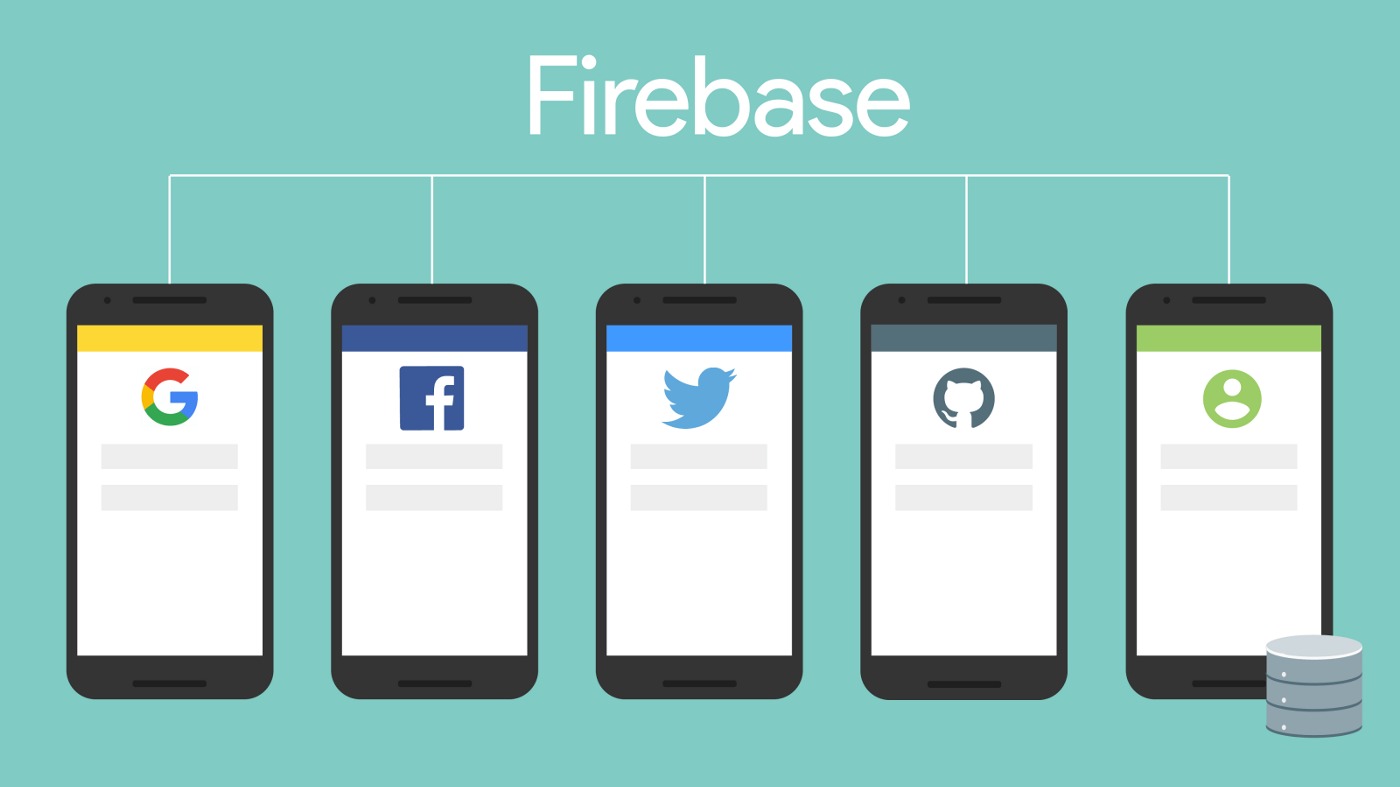
As a Google Cloud service, you have access to other Google products and features, such as Google Drive and Sheets. For example, you may use dummy data from Google Sheets to temporarily serve your app using this plugin. It’s quite easy to connect and utilize built-in third-party authentication providers, such as Google, Facebook, Twitter, and others with Firebase. You may also use a pre-built authentication UI if you like.
These options can help you avoid investing in development entirely, as they don’t require the same level of investment as creating from the ground up. Google Firebase pricing is readily adjustable. Although there are pay-as-you-go services available, you may utilize primary features on a free plan if your app is still in its infancy.
Negative aspects of Google Firebase
There are always drawbacks to any technology. As a result, while Firebase is a fast backend and server management solution, it may also have flaws along the way. The cost of maintaining Firebase on a pay-as-you-go service might mount up if it isn’t properly handled. As reads and writes increase, maintenance expenses may rise at certain periods.
- It is difficult to move data from Firebase into another database. Even if you do discover a means, it frequently needs advanced technical knowledge. It can also be quite time-consuming and expensive.
- It’s platform-agnostic, but it’s more Android-centric than iOS.
- As the size of the query result increases, it becomes increasingly messy and sluggish.
How to start using Google Firebase?
You can start utilizing Firebase immediately after you create a project on the Firebase platform and sign in. Then, your app should be registered with your project. Finally, install the npm package into your project’s root:
npm install firebase
That’s for a local machine, but you’ll need to follow a few more instructions in the Firebase setup documentation to get started. You’ll receive an initialization code when adding an app to a Firebase project. However, a Firebase project is cloud-based. You can manage numerous applications inside a project. However, resources are limited to each project individually.
Firebase offers a number of capabilities. You may import what you need to get the greatest performance at any time. Add authentication and storage functionality to your client-side application, for example, by using Firebase APIs.
Useful features of Google Firebase
The Firebase platform, by the way, is quite versatile; it provides tools and APIs for database management, authentication, push notifications, cloud hosting, and more. Below are a few of its key features.
Storage
Firebase uses cloud-based dedicated NoSQL databases, Firestore, and a real-time database to store data. They save information in collections and documents, like other NoSQL databases. It’s not necessary to have a lot of data in order to perform analytics. Rather, the amount of outcomes generated by the query makes it complicated. Cloud Firestore and the real-time database have one big advantage: they utilize real-time listeners to propagate data across platforms. Clients will get a representation of synchronized data even if there’s a network outage, thanks to this fact. It updates the clients automatically when they resume online.
Hosting
You may also host your web app on Firebase. With a few commands, you may host and deploy your online app with Firebase. Your software is hosted on globally dispersed content delivery networks (CDNs). Users can access and modify your program without interruption because of this, ensuring that they have constant access to it.
Authentication
The authentication service in Firebase is one of the most useful tools to look into. When you connect your application with Firebase, you may not need a separate login interface. You may use the built-in login UI to sign users into your app to save time. You may also use the authentication SDK if you want more customization. This allows you to sign users in using a variety of different authentication methods.
Firebase ML
Firebase ML is particularly useful if you’re working on a machine learning project that will be used in conjunction with your app. Firebase provides machine learning tools for building training models. As a result, you may use custom models to add them to your app and store them in the cloud.
Built-In push notifications
It might be tough to code and deploy push notifications. Firebase’s built-in push notification allows you to add personalized and real-time alert features to your app without having to write a completely new script.
So much productivity comes with simplicity. You may save a lot of time and decrease latency by using Google Firebase, as you’ve seen. Firebase is currently enhancing while it’s still actively powering many internet apps and mobile applications online.




