
TechBriefly
  • Tech
  • Business
  • Crypto
  • Science
  • Geek
  • How to
  • About
    • About TechBriefly
    • Terms and Conditions
    • Privacy Policy
    • Contact Us
    • Languages
      • 中文 (Chinese)
      • Dansk
      • Deutsch
      • Español
      • English
      • Français
      • Nederlands
      • Italiano
      • 日本语 (Japanese)
      • 한국인 (Korean)
      • Norsk
      • Polski
      • Português
      • Pусский (Russian)
      • Suomalainen
      • Svenska
No Result
View All Result
TechBriefly
Home Tech Smartphones
iOS 15.2 will enable locked iPhone to reset without a computer

iOS 15.2 will enable locked iPhone to reset without a computer

You'll still need your Apple ID and an internet connection...

Selim EnesbySelim Enes
15 December 2021
in Smartphones, Software, Tech
Reading Time: 1 min read
Share on FacebookShare on Twitter

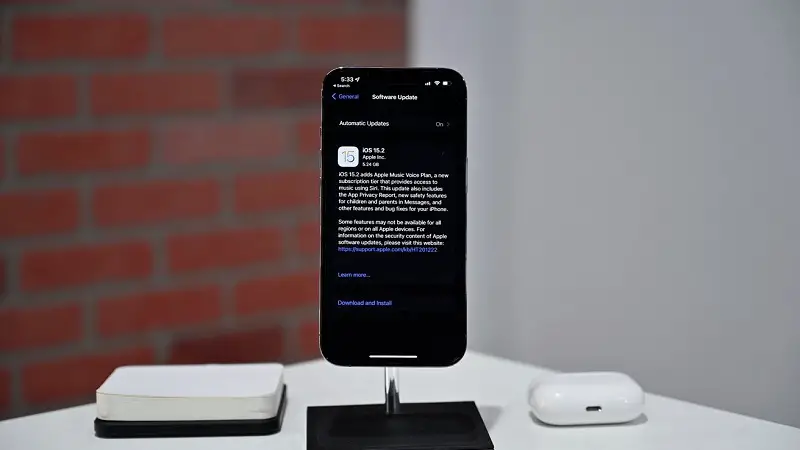
A new security feature in iOS 15 will allow users to wipe a locked iPhone, iPod, or iPad without connecting it to a computer. Previously, this only happened when an iPhone was connected to a computer.

Apple has revealed that as of version 15.2 of its mobile operating system, iOS, it will be possible to remotely erase all devices with just an internet connection.

You may also read: Check The Service History Of Your iPhone With iOS 15.2

When a previously locked iPhone was connected to a computer for the first time in order to erase it and reset its passcode, a new ‘Erase [Device]’ option would appear in the bottom right-hand corner of the screen.
iOS 15.2 will enable locked iPhone to reset without a computer

If you tap on this, it will prompt you for your Apple ID and password. Once entered correctly it will wipe all data and settings from the device and then set a new passcode.

Apple’s iOS 15.2 update brings a few new features to the public, including a new App Privacy Report, Apple’s new Apple Music Voice Plan, and Apple’s new Communication Safety feature for young children in Messages.

Tags: AppleiOSiOS 15iPhoneMacBookreset
ShareTweet
Selim Enes

Selim Enes

Related Posts

Announcements made by Samsung Display at CES 2026

Announcements made by Samsung Display at CES 2026

8 January 2026
Bluetti unveils dual-input Charger 2 at CES 2026

Bluetti unveils dual-input Charger 2 at CES 2026

8 January 2026
Whisper Aero unveils T1 leaf blower at CES 2026

Whisper Aero unveils T1 leaf blower at CES 2026

8 January 2026
OpenAI announces ChatGPT Health feature

OpenAI announces ChatGPT Health feature

8 January 2026
Please login to join discussion

LATEST

Announcements made by Samsung Display at CES 2026

Bluetti unveils dual-input Charger 2 at CES 2026

Whisper Aero unveils T1 leaf blower at CES 2026

OpenAI announces ChatGPT Health feature

Google Classroom turns lessons into podcasts with Gemini

Roblox users must scan faces to unlock chat features

Caterpillar partners with Nvidia to bring AI to the construction site

WhatsApp adds member tags and text stickers to group chats

Spotify brings live listening activity to Messages

How to use the exit command in Windows Command Prompt

TechBriefly

© 2021 TechBriefly is a Linkmedya brand.

  • Tech
  • Business
  • Science
  • Geek
  • How to
  • About
  • Privacy
  • Terms
  • Contact
  • | Network Sites |
  • Digital Report
  • LeaderGamer

Follow Us

No Result
View All Result
  • Tech
  • Business
  • Crypto
  • Science
  • Geek
  • How to
  • About
    • About TechBriefly
    • Terms and Conditions
    • Privacy Policy
    • Contact Us
    • Languages
      • 中文 (Chinese)
      • Dansk
      • Deutsch
      • Español
      • English
      • Français
      • Nederlands
      • Italiano
      • 日本语 (Japanese)
      • 한국인 (Korean)
      • Norsk
      • Polski
      • Português
      • Pусский (Russian)
      • Suomalainen
      • Svenska