
TechBriefly
  • Tech
  • Business
  • Crypto
  • Science
  • Geek
  • How to
  • About
    • About TechBriefly
    • Terms and Conditions
    • Privacy Policy
    • Contact Us
    • Languages
      • 中文 (Chinese)
      • Dansk
      • Deutsch
      • Español
      • English
      • Français
      • Nederlands
      • Italiano
      • 日本语 (Japanese)
      • 한국인 (Korean)
      • Norsk
      • Polski
      • Português
      • Pусский (Russian)
      • Suomalainen
      • Svenska
No Result
View All Result
TechBriefly
Home How to
How to automatically sort photos in Windows?

How to automatically sort photos in Windows?

Barış SelmanbyBarış Selman
16 September 2021
in How to
Reading Time: 2 mins read
Share on FacebookShare on Twitter

In this article, we’ll tell you how to automatically sort photos in Windows. Keeping track of a huge number of photographs may become a big headache. Finding anything particular among a sea of images might be tough if you don’t maintain good organization from the start.

How to automatically sort photos in Windows?

We’ve lately seen the emergence of a number of techniques to manage a slew of images on our phones. The one we’re going to show you, like in the old days, puts the focus back on our computers once more.

Before the predominance of the cell phone in everyday photography and social networks as we know them today, digital photo management inevitably involved a camera and a computer.

Those who kept a digital photo album throughout that era will undoubtedly recall programs like ACDSee or Picasa, which were popular throughout the last decades.

Nowadays, the focus of software applications’ offers is on phones, where significant portions of daily records that may be recorded are concentrated. However, digital cameras are still present, both in professional and amateur spaces. In addition, the computer continues to be used to back up photos and videos from the mobile, as an alternative to the cloud.

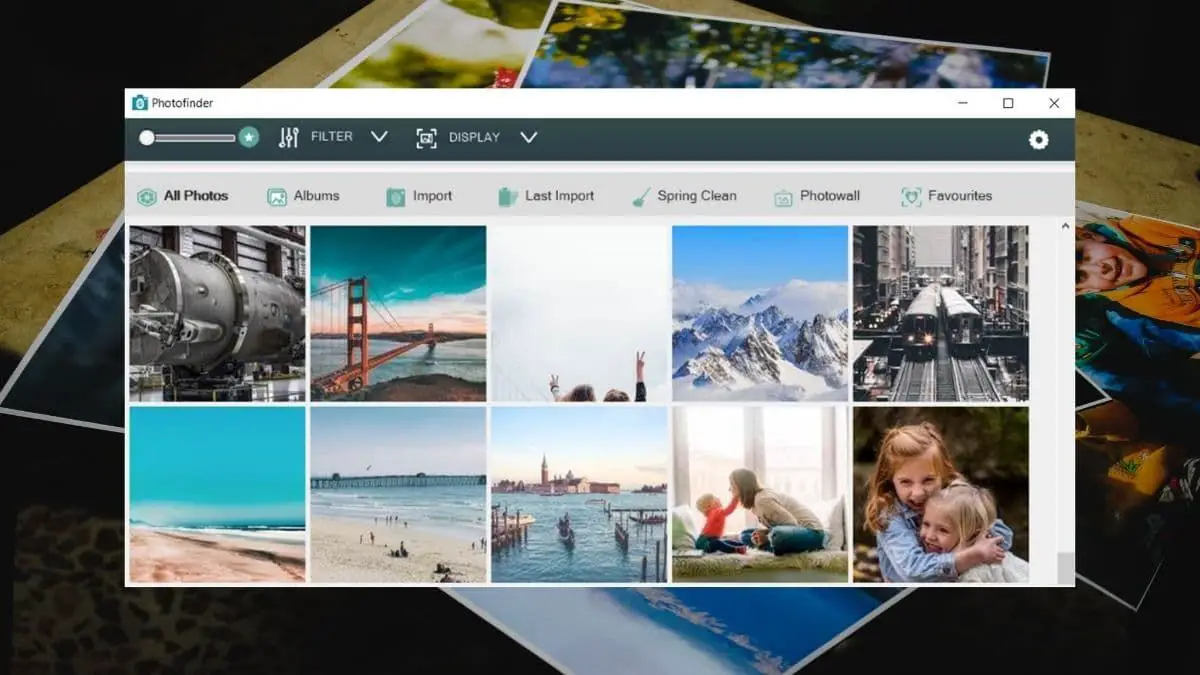
For those cases, there are still tools available to manage photos. One of those is Photofinder, a free app that bets on convenience and simplicity.

Photofinder, a free image manager

Photofinder can then use its machine learning technology to manage thousands of pictures and videos, automatically categorizing and filtering them into albums. According to the presentation, besides its face detection technology and analysis of metadata (camera used, configuration, and location of the photo), the machine learning system behind the application can select “happiest” and “most interesting” photographs.

How to automatically sort photos in Windows?

Remove batches of blurred and duplicate photos, as well as those with red eyes and others that the system detects as low-quality records using Photofinder. It also includes simple editing capabilities.

The application allows you to directly load a batch of images to analyze and classify, as well as to perform an intensive search through the entire disk. In addition, it is possible to configure automatic import rules for images and videos.

Photofinder does not require an Internet connection to process photographs and videos. All of the processing is done locally, ensuring desired privacy.

Photofinder can be downloaded for free from the Windows Store.

Tags: how tophotossoftwareWindows
ShareTweet
Barış Selman

Barış Selman

A technology and gaming enthusiast by day, Barış is a passionate composer and black/death metal guitarist by night. He keeps his finger on the pulse of the intersection of art and technology whenever he can from his tours worldwide.

Related Posts

How to install mods and custom content in The Sims 2

How to install mods and custom content in The Sims 2

26 December 2025
Running Python files and fixing path errors on Windows

Running Python files and fixing path errors on Windows

26 December 2025
How to boot your PC into Command Prompt for troubleshooting

How to boot your PC into Command Prompt for troubleshooting

26 December 2025
How to delete a virus using Command Prompt

How to delete a virus using Command Prompt

26 December 2025
Please login to join discussion

LATEST

New Punkt MC03 features split OS for better privacy control

Samsung reveals brighter Freestyle+ projector ahead of CES 2026

OpenAI explores prioritized ads for ChatGPT responses

Apple teases something big for Fitness+ in 2026

Samsung SDI rumored to test massive 20000mAh battery

Honor sells over 71 million smartphones in 2025

New WhatsApp update brings 2026 stickers and video call effects

Leaker reveals Xiaomi plans for high end eSIM device in 2026

HP prepares OMEN OLED monitor reveal for CES 2026

High RAM costs from AI boom could delay next Xbox and PlayStation

TechBriefly

© 2021 TechBriefly is a Linkmedya brand.

  • Tech
  • Business
  • Science
  • Geek
  • How to
  • About
  • Privacy
  • Terms
  • Contact
  • | Network Sites |
  • Digital Report
  • LeaderGamer

Follow Us

No Result
View All Result
  • Tech
  • Business
  • Crypto
  • Science
  • Geek
  • How to
  • About
    • About TechBriefly
    • Terms and Conditions
    • Privacy Policy
    • Contact Us
    • Languages
      • 中文 (Chinese)
      • Dansk
      • Deutsch
      • Español
      • English
      • Français
      • Nederlands
      • Italiano
      • 日本语 (Japanese)
      • 한국인 (Korean)
      • Norsk
      • Polski
      • Português
      • Pусский (Russian)
      • Suomalainen
      • Svenska