
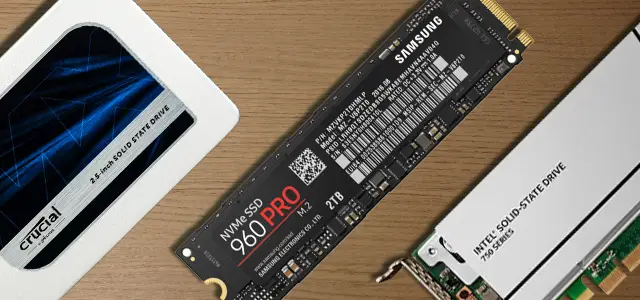

Today we are going to review the differences between HDD, SSD and M.2 NVMe. We will explain how do they work and make a comparison about their abilities and performances. The amount of storage included in a computer is the main factor that determines how much information it will be able to store.
HDD vs SSD vs M.2 NVMe

If you’re thinking about buying a new computer, you may have been seduced by the options with more storage capacity. And that’s fine, especially if your intention is to store a large amount of data. However, there are other aspects you should take into account.
What is an HDD (Hard Drive Disk)?
HDD stands for Hard Drive Disk. HDDs are designed to store operating system files, installed programs and private documents. Even when the power supply is cut off, all this information will be covered.
The first HDD was marketed in 1956 by IBM. At that time, this type of storage coexisted with floppy disks. One of the differences between the two was the hardness of the construction. The term “hard disk” was an accurate way to differentiate them.

How does an HDD work?
A hard disk consists of one or more vertically arranged platters and magnetic heads. Sequential changes in the direction of magnetization are used to represent the digits 1 and 0. A coding and decoding system is used to write and read the data available on the platens. The latter must rotate and, depending on the model, it should do so at high speed. In the case of HDDs developed for servers, the platters can reach 15,000 rpm.
Interestingly, the platters are not made of a magnetic material. Rather, an aluminum alloy or glass is used. To give them magnetism, they are coated with a thin layer of magnetic material with a thickness not exceeding 20 nm. On the other hand, you should know that the heads do not touch the platters while they are spinning, although it is true that the distance between the two elements has been reduced over time.
What is an SSD (Solid State Drive)?
An SSD is a permanent storage device that uses solid state electronics. It is a much faster alternative to traditional hard drives and was originally used to house operating system files. Although it may seem to be a recent technology, the truth is that the original concept was first used in the 1950s. It was not until 1980 when Dr. Fujio Masuoka, then a Toshiba employee, brought a flash-based SSD to market.
Over time, the first models of SSDs based on this technology appeared. For example, in 1999 the company BiTMICRO launched 18GB drives with 3.5-inch size. In the following years, specialized companies refined SSDs to the point where they became the fastest storage option. Similarly, their capacity, historically ranked below that of HDDs, also increased considerably.

How does an SSD work?
An SSD has several components that enable it to receive, store and send information. First of all, they require a chip very similar to SoCs. They, therefore, have a processor and a small temporary memory that acts as a cache. Storage is provided by NAND modules linked together by a controller. The NAND chips are installed in parallel to increase drive performance.
SSDs retain the dimensions of mechanical hard disks to keep up with the standard. However, they require much less space as they do not require physical moving parts. On the other hand, flash memories are also used in sticks and cards to store data externally.
What is an M.2 NVMe?
In addition to HDDs and SSDs, M.2 NVMe flash drives are becoming more and more common. The reality is that this is not a new system. Rather, it is a protocol for data transmission and access on flash drives, i.e. SSDs. The difference with its predecessors is that it is capable of much higher performance.

How does M.2 NVMe work?
A substantial difference between the SSDs we have known up to now and the new NVMe protocol SSDs is that they are connected via the PCI Express bus on the motherboard. This supports tens of thousands of parallel command queues. As a result, M.2 NVMe allows data to be read and written at higher speeds than SSDs with traditional architectures. However, the operation is exactly the same as the SSDs we discussed in the previous section.
Which one is better: HDD vs SSD vs M.2 NVMe
Depending on your needs, you will have to opt for one type of storage or another. HDDs offer a worse performance, although it is normal that they have a higher capacity and are cheaper. Therefore, if your intention is to store a lot of files on your computer, but your budget is tight, the HDD can become your ally. However, the most common in this type of equipment is that the hard disk drags down the performance.
SSDs are highly recommended when it comes to fast and agile operations. Obviously, some SSDs are faster than others, but in most cases, they offer better performance than HDDs. If you are going to play with your computer, this is the winning option. And in case you are going to demand a lot from your computer, think about acquiring a drive that uses the NVMe protocol.




