
TechBriefly
  • Tech
  • Business
  • Crypto
  • Science
  • Geek
  • How to
  • About
    • About TechBriefly
    • Terms and Conditions
    • Privacy Policy
    • Contact Us
    • Languages
      • 中文 (Chinese)
      • Dansk
      • Deutsch
      • Español
      • English
      • Français
      • Nederlands
      • Italiano
      • 日本语 (Japanese)
      • 한국인 (Korean)
      • Norsk
      • Polski
      • Português
      • Pусский (Russian)
      • Suomalainen
      • Svenska
No Result
View All Result
TechBriefly
Home Tech Software
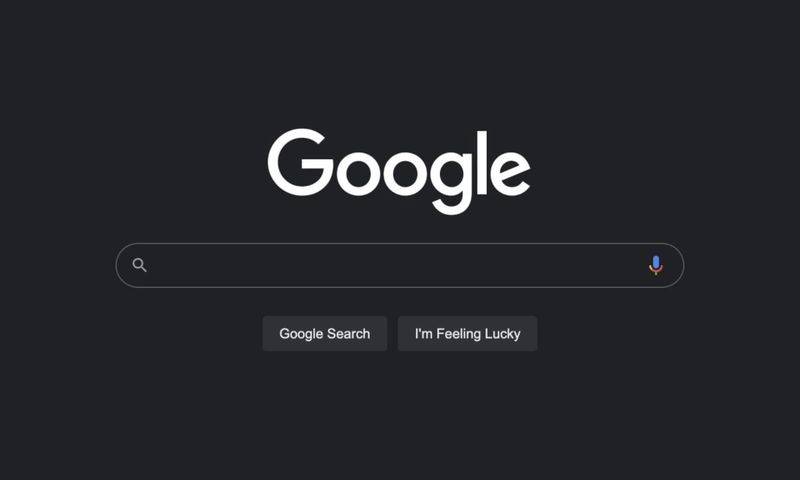
Google starts rolling out dark mode in the search engine

Google starts rolling out dark mode in the search engine

Barış SelmanbyBarış Selman
30 July 2021
in Software, Tech
Reading Time: 2 mins read
Share on FacebookShare on Twitter

The dark mode is nothing new for Google. Not for nothing can we find it, for example, on YouTube. However, and surprising as it may seem, this visual mode, which has been so much in demand for some time now, has not yet landed in the search engine, except in closed beta. And I say it is surprising because I understand that it poses some technical complexity, in terms of what colors and when they should be replaced by others. But of course, the same happens with more complex interfaces, such as YouTube, where it has been available for some time.

Fortunately, it seems that the days of this shortcoming are numbered. Google is already testing the dark mode in the search engine. The bad part is that for now, only certain users can access it. Hopefully, the deployment will be progressive and fast, and in not too long this option will become available to all users. Although, of course, this is only an assumption, as the company has not informed about it.
Google starts rolling out dark mode in the search engine

A very interesting aspect of the dark mode of the Google search engine is that it does not depend on either the operating system or browser settings and, what is even better, everything suggests that it can be used not only in Google Chrome, it is also available in other browsers, since, at least in this first phase of the deployment, the setting is made directly from the configuration of the browser’s web interface.

Users who have already received access to this setting will see, when accessing the browser, a message telling them that the dark mode is now available and, from the same, they can activate it to start using it immediately. In addition, if they reject it at first but later want to activate it, they will only have to click on Settings, at the bottom of the web interface of the search engine and, in the menu that will open, they will be able to activate the Google dark mode.

This setting is associated with the Google user account, so when you choose the dark mode, this should be displayed whenever you access the browser logged in, regardless of whether you do it from different browsers or even from different devices. However, if you use the Google app for Android or iOS, they will still be displayed in light mode.


Tags: dark modeGooglesearch enginesoftwareStarts
ShareTweet
Barış Selman

Barış Selman

A technology and gaming enthusiast by day, Barış is a passionate composer and black/death metal guitarist by night. He keeps his finger on the pulse of the intersection of art and technology whenever he can from his tours worldwide.

Related Posts

Apple begins iPhone 18 series production testing in January

Apple begins iPhone 18 series production testing in January

24 December 2025
EA investigates AI claims in Battlefield 6 cosmetics

EA investigates AI claims in Battlefield 6 cosmetics

24 December 2025
Amazon Alexa+ will book your hotels and salons starting in 2026

Amazon Alexa+ will book your hotels and salons starting in 2026

24 December 2025
OpenAI launches Skills in Codex

OpenAI launches Skills in Codex

24 December 2025
Please login to join discussion

LATEST

How to install mods and custom content in The Sims 2

Running Python files and fixing path errors on Windows

How to boot your PC into Command Prompt for troubleshooting

How to delete a virus using Command Prompt

How to connect a PS4 controller to Steam via USB or Bluetooth

How to connect your phone to Wi-Fi and fix connection issues

Apple begins iPhone 18 series production testing in January

EA investigates AI claims in Battlefield 6 cosmetics

Amazon Alexa+ will book your hotels and salons starting in 2026

OpenAI launches Skills in Codex

TechBriefly

© 2021 TechBriefly is a Linkmedya brand.

  • Tech
  • Business
  • Science
  • Geek
  • How to
  • About
  • Privacy
  • Terms
  • Contact
  • | Network Sites |
  • Digital Report
  • LeaderGamer

Follow Us

No Result
View All Result
  • Tech
  • Business
  • Crypto
  • Science
  • Geek
  • How to
  • About
    • About TechBriefly
    • Terms and Conditions
    • Privacy Policy
    • Contact Us
    • Languages
      • 中文 (Chinese)
      • Dansk
      • Deutsch
      • Español
      • English
      • Français
      • Nederlands
      • Italiano
      • 日本语 (Japanese)
      • 한국인 (Korean)
      • Norsk
      • Polski
      • Português
      • Pусский (Russian)
      • Suomalainen
      • Svenska