
TechBriefly
  • Tech
  • Business
  • Crypto
  • Science
  • Geek
  • How to
  • About
    • About TechBriefly
    • Terms and Conditions
    • Privacy Policy
    • Contact Us
    • Languages
      • 中文 (Chinese)
      • Dansk
      • Deutsch
      • Español
      • English
      • Français
      • Nederlands
      • Italiano
      • 日本语 (Japanese)
      • 한국인 (Korean)
      • Norsk
      • Polski
      • Português
      • Pусский (Russian)
      • Suomalainen
      • Svenska
No Result
View All Result
TechBriefly
Home Tech Software
OpenScan: An open-source document scanner for Android

OpenScan: An open-source document scanner for Android

Barış SelmanbyBarış Selman
10 June 2021
in Software, Tech
Reading Time: 2 mins read
Share on FacebookShare on Twitter

OpenScan is an application for Android with which you can scan documents easily and it is also open source.

Scanning documents from an Android phone is something that many users in some countries do regularly. This is something that can be done with apps designed for this purpose or with the camera application in brands like Samsung, for example. If you are looking for an app for this process, OpenScan is good to help.

OpenScan is an application for Android with which we can scan documents easily. One of the keys to this application is that it is open source (open source), so we have guarantees of privacy in it.

An open-source document scanner
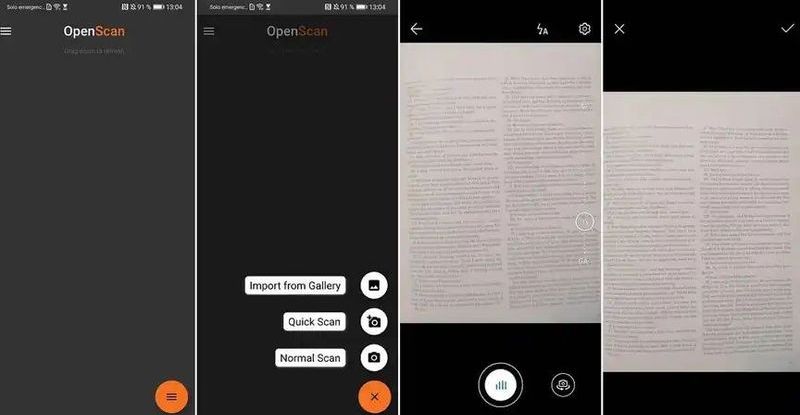
OpenScan: An open-source document scanner for Android

OpenScan is an application to scan documents from our Android phone at any time. The app allows us to scan any type of document (official papers, notes, business cards), so we can use it with any type of file. The documents to be scanned are saved in PDF format on the phone. Before saving them we also have several editing options.

The application presents a very easy-to-use interface, so that this process of scanning that document is very simple and fast, even when we have several documents that we have to scan. In addition, it protects the user’s privacy at all times as it is an open-source app because we can see its entire code.
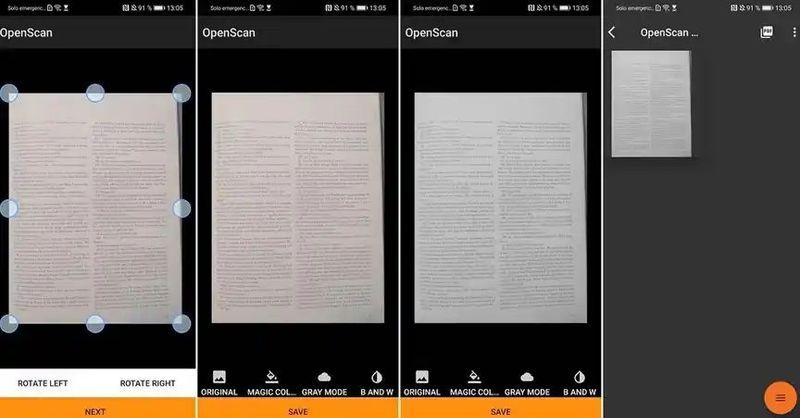
OpenScan: An open-source document scanner for Android

Any document we have scanned using OpenScan can be easily shared in messaging or email apps. So, if we have to send it to someone it will be possible to do it quickly. The app also allows us to send these files in PDF or JPG format, depending on what is appropriate for us at any given time.

It is a good choice for those looking for a productive tool for your phone, because it is very easy to use, scans in seconds and we can have everything saved on the phone. In addition, it is a lightweight application.

How to download OpenScan on Android?

OpenScan is an application that we can download for free on our Android phones. It is available in the Play Store, at this link. We can also find it in other open source app repositories for Android, such as GitHub, in case you want to use any of them.

Tags: Androidapplicationdocumentopen-sourcesoftware
ShareTweet
Barış Selman

Barış Selman

A technology and gaming enthusiast by day, Barış is a passionate composer and black/death metal guitarist by night. He keeps his finger on the pulse of the intersection of art and technology whenever he can from his tours worldwide.

Related Posts

New WhatsApp update brings 2026 stickers and video call effects

New WhatsApp update brings 2026 stickers and video call effects

30 December 2025
Leaker reveals Xiaomi plans for high end eSIM device in 2026

Leaker reveals Xiaomi plans for high end eSIM device in 2026

30 December 2025
HP prepares OMEN OLED monitor reveal for CES 2026

HP prepares OMEN OLED monitor reveal for CES 2026

30 December 2025
High RAM costs from AI boom could delay next Xbox and PlayStation

High RAM costs from AI boom could delay next Xbox and PlayStation

30 December 2025
Please login to join discussion

LATEST

New WhatsApp update brings 2026 stickers and video call effects

Leaker reveals Xiaomi plans for high end eSIM device in 2026

HP prepares OMEN OLED monitor reveal for CES 2026

High RAM costs from AI boom could delay next Xbox and PlayStation

LG to unveil its Gallery TV at CES 2026

Bitcoin drops 3% to $87,300 as altcoins decline

How to install mods and custom content in The Sims 2

Running Python files and fixing path errors on Windows

How to boot your PC into Command Prompt for troubleshooting

How to delete a virus using Command Prompt

TechBriefly

© 2021 TechBriefly is a Linkmedya brand.

  • Tech
  • Business
  • Science
  • Geek
  • How to
  • About
  • Privacy
  • Terms
  • Contact
  • | Network Sites |
  • Digital Report
  • LeaderGamer

Follow Us

No Result
View All Result
  • Tech
  • Business
  • Crypto
  • Science
  • Geek
  • How to
  • About
    • About TechBriefly
    • Terms and Conditions
    • Privacy Policy
    • Contact Us
    • Languages
      • 中文 (Chinese)
      • Dansk
      • Deutsch
      • Español
      • English
      • Français
      • Nederlands
      • Italiano
      • 日本语 (Japanese)
      • 한국인 (Korean)
      • Norsk
      • Polski
      • Português
      • Pусский (Russian)
      • Suomalainen
      • Svenska
