
TechBriefly
  • Tech
  • Business
  • Crypto
  • Science
  • Geek
  • How to
  • About
    • About TechBriefly
    • Terms and Conditions
    • Privacy Policy
    • Contact Us
    • Languages
      • 中文 (Chinese)
      • Dansk
      • Deutsch
      • Español
      • English
      • Français
      • Nederlands
      • Italiano
      • 日本语 (Japanese)
      • 한국인 (Korean)
      • Norsk
      • Polski
      • Português
      • Pусский (Russian)
      • Suomalainen
      • Svenska
No Result
View All Result
TechBriefly
Home Tech Software
Android 12 conversations widget is introduced: Here’s how it works

Android 12 conversations widget is introduced: Here’s how it works

Barış SelmanbyBarış Selman
22 April 2021
in Software, Tech
Reading Time: 2 mins read
Share on FacebookShare on Twitter

The third Android 12 Developer Preview brings full circle the design changes that were leaked, but not yet 100% ready in the previous betas. One of the changes was a new conversations widget that, at last, seems to be available for users and developers to try out.

The conversations widget appears in Android 12 DP3 as selectable in the widget list and includes for the time being what was promised: a custom way to add your favorite chats to the home screen. While it doesn’t appear to be 100% functional yet, we can get a good idea of what it will look like.

Android 12 conversation widget design

Except for some minor versions with corrections, Android 12 DP3 is expected to be the last Developer Preview. After that will come the first beta version of Android 12, sometime in May, intended for end-users who want to test the operating system. By then, Google needs to have finalized or almost finalized important parts of the redesign of Android 12, including the new conversations widget.
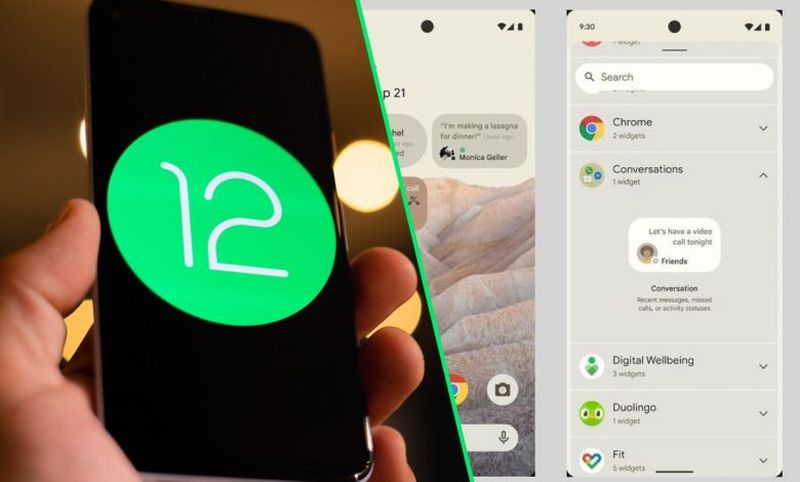
The Android 12 conversations widget is here: Here's how it works
The Android 12 conversations widget is here: Here’s how it works

We met this widget in the leak before the first Android 12 DP, but until now it could not be tested. The widget already appears, at least for some users, in the widget selector, under System UI. It is called Conversation and has a standard size of 2×1 blocks.

When trying to add this widget to the home screen, a selection window is displayed where the latest conversations that have arrived on the mobile are included. Chats from messaging apps such as WhatsApp, Telegram, SMS, and co. are included and Google’s description indicates that data such as missed calls and status changes will also be included.

The widget represents a single chat, so if you want to create a collage with several conversations you will have to repeat the process several times. Also, the widget has a default size of 2×1 and, in our tests, its appearance at first is a bit chaotic in this first version.

The trick is to resize the widget, which is flexible and can be anything from a small icon to a single line or multiple lines. The widget can be resized by long-tapping on it until the sliders appear to change their size.

As for the content, what you see in the widget is the same as what comes out in the notifications, so as soon as you close the notification, the text of the message is removed from the widget. That is, if someone writes to you on Telegram, you can read that message in the widget as long as the notification is still there.

When there are multiple messages, they are not displayed one after the other as happens for example with the official WhatsApp widget. Instead, it shows the last message that has arrived and a number indicating how many messages are pending. The widget at the moment does not work well when tapping on a conversation and is that we must remember that we are still in an early version of Android. Everything may change between now and the final version.


Tags: android 12conversationsHowsoftwaretechnologywidgetWorks
ShareTweet
Barış Selman

Barış Selman

A technology and gaming enthusiast by day, Barış is a passionate composer and black/death metal guitarist by night. He keeps his finger on the pulse of the intersection of art and technology whenever he can from his tours worldwide.

Related Posts

Announcements made by Samsung Display at CES 2026

Announcements made by Samsung Display at CES 2026

8 January 2026
Bluetti unveils dual-input Charger 2 at CES 2026

Bluetti unveils dual-input Charger 2 at CES 2026

8 January 2026
Whisper Aero unveils T1 leaf blower at CES 2026

Whisper Aero unveils T1 leaf blower at CES 2026

8 January 2026
OpenAI announces ChatGPT Health feature

OpenAI announces ChatGPT Health feature

8 January 2026
Please login to join discussion

LATEST

Announcements made by Samsung Display at CES 2026

Bluetti unveils dual-input Charger 2 at CES 2026

Whisper Aero unveils T1 leaf blower at CES 2026

OpenAI announces ChatGPT Health feature

Google Classroom turns lessons into podcasts with Gemini

Roblox users must scan faces to unlock chat features

Caterpillar partners with Nvidia to bring AI to the construction site

WhatsApp adds member tags and text stickers to group chats

Spotify brings live listening activity to Messages

How to use the exit command in Windows Command Prompt

TechBriefly

© 2021 TechBriefly is a Linkmedya brand.

  • Tech
  • Business
  • Science
  • Geek
  • How to
  • About
  • Privacy
  • Terms
  • Contact
  • | Network Sites |
  • Digital Report
  • LeaderGamer

Follow Us

No Result
View All Result
  • Tech
  • Business
  • Crypto
  • Science
  • Geek
  • How to
  • About
    • About TechBriefly
    • Terms and Conditions
    • Privacy Policy
    • Contact Us
    • Languages
      • 中文 (Chinese)
      • Dansk
      • Deutsch
      • Español
      • English
      • Français
      • Nederlands
      • Italiano
      • 日本语 (Japanese)
      • 한국인 (Korean)
      • Norsk
      • Polski
      • Português
      • Pусский (Russian)
      • Suomalainen
      • Svenska