

TechBriefly
  • Tech
  • Business
  • Crypto
  • Science
  • Geek
  • How to
  • About
    • About TechBriefly
    • Terms and Conditions
    • Privacy Policy
    • Contact Us
    • Languages
      • 中文 (Chinese)
      • Dansk
      • Deutsch
      • Español
      • English
      • Français
      • Nederlands
      • Italiano
      • 日本语 (Japanese)
      • 한국인 (Korean)
      • Norsk
      • Polski
      • Português
      • Pусский (Russian)
      • Suomalainen
      • Svenska
No Result
View All Result
TechBriefly
Home How to
How to download Windows 10 21H1 ISO?

How to download Windows 10 21H1 ISO?

Kerem GülenbyKerem Gülen
7 April 2021
in How to
Reading Time: 2 mins read
Share on FacebookShare on Twitter

Do you want to learn how to download Windows 10 21H1 ISO before anyone else, then keep reading. The next major update of Microsoft’s operating system will arrive this spring and will be called Windows 10 21H1 or Windows 10 May 2021 Update. At the moment Microsoft has not announced the exact release date, but technically it is already possible to enjoy all the features that the company will offer.

The last build for Insiders in the beta channel received an update recently, and it was very small because it only fixed some bugs. That’s what happens when we are so close to the final release, and in fact, it is possible to download the latest ISO of Windows 10 21H1 in beta if you don’t want to wait.

This ISO contains basically everything you will receive with the final release of the Windows 10 May 2021 update when it starts to reach all users, except some last-minute bug fixes that may or may not come up.

How to download Windows 10 21H1 ISO?

To download the ISO, you just have to go to the Microsoft download website where they offer the ISOs of the preliminary versions of Windows 10. To access these downloads you must log in with your Microsoft account, and register to the Insider program if you haven’t before.
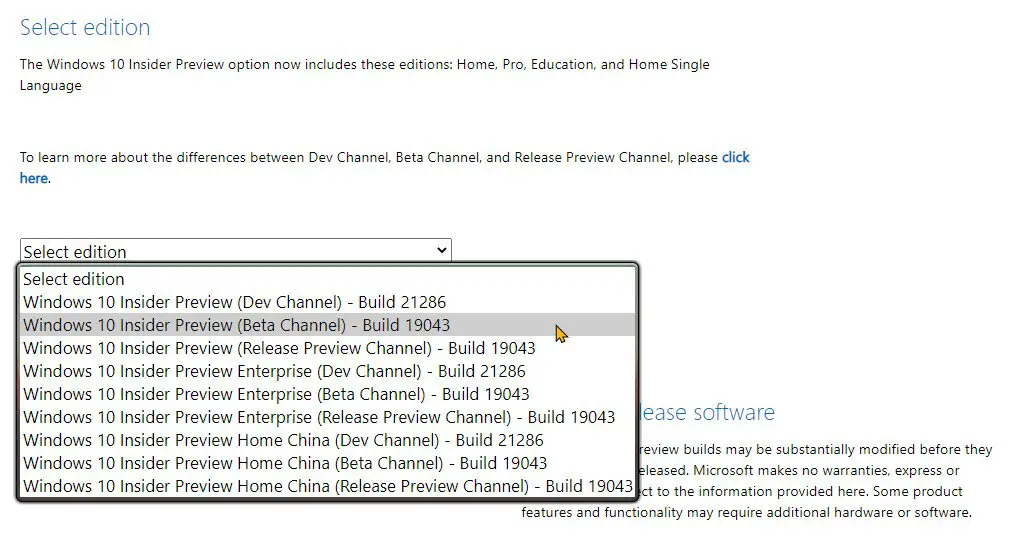
How to download Windows 10 21H1 ISO before anyone else?

Go to the bottom of the page and from the drop-down menu select the Beta Channel edition (Beta Channel – Build 19043) and click “Confirm”. After you do this you will be able to select the Windows language and after confirming your choice a 64-bit and a 32-bit download will be offered. Unless your computer is very old (more than 15 years old) assume it needs the 64-bit.

Once you have downloaded your Windows 10 image file, you can use a tool such as Rufus to create a USB boot disk and perform a clean install.

Or, in any case, you can go the safe route and simply use the ISO to create a virtual machine and test the new features without compromising your main installation. Windows 10 21H1 is a minor update that will arrive mainly with some features focused on home office, performance improvements, and better security. If you want to learn how to clone Windows 10 to an SSD, check this guide out.

Tags: betadownloadhow toInsiderMicrosoftupdateWindowsWindows 10windows 10 21H1
ShareTweet
Kerem Gülen

Kerem Gülen

Kerem from Turkey has an insatiable curiosity for the latest advancements in tech gadgets and a knack for innovative thinking.With 3 years of experience in editorship and a childhood dream of becoming a journalist, Kerem has always been curious about the latest tech gadgets and is constantly seeking new ways to create.As a Master's student in Strategic Communications, Kerem is eager to learn more about the ever-evolving world of technology. His primary focuses are artificial intelligence and digital inclusion, and he delves into the most current and accurate information on these topics.

Related Posts

How to gain full control by jailbreaking iPhone and rooting Android

How to gain full control by jailbreaking iPhone and rooting Android

19 January 2026
How to create folders and add widgets on Android

How to create folders and add widgets on Android

19 January 2026
How to tell if your iPhone or Android phone is carrier unlocked

How to tell if your iPhone or Android phone is carrier unlocked

16 January 2026
How to apply screen protectors without air bubbles

How to apply screen protectors without air bubbles

16 January 2026
Please login to join discussion

LATEST

Nvidia Rubin GPUs: 200 teraFLOPS FP64 from software emulation

Walmart maintains Apple Pay blockade across US stores for 2026

Musk demands $134 billion from OpenAI and Microsoft for wrongful gains

Apple shifts iOS 27 focus to quality and underlying performance

Google integrates Wallet and Tasks into Pixel 10 Magic Cue

Threads overtakes X with 141.5M mobile users

Microsoft issues emergency fix for Windows 11 shutdown bugs

How to gain full control by jailbreaking iPhone and rooting Android

How to create folders and add widgets on Android

OpenAI rockets $250 million into Altman’s Merge Labs brain-AI bridge

TechBriefly

© 2021 TechBriefly is a Linkmedya brand.

  • Tech
  • Business
  • Science
  • Geek
  • How to
  • About
  • Privacy
  • Terms
  • Contact
  • | Network Sites |
  • Digital Report
  • LeaderGamer

Follow Us

No Result
View All Result
  • Tech
  • Business
  • Crypto
  • Science
  • Geek
  • How to
  • About
    • About TechBriefly
    • Terms and Conditions
    • Privacy Policy
    • Contact Us
    • Languages
      • 中文 (Chinese)
      • Dansk
      • Deutsch
      • Español
      • English
      • Français
      • Nederlands
      • Italiano
      • 日本语 (Japanese)
      • 한국인 (Korean)
      • Norsk
      • Polski
      • Português
      • Pусский (Russian)
      • Suomalainen
      • Svenska