

TechBriefly
  • Tech
  • Business
  • Crypto
  • Science
  • Geek
  • How to
  • About
    • About TechBriefly
    • Terms and Conditions
    • Privacy Policy
    • Contact Us
    • Languages
      • 中文 (Chinese)
      • Dansk
      • Deutsch
      • Español
      • English
      • Français
      • Nederlands
      • Italiano
      • 日本语 (Japanese)
      • 한국인 (Korean)
      • Norsk
      • Polski
      • Português
      • Pусский (Russian)
      • Suomalainen
      • Svenska
No Result
View All Result
TechBriefly
Home How to
How to show screen refresh rate in real-time on Android?

How to show screen refresh rate in real-time on Android?

Kerem GülenbyKerem Gülen
30 March 2021
in How to
Reading Time: 2 mins read
Share on FacebookShare on Twitter

If you don’t know How to show screen refresh rate in real-time on Android, we are going to help you out. With the arrival of gaming smartphones, we are seeing the arrival of new forms of cooling systems, specific software modes to get the best gaming experience. There are even triggers located onto the phone on some models.

And of course, we are witnessing an escalation in terms of the refresh rate of smartphone screens. Now we’ll show you how to check, in real-time, the screen refresh rate of your Android smartphone.

How to show screen refresh rate in real-time on Android?

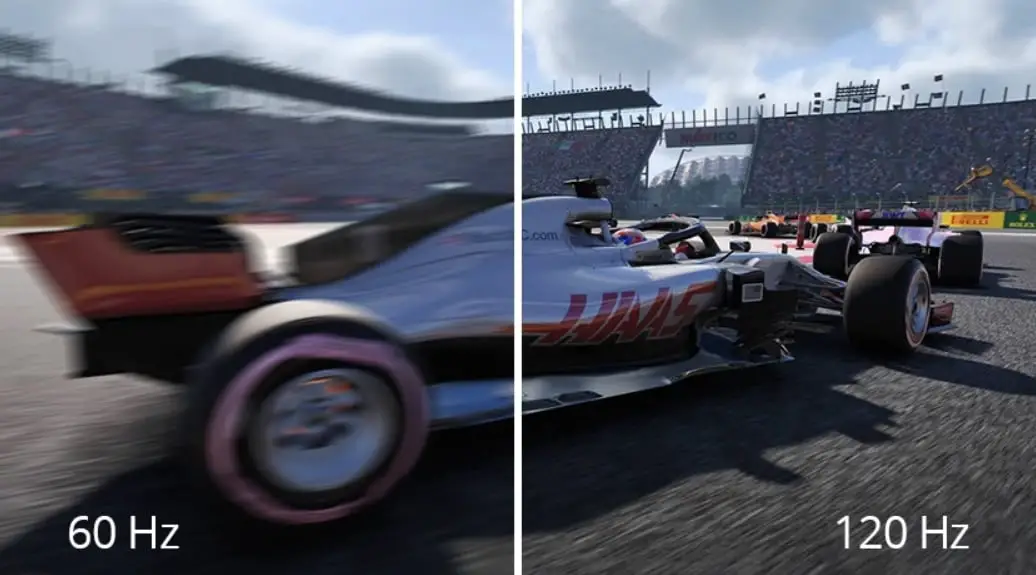
The refresh rate of a smartphone specifies the number of times the screen turns on and off to show you the images you see on it. Each time the screen turns on and off is called a ‘hertz’, so a 60Hz panel turns off and on 60 times every second.
How to show screen refresh rate in real-time on Android?

The higher the refresh rate, the more fluid we see the image on the screen, especially when there are complex animations, so we are going to show you a simple tutorial so you can check the screen refresh rate in real-time, and thus check, incidentally, how your phone behaves in front of apps and games in case of having a dynamic frequency.

In order to activate this refresh rate in real-time, we have to go to the developer options of the smartphone:

  • We go to the ‘Settings‘ of the phone.
  • Within ‘Settings’, go to ‘Phone Info’ at the bottom.
  • Now find ‘Build number’ and click on it ten times in a row.
  • This way we have activated the ‘Developer options’
How to show screen refresh rate in real-time on Android?

These developer options are hidden on Android phones, hence we have to enable them before we can access them. After you activate the developer options follow this process:

  • We go to the ‘Settings’ of the phone again.
  • Go to ‘System’
  • Inside, we find the ‘Advanced’ tab.
  • We enter the ‘Developer options’
  • We look for the ‘Debugging’ section and then ‘Show update frequency’.
  • We activate the switch and we see that the screen displays an overlay number indicating the real-time refresh rate.

As you can see the process is really simple, why don’t you try it out now?

Tags: Androidguidehow toreal timestep by steptutorial
ShareTweet
Kerem Gülen

Kerem Gülen

Kerem from Turkey has an insatiable curiosity for the latest advancements in tech gadgets and a knack for innovative thinking.With 3 years of experience in editorship and a childhood dream of becoming a journalist, Kerem has always been curious about the latest tech gadgets and is constantly seeking new ways to create.As a Master's student in Strategic Communications, Kerem is eager to learn more about the ever-evolving world of technology. His primary focuses are artificial intelligence and digital inclusion, and he delves into the most current and accurate information on these topics.

Related Posts

How to tell if your iPhone or Android phone is carrier unlocked

How to tell if your iPhone or Android phone is carrier unlocked

16 January 2026
How to apply screen protectors without air bubbles

How to apply screen protectors without air bubbles

16 January 2026
How to check if someone read your message on iPhone or iPad

How to check if someone read your message on iPhone or iPad

16 January 2026
A guide to viewing calculation history on iOS 18

A guide to viewing calculation history on iOS 18

16 January 2026
Please login to join discussion

LATEST

OpenAI rockets $250 million into Altman’s Merge Labs brain-AI bridge

Bluesky opens “Live Now” badges to all users to lure Twitch creators

Capcom reveals Resident Evil: Requiem classic mode and ink ribbons

How to tell if your iPhone or Android phone is carrier unlocked

Paramount+ slams subscribers with first price hike since 2024

Ashley St. Clair sues xAI over Grok deepfakes

Samsung launches instant-play cloud streaming in Mobile Gaming Hub update

Netflix secures Sony Pictures first-to-stream rights

How to apply screen protectors without air bubbles

How to check if someone read your message on iPhone or iPad

TechBriefly

© 2021 TechBriefly is a Linkmedya brand.

  • Tech
  • Business
  • Science
  • Geek
  • How to
  • About
  • Privacy
  • Terms
  • Contact
  • | Network Sites |
  • Digital Report
  • LeaderGamer

Follow Us

No Result
View All Result
  • Tech
  • Business
  • Crypto
  • Science
  • Geek
  • How to
  • About
    • About TechBriefly
    • Terms and Conditions
    • Privacy Policy
    • Contact Us
    • Languages
      • 中文 (Chinese)
      • Dansk
      • Deutsch
      • Español
      • English
      • Français
      • Nederlands
      • Italiano
      • 日本语 (Japanese)
      • 한국인 (Korean)
      • Norsk
      • Polski
      • Português
      • Pусский (Russian)
      • Suomalainen
      • Svenska