
TechBriefly
  • Tech
  • Business
  • Crypto
  • Science
  • Geek
  • How to
  • About
    • About TechBriefly
    • Terms and Conditions
    • Privacy Policy
    • Contact Us
    • Languages
      • 中文 (Chinese)
      • Dansk
      • Deutsch
      • Español
      • English
      • Français
      • Nederlands
      • Italiano
      • 日本语 (Japanese)
      • 한국인 (Korean)
      • Norsk
      • Polski
      • Português
      • Pусский (Russian)
      • Suomalainen
      • Svenska
No Result
View All Result
TechBriefly
Home How to
How to create an avatar in Virtual Reality?

How to create an avatar in Virtual Reality?

Barış SelmanbyBarış Selman
1 March 2021
in How to
Reading Time: 2 mins read
Share on FacebookShare on Twitter

It is amazing how virtual reality, which used to look like something far away, has become such a widely used concept that you can now have the opportunity to create an avatar for games that make use of this technology.

How to create an avatar in Virtual Reality?

One of them is VRChat, a free virtual reality video game where players can have the opportunity to create their character and use it to get in contact with other players within the game. One of the features that VRChat presents is the ability to assign an avatar to your character.

For this purpose, a tool is known as Ready Player Me (an obvious reference to the movie and book Ready Player One), a free avatar creator developed by Wolf3D has been made available, which has added support for the VR social network VRChat, where the only thing you will need is a photograph of your face.
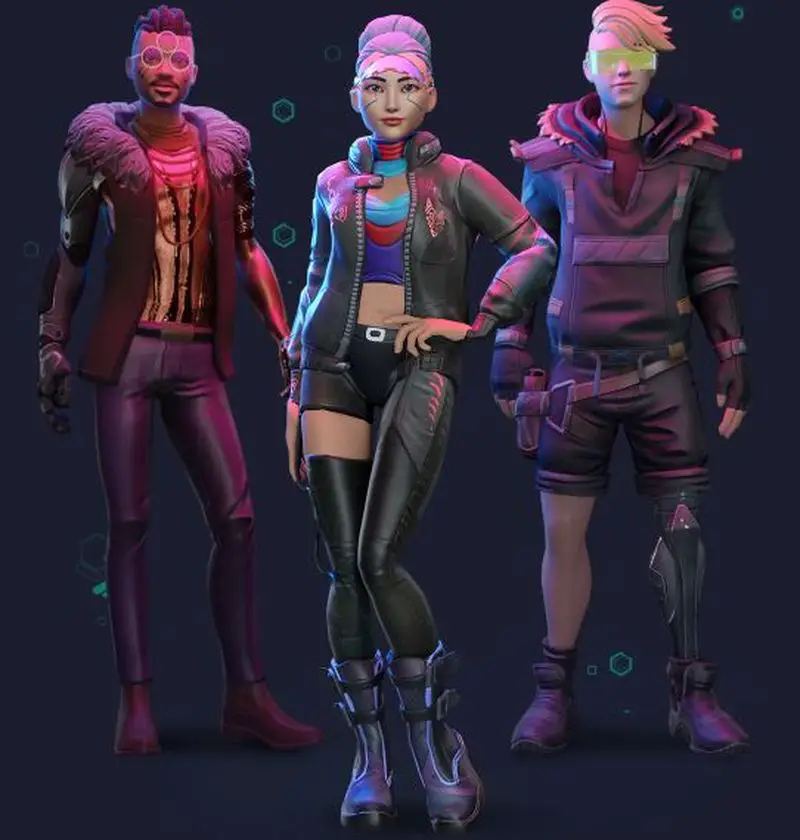
How to create an avatar in Virtual Reality?

When you experience the use of Ready Player Me avatar creator you will notice how easy this tool is to use. Once you have obtained the result, you can import it to VRChat and select it from the game menu.

For years now, VRChat’s open avatar system has allowed users to have the opportunity to import the character models of their choice.

However, this was only possible if the person had enough experience and knowledge in development, leaving out those inexperienced in the subject.

Now through this tool, anyone can create their virtual reality avatar in a few quick steps.

Create your avatar for VRChat with Ready Player Me

The steps you will need to follow to create your virtual reality avatar with Ready Player Me for VRChat are as follows:

  • Enter the Ready Player Me web page for VRChat.
  • Once the page has loaded click on the Create your avatar option. This will bring up the avatar creator.
  • You will then need to choose the body type of your avatar.
  • Once you have done this you will move on to the next stage of the process in which you can choose a photo of your face that you already have stored on your mobile or PC. You can also continue the process without one to create your avatar from scratch and have the opportunity to customize different elements such as hair, eyes, clothing, among others.

No matter which option you have chosen after you are done, the next thing you will do is click on the Import to VRChat option. This will prompt you to log into your account to give access to the Wolf3D application. You will have to wait a few minutes for the created avatar to synchronize with VRChat and that’s it.

Tags: applicationCreatehow tosoftwaretechnologyvirtual reality
ShareTweet
Barış Selman

Barış Selman

A technology and gaming enthusiast by day, Barış is a passionate composer and black/death metal guitarist by night. He keeps his finger on the pulse of the intersection of art and technology whenever he can from his tours worldwide.

Related Posts

How to tell if your iPhone or Android phone is carrier unlocked

How to tell if your iPhone or Android phone is carrier unlocked

16 January 2026
How to apply screen protectors without air bubbles

How to apply screen protectors without air bubbles

16 January 2026
How to check if someone read your message on iPhone or iPad

How to check if someone read your message on iPhone or iPad

16 January 2026
A guide to viewing calculation history on iOS 18

A guide to viewing calculation history on iOS 18

16 January 2026
Please login to join discussion

LATEST

OpenAI rockets $250 million into Altman’s Merge Labs brain-AI bridge

Bluesky opens “Live Now” badges to all users to lure Twitch creators

Capcom reveals Resident Evil: Requiem classic mode and ink ribbons

How to tell if your iPhone or Android phone is carrier unlocked

Paramount+ slams subscribers with first price hike since 2024

Ashley St. Clair sues xAI over Grok deepfakes

Samsung launches instant-play cloud streaming in Mobile Gaming Hub update

Netflix secures Sony Pictures first-to-stream rights

How to apply screen protectors without air bubbles

How to check if someone read your message on iPhone or iPad

TechBriefly

© 2021 TechBriefly is a Linkmedya brand.

  • Tech
  • Business
  • Science
  • Geek
  • How to
  • About
  • Privacy
  • Terms
  • Contact
  • | Network Sites |
  • Digital Report
  • LeaderGamer

Follow Us

No Result
View All Result
  • Tech
  • Business
  • Crypto
  • Science
  • Geek
  • How to
  • About
    • About TechBriefly
    • Terms and Conditions
    • Privacy Policy
    • Contact Us
    • Languages
      • 中文 (Chinese)
      • Dansk
      • Deutsch
      • Español
      • English
      • Français
      • Nederlands
      • Italiano
      • 日本语 (Japanese)
      • 한국인 (Korean)
      • Norsk
      • Polski
      • Português
      • Pусский (Russian)
      • Suomalainen
      • Svenska