TechBriefly
  • Tech
  • Business
  • Crypto
  • Science
  • Geek
  • How to
  • About
    • About TechBriefly
    • Terms and Conditions
    • Privacy Policy
    • Contact Us
    • Languages
      • 中文 (Chinese)
      • Dansk
      • Deutsch
      • Español
      • English
      • Français
      • Nederlands
      • Italiano
      • 日本语 (Japanese)
      • 한국인 (Korean)
      • Norsk
      • Polski
      • Português
      • Pусский (Russian)
      • Suomalainen
      • Svenska
No Result
View All Result
TechBriefly
Home Tech Internet
Chrome shows a button to follow websites

Chrome shows a button to follow websites

Barış SelmanbyBarış Selman
22 February 2021
in Internet, Tech
Reading Time: 2 mins read
Share on FacebookShare on Twitter

Chrome shows a button to follow websites now. People who want to follow the news of a website have several resources to do so. One can use a newsreader, such as Feedly, or Flipboard, to give two examples, or subscribe to the website’s newsletter, if available. There are also social networks and Chrome notifications, but it seems that Google wants to give you an additional option integrated into the browser for android.

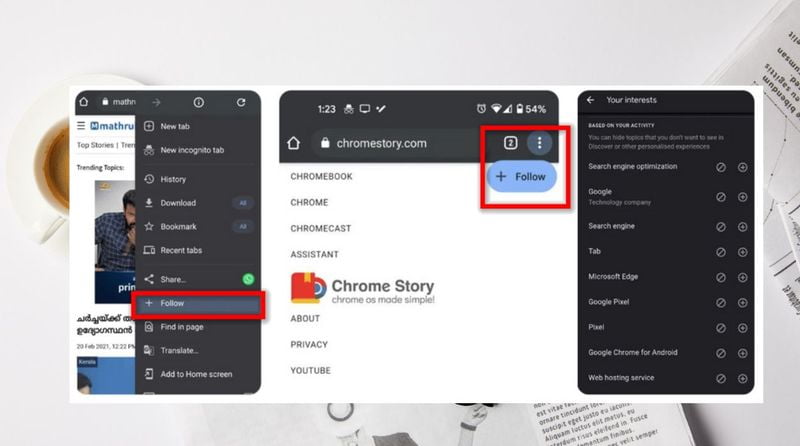
You can see the “Follow” button that is currently available in the Canary version of Chrome, in the development version in the image below.
Chrome shows a button to follow websites

Google already allows us to follow specific topics using the Google app so that in the Discover feed you see topics of our interest. Those topics will also appear in the “Discover” feed on the Chrome New Tab page on Android, but the recent update to the Canary channel brings a “Follow” option that no one expected.

At the moment the button does not work, as indicated in the chrome story, it is still in the early stages of development, but users have already begun to wind their imagination, hoping that it is a kind of feed reader, like the old google reader, which automatically detects the RSS of the media in front of us.

The only way to find out how these options works is to wait for the next releases of Chrome Canary and test it, so it is best to have some patience before imagining how it works. We think this is an additional resource to customize the news feed in Google Discover, to avoid continuing to distribute the information in different channels.


Tags: buttonChromefollowgoogle discoverinternetshowswebsites
ShareTweet
Barış Selman

Barış Selman

A technology and gaming enthusiast by day, Barış is a passionate composer and black/death metal guitarist by night. He keeps his finger on the pulse of the intersection of art and technology whenever he can from his tours worldwide.

Related Posts

ASUS to launch new AI PCs at CES 2026

ASUS to launch new AI PCs at CES 2026

5 January 2026
GameSir announces CES 2026 participation

GameSir announces CES 2026 participation

5 January 2026
LG Electronics announces LG CLOiD home robot

LG Electronics announces LG CLOiD home robot

5 January 2026
LG revives Wallpaper OLED line with Evo W6 at CES 2026

LG revives Wallpaper OLED line with Evo W6 at CES 2026

5 January 2026
Please login to join discussion

LATEST

ASUS to launch new AI PCs at CES 2026

GameSir announces CES 2026 participation

LG Electronics announces LG CLOiD home robot

LG revives Wallpaper OLED line with Evo W6 at CES 2026

Samsung Display starts mass production of 34-inch 360Hz QD-OLED

LG Electronics announces 2026 LG gram lineup

Samsung unveils Companion to AI Living at CES 2026

Samsung showcases C-Lab startups at CES 2026

Bosch eBike Systems adds theft protection to eBike Flow app

Bosch unveils AI extension platform, AI-powered cockpit at CES 2026

TechBriefly

© 2021 TechBriefly is a Linkmedya brand.

  • Tech
  • Business
  • Science
  • Geek
  • How to
  • About
  • Privacy
  • Terms
  • Contact
  • | Network Sites |
  • Digital Report
  • LeaderGamer

Follow Us

No Result
View All Result
  • Tech
  • Business
  • Crypto
  • Science
  • Geek
  • How to
  • About
    • About TechBriefly
    • Terms and Conditions
    • Privacy Policy
    • Contact Us
    • Languages
      • 中文 (Chinese)
      • Dansk
      • Deutsch
      • Español
      • English
      • Français
      • Nederlands
      • Italiano
      • 日本语 (Japanese)
      • 한국인 (Korean)
      • Norsk
      • Polski
      • Português
      • Pусский (Russian)
      • Suomalainen
      • Svenska