
TechBriefly
  • Tech
  • Business
  • Crypto
  • Science
  • Geek
  • How to
  • About
    • About TechBriefly
    • Terms and Conditions
    • Privacy Policy
    • Contact Us
    • Languages
      • 中文 (Chinese)
      • Dansk
      • Deutsch
      • Español
      • English
      • Français
      • Nederlands
      • Italiano
      • 日本语 (Japanese)
      • 한국인 (Korean)
      • Norsk
      • Polski
      • Português
      • Pусский (Russian)
      • Suomalainen
      • Svenska
No Result
View All Result
TechBriefly
Home Tech Software
The new NVIDIA driver will no longer enable V-Sync vertical sync to be set to off by default

The new NVIDIA driver will no longer enable V-Sync vertical sync to be set to off by default

Barış SelmanbyBarış Selman
17 February 2021
in Software, Tech
Reading Time: 2 mins read
Share on FacebookShare on Twitter

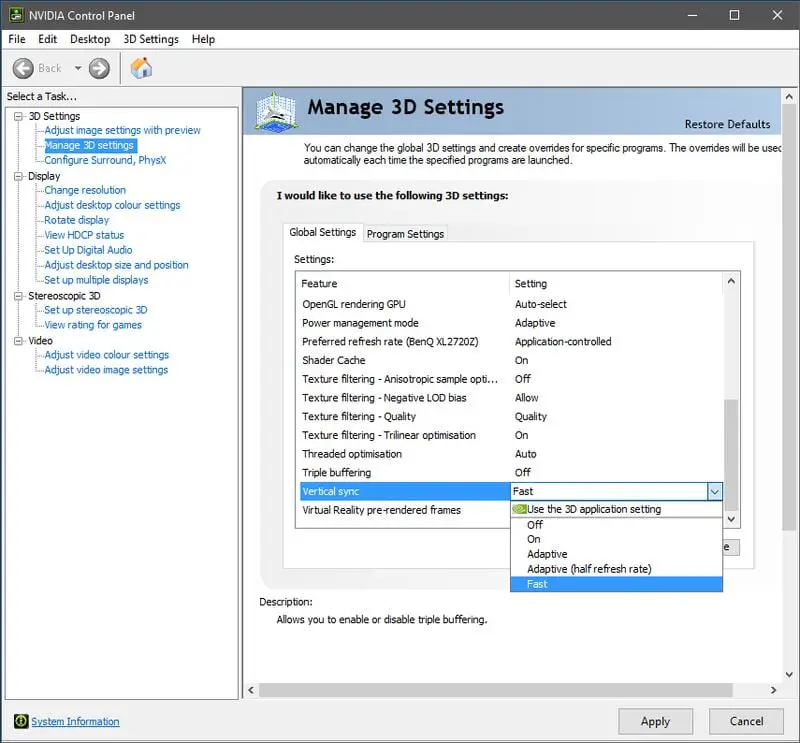
NVIDIA since the beginning of 2021 released the first graphics card driver update this year, version 461.09, as of now, the driver version is 461.40. Starting with the 461.09 drivers, NVIDIA will no longer make the “V-Sync” in the global settings of the graphics card Vertical Sync” option in the card’s global settings is set to off by default.

The new NVIDIA driver will no longer enable V-Sync vertical sync to be set to “off” by default

NVIDIA explained the reason for this change in the official note. According to the description, if this option is set to off, running some applications in windowed mode will cause screen tearing and affect the viewing experience. When vertical sync is on, the frame rate of the application is synchronized with the display to avoid tearing. Typically, tearing occurs in fullscreen mode, and this feature prevents this from happening.
The new NVIDIA driver will no longer enable V-Sync vertical sync to be set to off by default

Before the 461.09 drivers, there was only one option for the operating system. Windows Manager (DWM) would composite elements of all windows and then output them uniformly at the display frame rate, which meant that DWM would prevent tearing even without V-Sync technology. However, the 461.09 driver brings multiplane overlay (MPO) multi-threaded display technology. This technology has the benefit of reducing the latency of windowed mode games, allowing applications to use a different frame rate than the Windows desktop, other windows for independent output, and the ability to apply V-Sync vertical synchronization to a separate window. For the operating system, it is still determined that other applications are displayed through MPO. If V-Sync is turned off at this point, windowed mode games will also have tearing problems, which can be as bad for games as the full-screen mode.

NVIDIA version 461.09 of the driver, the V-Sync setting in the graphics card’s 3D global settings were changed to “Use 3D application settings”. However, for some FPS games such as “CS: GO” that pursue extreme responsiveness, users can set it separately in the game or graphics card 3D settings to turn off the vertical sync option.

Tags: defaultNVIDIAsetsoftwaretechnology
ShareTweet
Barış Selman

Barış Selman

A technology and gaming enthusiast by day, Barış is a passionate composer and black/death metal guitarist by night. He keeps his finger on the pulse of the intersection of art and technology whenever he can from his tours worldwide.

Related Posts

Anthropic launches health features for Claude

Anthropic launches health features for Claude

12 January 2026
Google removes AI Overviews from medical queries

Google removes AI Overviews from medical queries

12 January 2026
Instagram disputes Malwarebytes’ claim of massive data theft

Instagram disputes Malwarebytes’ claim of massive data theft

12 January 2026
X to open-source new recommendation algorithm in 7 days

X to open-source new recommendation algorithm in 7 days

12 January 2026
Please login to join discussion

LATEST

Simple ways to install and remove programs on Ubuntu

A guide to preventing accidental typing on Windows and Mac

Accessing your Google Chrome bookmarks

A guide to installing restricted extensions in Google Chrome

Anthropic launches health features for Claude

Google removes AI Overviews from medical queries

Instagram disputes Malwarebytes’ claim of massive data theft

X to open-source new recommendation algorithm in 7 days

How to choose the right reset method for Samsung Galaxy devices

What resetting end-to-end encryption does on iPhone, iPad or Mac

TechBriefly

© 2021 TechBriefly is a Linkmedya brand.

  • Tech
  • Business
  • Science
  • Geek
  • How to
  • About
  • Privacy
  • Terms
  • Contact
  • | Network Sites |
  • Digital Report
  • LeaderGamer

Follow Us

No Result
View All Result
  • Tech
  • Business
  • Crypto
  • Science
  • Geek
  • How to
  • About
    • About TechBriefly
    • Terms and Conditions
    • Privacy Policy
    • Contact Us
    • Languages
      • 中文 (Chinese)
      • Dansk
      • Deutsch
      • Español
      • English
      • Français
      • Nederlands
      • Italiano
      • 日本语 (Japanese)
      • 한국인 (Korean)
      • Norsk
      • Polski
      • Português
      • Pусский (Russian)
      • Suomalainen
      • Svenska