
TechBriefly
  • Tech
  • Business
  • Crypto
  • Science
  • Geek
  • How to
  • About
    • About TechBriefly
    • Terms and Conditions
    • Privacy Policy
    • Contact Us
    • Languages
      • 中文 (Chinese)
      • Dansk
      • Deutsch
      • Español
      • English
      • Français
      • Nederlands
      • Italiano
      • 日本语 (Japanese)
      • 한국인 (Korean)
      • Norsk
      • Polski
      • Português
      • Pусский (Russian)
      • Suomalainen
      • Svenska
No Result
View All Result
TechBriefly
Home Tech Software
Zoom adds effects to change your appearance in video calls

Zoom adds effects to change your appearance in video calls

Barış SelmanbyBarış Selman
11 February 2021
in Software, Tech
Reading Time: 2 mins read
Share on FacebookShare on Twitter

While Zoom has become an essential tool for teamwork in times of pandemic, it has also earned a place as one of the favorite options for communicating with friends and family.

So, little by little, it has been adding functions that turn video calls into meetings that are a little more fun and not so formal. For example, one of the experimental options that seem to be reaching all users is the one that allows you to apply facial effects.

How to change your face in Zoom video calls?

If you want to improvise a fun video call with your family members or surprise your friends with your crazy antics, you can get your hands on “Studio Effects”. A new feature that’s popping up on Zoom accounts.

As they mention on TC, this option was announced last year as part of “Studio Effect,” but it seems to be rolling out to more users these days. What’s it all about? This feature, which is part of the video filters, gives you many elements to “edit” your face and apply eyebrows, mustaches, lip color, etc.
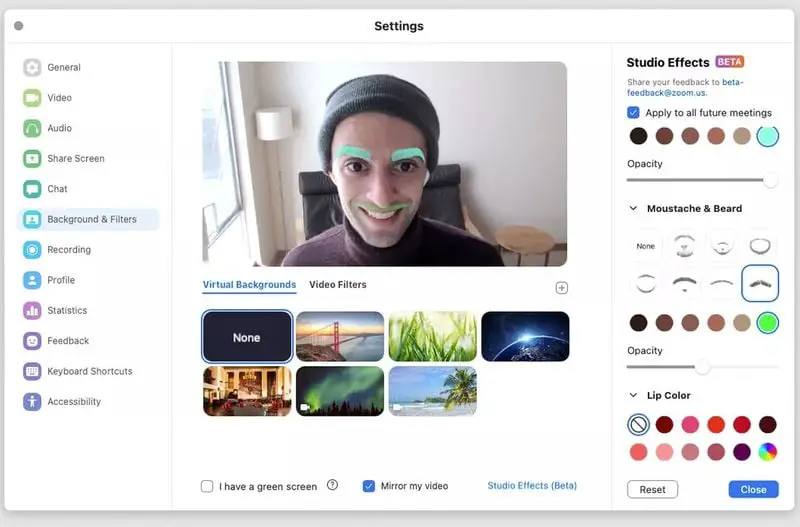
Zoom adds effects to change your appearance in video calls

To enjoy this new option you only have to follow a few steps. Open your Zoom account, go to Settings and go to the “Background & Filters” section. You will see this option at the bottom of the window as “Studio Effects”, and once you select it, you will be asked for permission to download the effects pack for your videos.

The dynamic is very simple, you just have to choose the options you like and test how they look on the screen. You can apply different eyebrow shapes, add opacity or try different colors. And the same process can be done when choosing a beard and mustache style or applying color to your lips.

And of course, you can change the effects as many times as you want or reset the settings to remove all the changes. And a bonus of this feature is that it allows you to save the effect settings you choose to apply automatically in future meetings.

Tags: Addschangesoftwarevideovideo callingvideo callszoom
ShareTweet
Barış Selman

Barış Selman

A technology and gaming enthusiast by day, Barış is a passionate composer and black/death metal guitarist by night. He keeps his finger on the pulse of the intersection of art and technology whenever he can from his tours worldwide.

Related Posts

Substack launches TV app for Apple and Google platforms

Substack launches TV app for Apple and Google platforms

23 January 2026
JBL enters the practice amp market with AI-driven Stem separation technology

JBL enters the practice amp market with AI-driven Stem separation technology

23 January 2026
Google Search adds “Personal Intelligence” to AI Mode

Google Search adds “Personal Intelligence” to AI Mode

23 January 2026
Anthropic redesigns hiring tests after Claude 4.5 “aces” human interview

Anthropic redesigns hiring tests after Claude 4.5 “aces” human interview

22 January 2026
Please login to join discussion

LATEST

OpenAI appoints Barret Zoph to lead enterprise sales

Vimeo begins global staff reductions following Bending Spoons acquisition

LiveKit reaches unicorn status with $100 million in new funding

Substack launches TV app for Apple and Google platforms

Oracle and Silver Lake lead consortium in landmark TikTok US deal

JBL enters the practice amp market with AI-driven Stem separation technology

Google Search adds “Personal Intelligence” to AI Mode

Amazon set to launch second wave of corporate layoffs next week

Blue Origin’s New Glenn-3 mission to deploy AST SpaceMobile’s BlueBird 7

Anthropic redesigns hiring tests after Claude 4.5 “aces” human interview

TechBriefly

© 2021 TechBriefly is a Linkmedya brand.

  • Tech
  • Business
  • Science
  • Geek
  • How to
  • About
  • Privacy
  • Terms
  • Contact
  • | Network Sites |
  • Digital Report
  • LeaderGamer

Follow Us

No Result
View All Result
  • Tech
  • Business
  • Crypto
  • Science
  • Geek
  • How to
  • About
    • About TechBriefly
    • Terms and Conditions
    • Privacy Policy
    • Contact Us
    • Languages
      • 中文 (Chinese)
      • Dansk
      • Deutsch
      • Español
      • English
      • Français
      • Nederlands
      • Italiano
      • 日本语 (Japanese)
      • 한국인 (Korean)
      • Norsk
      • Polski
      • Português
      • Pусский (Russian)
      • Suomalainen
      • Svenska