
TechBriefly
  • Tech
  • Business
  • Crypto
  • Science
  • Geek
  • How to
  • About
    • About TechBriefly
    • Terms and Conditions
    • Privacy Policy
    • Contact Us
    • Languages
      • 中文 (Chinese)
      • Dansk
      • Deutsch
      • Español
      • English
      • Français
      • Nederlands
      • Italiano
      • 日本语 (Japanese)
      • 한국인 (Korean)
      • Norsk
      • Polski
      • Português
      • Pусский (Russian)
      • Suomalainen
      • Svenska
No Result
View All Result
TechBriefly
Home Tech Security
You can save Google Chrome passwords without synchronizing now

You can save Google Chrome passwords without synchronizing now

Barış SelmanbyBarış Selman
9 December 2020
in Security, Tech
Reading Time: 2 mins read
Share on FacebookShare on Twitter

It is possible to save Google Chrome passwords without syncronizing your account now. Google Chrome has been experimenting for some time now with some options that don’t need a Gmail account syncronization.

Google Chrome passwords will be saved without synchronizing account

As you know, practically any information we have available on several devices at once can be stored on Google accounts through Chrome syncronization. The data we store in our Google account, expands more and more with Google Chrome, as it stores card numbers, username and passwords and, of course, favorites, bookmarks, etc. Well, now Google will make it easier for us to reach them on other devices.

More simplified access methods

Google wants users to access their personal information in a much faster way, especially in those cases in which people do not connect from their usual devices. This means that if we need to access a website on a PC that is not ours, and we don’t remember the user and password, we can recover that data without having to synchronize our account at all.
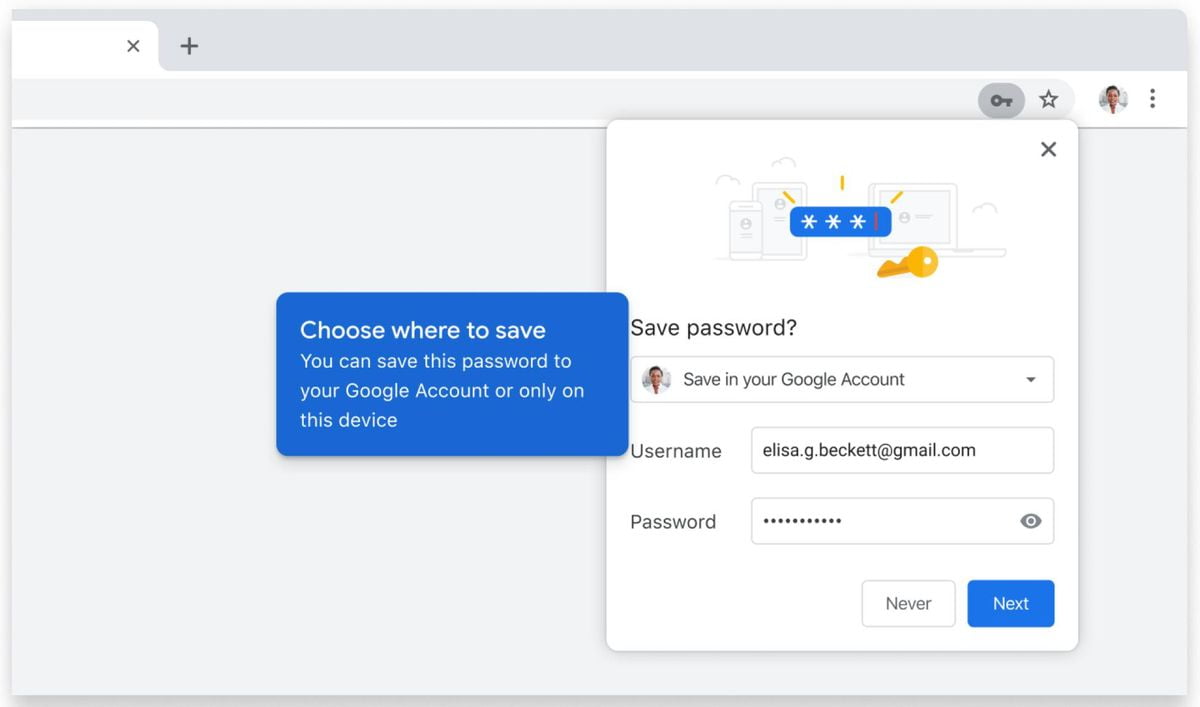
Google Chrome will able to save passwords without synchronizing account

This simplification will save Chrome (in Android first) the process of having to retrieve all that information we store in the browser which can take a precious time to sync. This was a problem for many users who preferred not to download their data to a computer other than their own to avoid potential threats, thinking that even if they deleted their account from the browser, someone would still be able to access all this information.

This new quick sync function, which allows users to access only the specific information they need and avoid synchronizing their entire profile, will not only allow them to keep their account users and passwords at hand but also their card details. In any case, even though Google eliminates potential threats and is selective when it comes to downloading the personal information it stores about us, it never hurts to stay alert by making decisions such as verifying after uninstalling your account from Chrome.

In any case, this new feature will be available in all Chrome releases in the coming months, as announced in its official blog.


Tags: AndroidbrowserfeaturedGoogle Chromepasswordssecurity
ShareTweet
Barış Selman

Barış Selman

A technology and gaming enthusiast by day, Barış is a passionate composer and black/death metal guitarist by night. He keeps his finger on the pulse of the intersection of art and technology whenever he can from his tours worldwide.

Related Posts

Apple begins iPhone 18 series production testing in January

Apple begins iPhone 18 series production testing in January

24 December 2025
EA investigates AI claims in Battlefield 6 cosmetics

EA investigates AI claims in Battlefield 6 cosmetics

24 December 2025
Amazon Alexa+ will book your hotels and salons starting in 2026

Amazon Alexa+ will book your hotels and salons starting in 2026

24 December 2025
OpenAI launches Skills in Codex

OpenAI launches Skills in Codex

24 December 2025
Please login to join discussion

LATEST

How to install mods and custom content in The Sims 2

Running Python files and fixing path errors on Windows

How to boot your PC into Command Prompt for troubleshooting

How to delete a virus using Command Prompt

How to connect a PS4 controller to Steam via USB or Bluetooth

How to connect your phone to Wi-Fi and fix connection issues

Apple begins iPhone 18 series production testing in January

EA investigates AI claims in Battlefield 6 cosmetics

Amazon Alexa+ will book your hotels and salons starting in 2026

OpenAI launches Skills in Codex

TechBriefly

© 2021 TechBriefly is a Linkmedya brand.

  • Tech
  • Business
  • Science
  • Geek
  • How to
  • About
  • Privacy
  • Terms
  • Contact
  • | Network Sites |
  • Digital Report
  • LeaderGamer

Follow Us

No Result
View All Result
  • Tech
  • Business
  • Crypto
  • Science
  • Geek
  • How to
  • About
    • About TechBriefly
    • Terms and Conditions
    • Privacy Policy
    • Contact Us
    • Languages
      • 中文 (Chinese)
      • Dansk
      • Deutsch
      • Español
      • English
      • Français
      • Nederlands
      • Italiano
      • 日本语 (Japanese)
      • 한국인 (Korean)
      • Norsk
      • Polski
      • Português
      • Pусский (Russian)
      • Suomalainen
      • Svenska