


LinkedIn may be using your account information to train AI without your permission. You should think about how your information is being used and how you can control it.
LinkedIn has updated its privacy settings to allow the platform to use personal data to improve its AI-driven features. The company’s revised privacy policy confirms that user data is used to train AI models. However, many users were not informed in advance.
What LinkedIn says about data use
LinkedIn lets you stop your data from being used in AI training, but it’s not simple. Go to your account settings and turn off the “Data for Generative AI Improvement” toggle. This stops your data from being used to train AI models in the future. However, it doesn’t affect any data that has already been used.
LinkedIn has more machine learning tools, unrelated to generative AI, that are used for tasks like personalizing recommendations or moderating content. Opting out of this category requires you to complete a separate LinkedIn Data Processing Opt-out form. This form explains how LinkedIn uses your data.

According to LinkedIn, its use of personal data is intended to improve and develop its products and services. On a help page, the company explains that generative AI is being used for features like writing assistance and that opting out will prevent your data from being used for future AI training. However, it’s important to note that LinkedIn claims to use “privacy enhancing technologies” to remove personal data from its training sets. Additionally, the platform does not use the data of users living in the European Union, European Economic Area, or Switzerland for AI training due to regional data protection laws.
Users who live in other regions, however, are automatically included unless they proactively opt-out. This approach has sparked concern, especially in the wake of similar revelations from Meta, which recently admitted to having used non-private user data for AI training going back to 2007.
How to stop LinkedIn from using your data to train AI
LinkedIn now uses user data to train its AI models, but you can opt-out if you’re concerned about your privacy. While LinkedIn limits opt-outs to future AI training, here’s how you can prevent your data from being used moving forward:
- Access LinkedIn Settings:
- Log in to your LinkedIn account.
- Click on your profile icon in the top right corner and select Settings & Privacy from the dropdown menu.
- Navigate to the Data Privacy section:
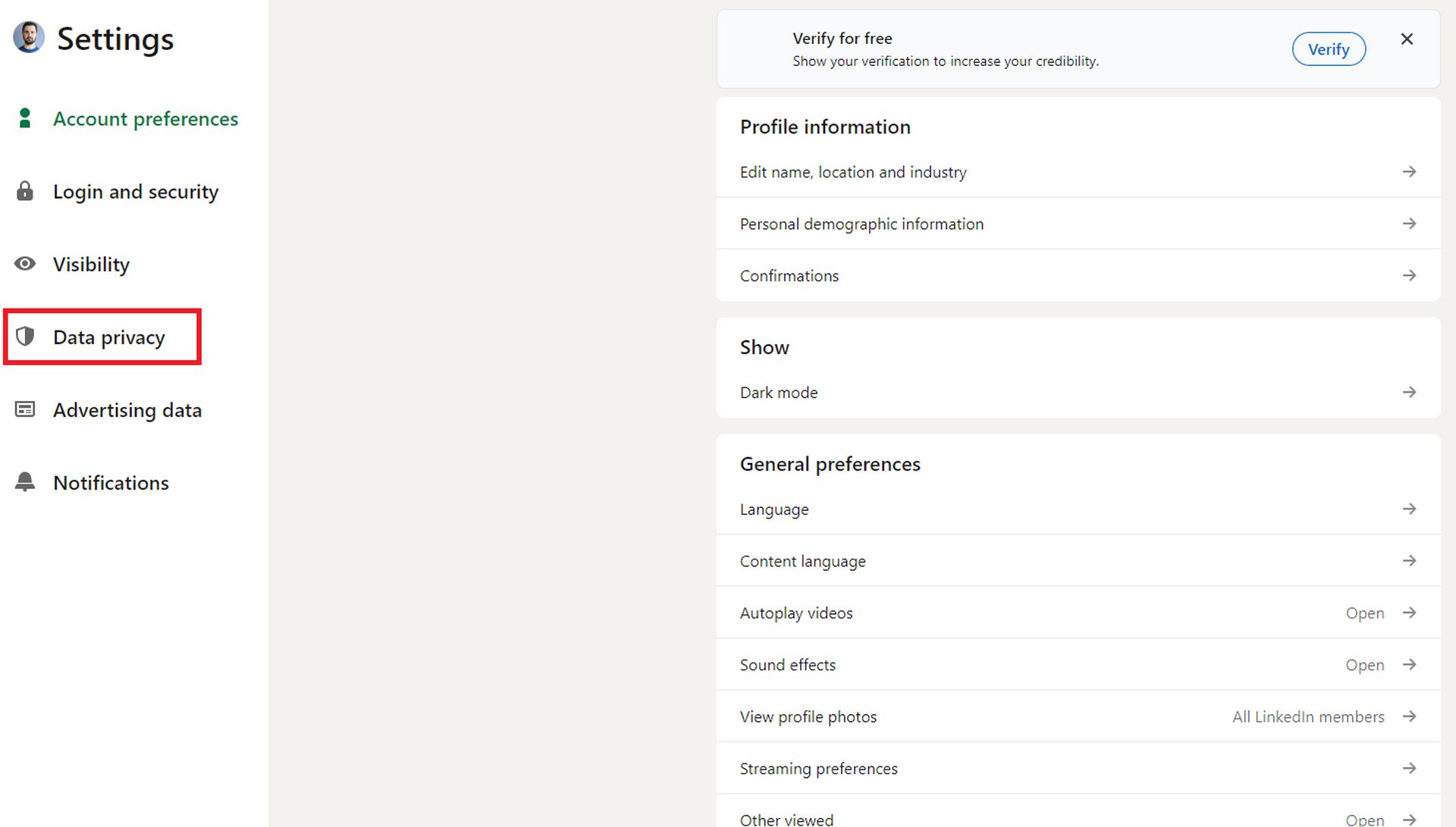
- Once in Settings & Privacy, click on the Data Privacy tab on the left-hand menu.
- Scroll down to the section labeled How LinkedIn uses your data.
- Turn off AI data usage:
- Look for the Productive AI Improvement Data option.
- Toggle this setting to Off. This will prevent LinkedIn from using your data to train future AI models.
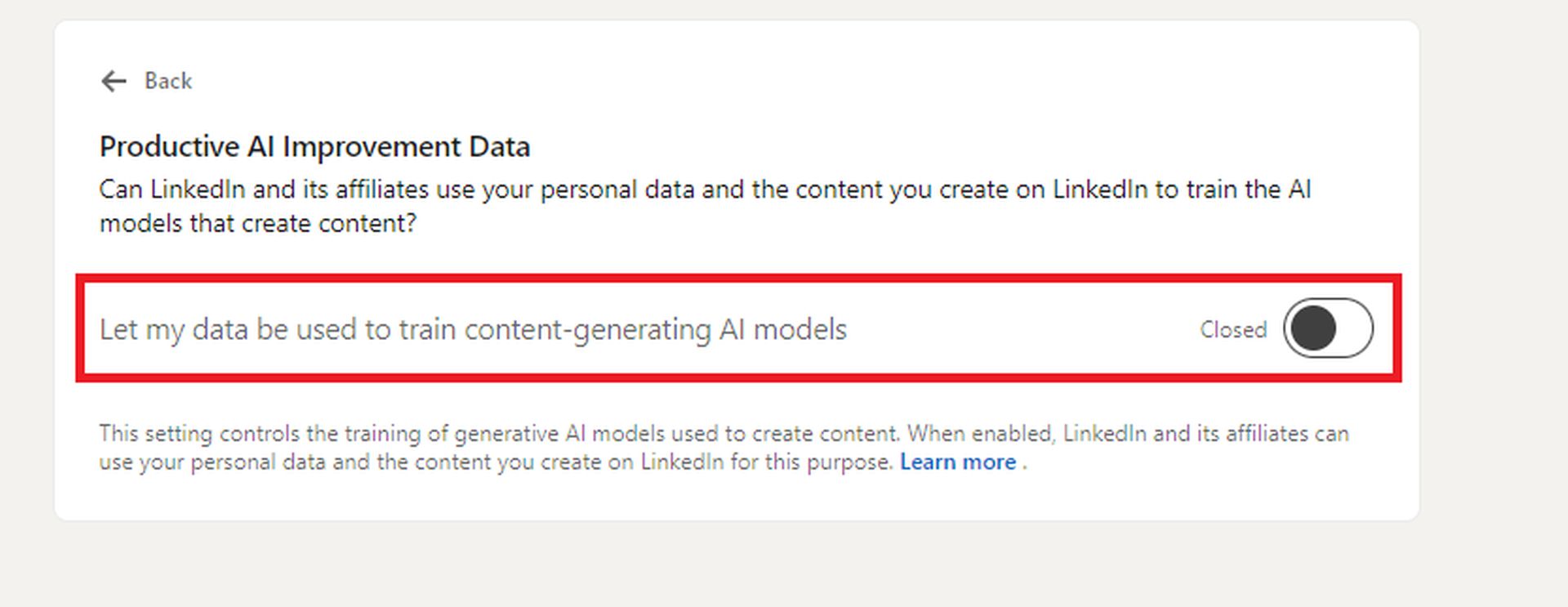
- Additional steps to protect your data: To stop LinkedIn from using your data for other purposes, fill out the LinkedIn Data Processing Objection Form. This form allows you to object to broader data use not related to generative AI features.
- Know your rights (for European users): Users in the European Economic Area (EEA), Switzerland, and other regions protected by strict data privacy laws like GDPR are automatically opted out of AI training. These users don’t need to take any action.
- Understand the limitations:
- Opting out only applies to future data use. Unfortunately, there’s no way to retroactively remove data that has already been used in AI training.
- LinkedIn has stated that it uses “privacy enhancing technologies” to limit the amount of personal data in its AI models, but this does not guarantee complete anonymity.
- Stay updated on data policies: Regularly check LinkedIn’s privacy policies and settings as data practices can change over time. LinkedIn has committed to updating users about significant changes to its AI-related data usage, but it’s always good to be proactive.
A growing trend among tech giants
The practice of using vast amounts of user data to train AI models is becoming increasingly common among tech companies. LinkedIn’s decision to opt users into this program without direct consent mirrors actions taken by other platforms, raising questions about transparency and data privacy. Although LinkedIn provides ways to opt-out, many users are left wondering how much control they really have over their personal information once it’s been used for AI training.
As AI becomes more common online, companies like LinkedIn are using user data in new ways. While LinkedIn offers opt-out options, it’s unclear how users will respond to these data practices.
Featured image credit: Dayne Topkin / Unsplash


