
Ready to groove on Twitch? If you get a Twitch DJ badge, you can literally play concerts on your streams. This little icon is a great opportunity for music lovers who want to shuffle the internet records.
Let’s break down what the Twitch DJ badge means. The badge is part of Twitch’s DJ Program, which allows streamers to play music legally during their live streams. The program gives DJs access to a catalog of tracks approved by music labels for use on Twitch.
Twitch DJ Badge and the program your passport to music streaming
The Twitch DJ badge will show that you are free from royalties on selected tracks. It shows that a streamer is part of the official Twitch DJ Program. This means they can use music from the Twitch DJ Catalog in their live streams without worrying about copyright issues. Musicians whose broadcasts have been plagued by copyright issues will no longer have to worry.
To get the Twitch DJ badge, streamers need to join the DJ Program. This involves agreeing to the terms of the program and following certain rules about how music can be used during broadcasts. So once you get the badge, you’re subject to some rules, but you’re still not free to do everything.

Mixing it up with the Twitch DJ Program
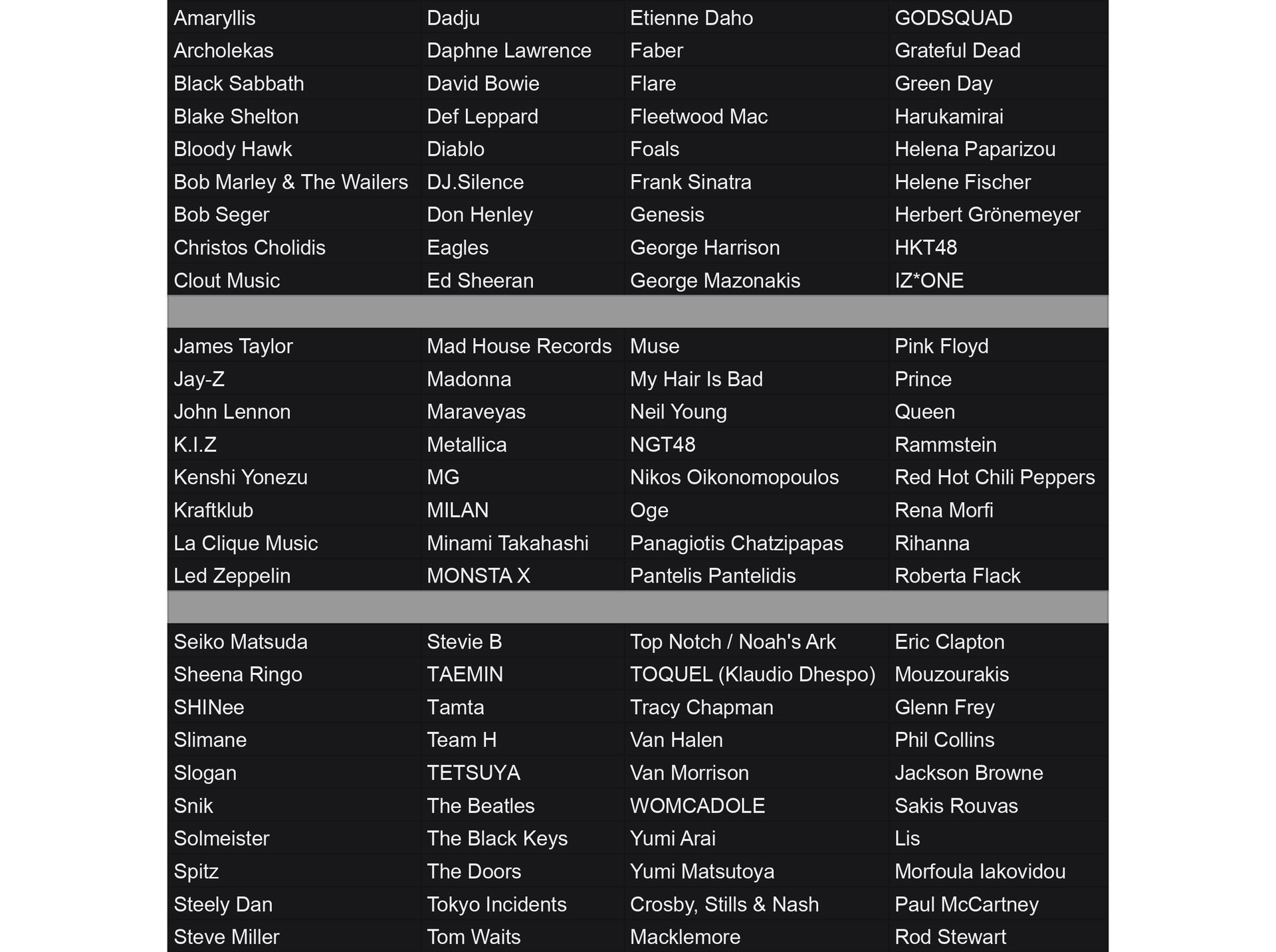
Once a streamer has a Twitch DJ badge, they have access to the Twitch DJ Catalog. This collection contains a wide variety of music tracks that can be played during live broadcasts. The catalog is updated regularly, so DJs always have new beats to work with. There are a lot of musicians in the catalog, so it’s easier to point out the ones that aren’t in it, so here are the ones that aren’t in it:
The Twitch DJ badge comes with some responsibilities. DJs must follow the program rules, which include:
- Only playing music from the approved catalog.
- Not streaming full albums or focusing on just one artist.
- Providing a live, interactive visual performance along with the music.
- Not recording or rebroadcasting DJ performances.
Twitch keeps track of which songs are played during DJ streams. This helps ensure that music rights holders are properly compensated for the use of their tracks.
How to get the Twitch DJ Badge and join the program
If you’re ready to dive into the music world on Twitch, the Twitch DJ Program is perfect for you. Here’s how to get your Twitch DJ Badge and join the program:
- Sign up for the program: The first step is to visit the official registration page. Go to https://www.twitch.tv/dj-signup in your browser. This page contains all the information about the program and allows you to start the registration process.
- Read and accept the terms: On the registration page, carefully read the DJ Program Terms. These terms explain the rules and expectations of the program. Check the box indicating that you accept the terms.
- Click the join button: After accepting the terms, click the “Join Twitch DJ Program” button at the bottom of the page. This will initiate your registration process.
- Verify your account: Twitch may ask you to verify your account. This could involve confirming your email address or phone number. Make sure to complete all verification steps.
- Receive your DJ badge: Once your registration is approved, your Twitch DJ Badge will be automatically added to your account. This badge shows other users that you’re part of the DJ Program.
- Access the DJ catalog: Now that you’re part of the program, you’ll have access to the Twitch DJ Catalog. This catalog offers a vast collection of music you can use in your streams.
- Start streaming: After completing all these steps, you can start your DJ streams. Remember, it’s important to follow the program rules and only play approved music.
By following these steps, you can join the Twitch DJ Program and get your Twitch DJ Badge. Get ready to share your passion for music with the Twitch community!
Tuning into the fine print
The Twitch DJ Program is not available everywhere. Twitch decides which countries or regions can participate in the program. Some places, like Belarus, China, Cuba, Iran, North Korea, South Korea, and Syria, are currently excluded.
DJs in the program need to be careful about how they use branded content in their streams. They can include product placements like physical signs and logos, but other types of branded content are generally not allowed without special permission from Twitch.
It’s important to note that joining the DJ Program may affect a streamer’s earnings on Twitch. There’s a deduction for music rights costs that applies to participants in Twitch’s monetization programs.
The Twitch DJ badge opens up new possibilities for music-focused streams on the platform. It allows DJs to legally share their mixes and sets with viewers while respecting copyright laws. As the program continues to evolve, it’s creating a vibrant space for music on Twitch.
For streamers looking to add some musical flair to their broadcasts, the Twitch DJ badge might just be the perfect mix. It’s a way to keep the party going while staying in tune with the rules.
Featured image credit: Twitch Blog