TechBriefly
  • Tech
  • Business
  • Crypto
  • Science
  • Geek
  • How to
  • About
    • About TechBriefly
    • Terms and Conditions
    • Privacy Policy
    • Contact Us
    • Languages
      • 中文 (Chinese)
      • Dansk
      • Deutsch
      • Español
      • English
      • Français
      • Nederlands
      • Italiano
      • 日本语 (Japanese)
      • 한국인 (Korean)
      • Norsk
      • Polski
      • Português
      • Pусский (Russian)
      • Suomalainen
      • Svenska
No Result
View All Result
TechBriefly
Home Tech Software
Microsoft’s 41-year-old Notepad gets spell checking feature

Microsoft’s 41-year-old Notepad gets spell checking feature

Barış SelmanbyBarış Selman
22 March 2024
in Software, Tech
Reading Time: 1 min read
Share on FacebookShare on Twitter

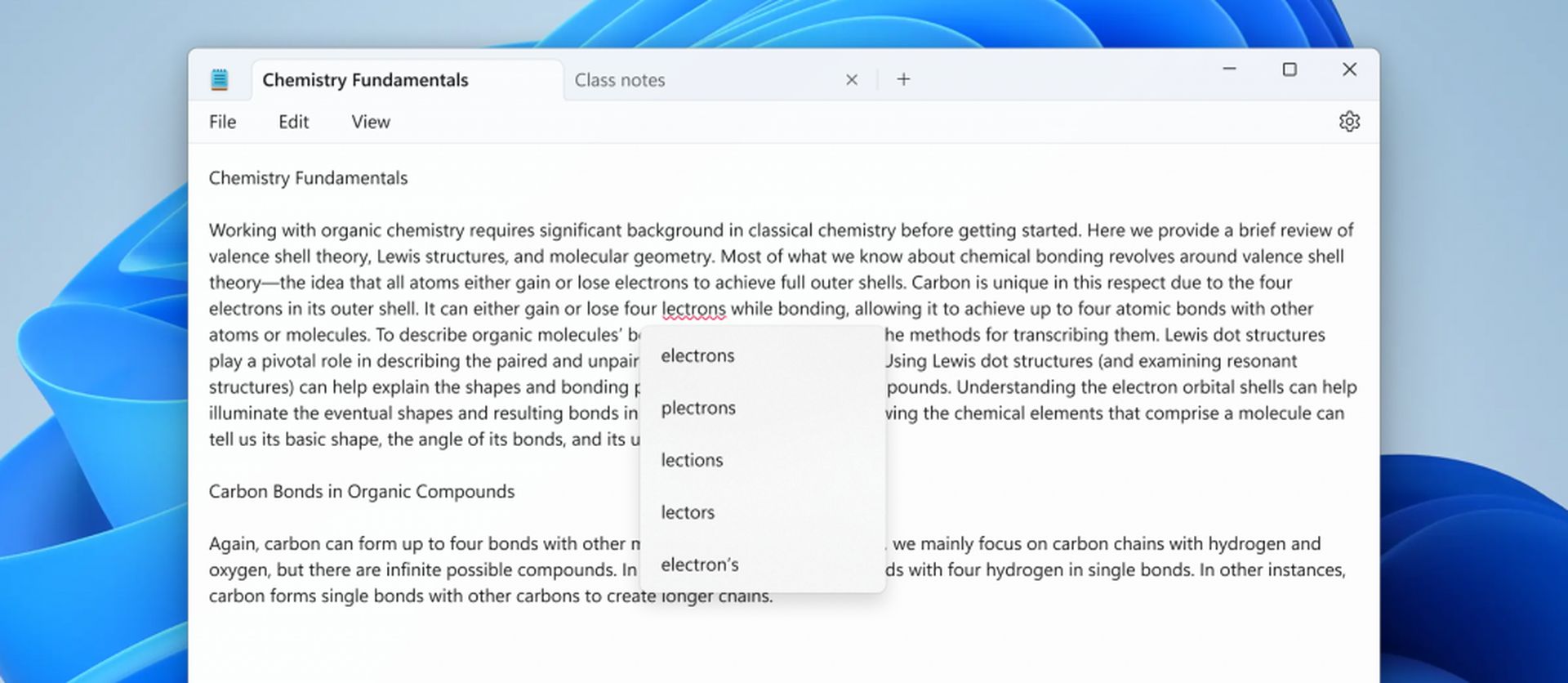
Notepad, first introduced in MS-DOS in 1983, is getting a spell-checker feature.

After over 40 years as Windows’ faithful text editor, Notepad aims to make this simple yet powerful tool even more useful. It allows users to eliminate typos and speed up text entry.

Spellcheck in Notepad: How does it work?

When Spell Check is enabled, misspelled words are underlined in red. Right-click on words or use the Shift + F10 keyboard shortcut to see suggestions for correction. Autocorrect instantly corrects common spelling mistakes for you.

Spellcheck in Notepad: How does it work?
Notepad, a classic Windows text editor since 1983, is finally getting a built-in spell-checker (Image credit)

On the other hand, the new Notepad update will also offer multi-language support, so users who write in different languages can avoid spelling mistakes.

You can configure the spell check and autocorrect settings as you wish. You can also set different settings for specific file types.

Where can you use Notepad?

  • Taking quick notes
  • Writing simple code fragments
  • To edit text files
  • To keep daily notes, such as a shopping list

Spellcheck in Notepad: How does it work?
This update aims to enhance Notepad’s usefulness and help users eliminate typos (Image credit)

Notepad’s spell checker will make your notes, code, and other text look more professional.

By the way, the new feature is currently available to Windows 11 Insider program users and will likely soon be available to all Windows 11 users.

It’s great to see this feature coming to Notepad, which I’ve used to take notes since I was a kid. I’m excited to be able to easily do everything I want with Notepad without needing other programs.

Featured image credit: Windows

Tags: Notepadwindows 11
ShareTweet
Barış Selman

Barış Selman

A technology and gaming enthusiast by day, Barış is a passionate composer and black/death metal guitarist by night. He keeps his finger on the pulse of the intersection of art and technology whenever he can from his tours worldwide.

Related Posts

Anthropic launches health features for Claude

Anthropic launches health features for Claude

12 January 2026
Google removes AI Overviews from medical queries

Google removes AI Overviews from medical queries

12 January 2026
Instagram disputes Malwarebytes’ claim of massive data theft

Instagram disputes Malwarebytes’ claim of massive data theft

12 January 2026
X to open-source new recommendation algorithm in 7 days

X to open-source new recommendation algorithm in 7 days

12 January 2026

LATEST

Simple ways to install and remove programs on Ubuntu

A guide to preventing accidental typing on Windows and Mac

Accessing your Google Chrome bookmarks

A guide to installing restricted extensions in Google Chrome

Anthropic launches health features for Claude

Google removes AI Overviews from medical queries

Instagram disputes Malwarebytes’ claim of massive data theft

X to open-source new recommendation algorithm in 7 days

How to choose the right reset method for Samsung Galaxy devices

What resetting end-to-end encryption does on iPhone, iPad or Mac

TechBriefly

© 2021 TechBriefly is a Linkmedya brand.

  • Tech
  • Business
  • Science
  • Geek
  • How to
  • About
  • Privacy
  • Terms
  • Contact
  • | Network Sites |
  • Digital Report
  • LeaderGamer

Follow Us

No Result
View All Result
  • Tech
  • Business
  • Crypto
  • Science
  • Geek
  • How to
  • About
    • About TechBriefly
    • Terms and Conditions
    • Privacy Policy
    • Contact Us
    • Languages
      • 中文 (Chinese)
      • Dansk
      • Deutsch
      • Español
      • English
      • Français
      • Nederlands
      • Italiano
      • 日本语 (Japanese)
      • 한국인 (Korean)
      • Norsk
      • Polski
      • Português
      • Pусский (Russian)
      • Suomalainen
      • Svenska