

TechBriefly
  • Tech
  • Business
  • Crypto
  • Science
  • Geek
  • How to
  • About
    • About TechBriefly
    • Terms and Conditions
    • Privacy Policy
    • Contact Us
    • Languages
      • 中文 (Chinese)
      • Dansk
      • Deutsch
      • Español
      • English
      • Français
      • Nederlands
      • Italiano
      • 日本语 (Japanese)
      • 한국인 (Korean)
      • Norsk
      • Polski
      • Português
      • Pусский (Russian)
      • Suomalainen
      • Svenska
No Result
View All Result
TechBriefly
Home How to
How to bold in Whatsapp: Easy text formating ways

How to bold in Whatsapp: Easy text formating ways

Eray EliaçıkbyEray Eliaçık
28 November 2023
in How to
Reading Time: 2 mins read
Share on FacebookShare on Twitter

Are you ready to make some bold moves? With this article, you can learn how to bold in WhatsApp and format your text as you want.

Formatting your WhatsApp messages is like giving them a makeover, and it’s simpler than you might think. By incorporating a few symbols and characters into your text, you can transform a regular message into a visually striking piece of communication.

How to bold in WhatsApp

Ever wanted to emphasize a certain word or phrase? Enter bold text. Here’s a quick guide on how to send bold text messages on WhatsApp:

  • Open the conversation: Start by opening the chat on WhatsApp where you want to send a bold message.
  • Type your message: Craft your message as you normally would.
  • Add the asterisks (*): To make your text bold, add an asterisk (*) before and after the words you want to highlight.
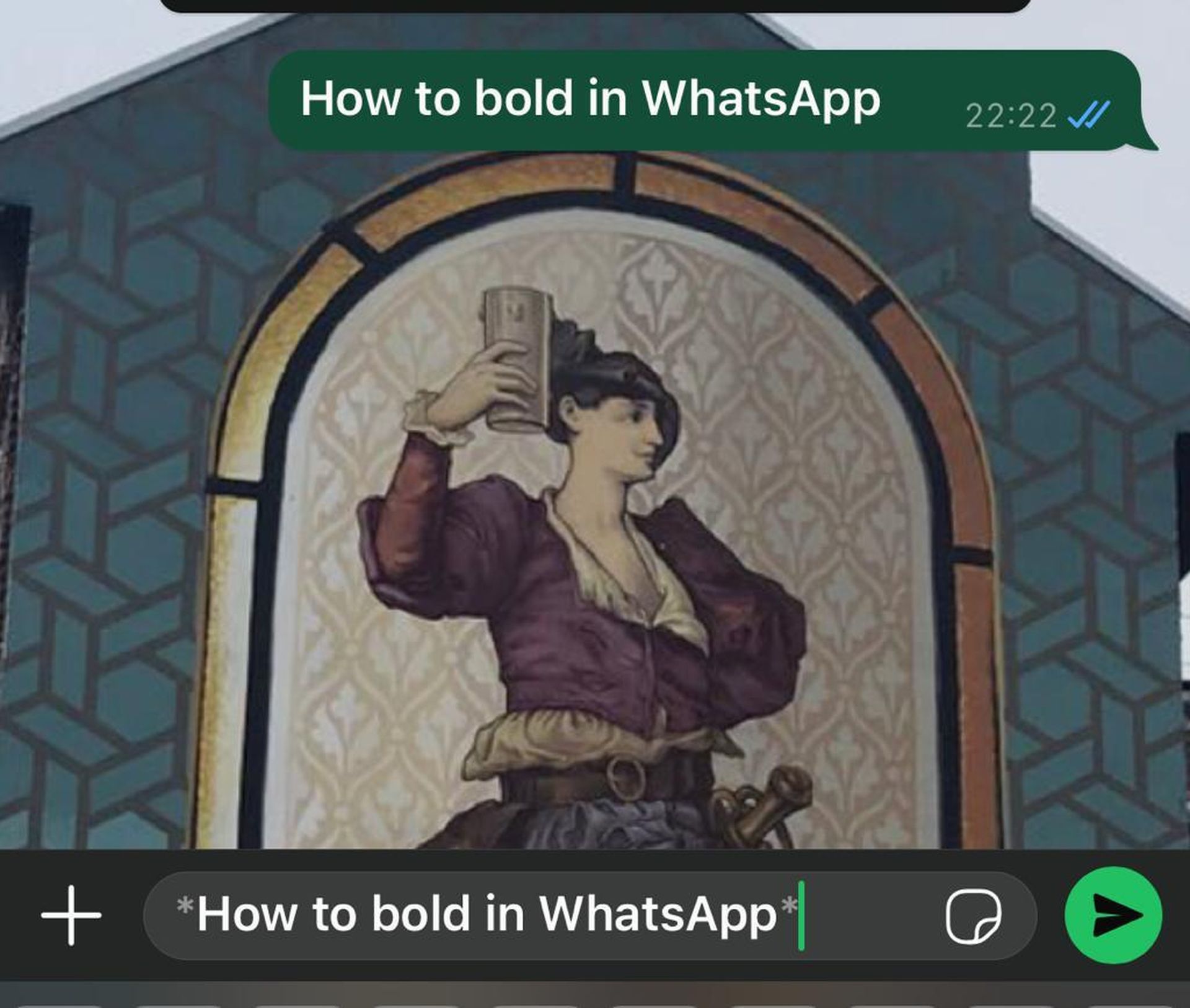
How to bold in Whatsapp: Easy text formating ways

  • Hit ‘Send’: Once you’re satisfied with your bold creation, hit the send button and make a lasting impression.

For those who prefer the expansive comfort of WhatsApp Web, fear not. The process is almost identical to the mobile version. However, note that unlike on your phone, WhatsApp Web doesn’t provide a preview of the formatted text before sending.


Hey, do you know you can add your email to WhatsApp


A shortcut

If you’re more of a tap-and-hold enthusiast, WhatsApp has you covered:

  • Compose your message: Type your message in the chat.
  • Tap and hold: Select the specific words you want to make bold.
  • Choose ‘Bold’: A popup will appear; select the “format” option and find “bold”.
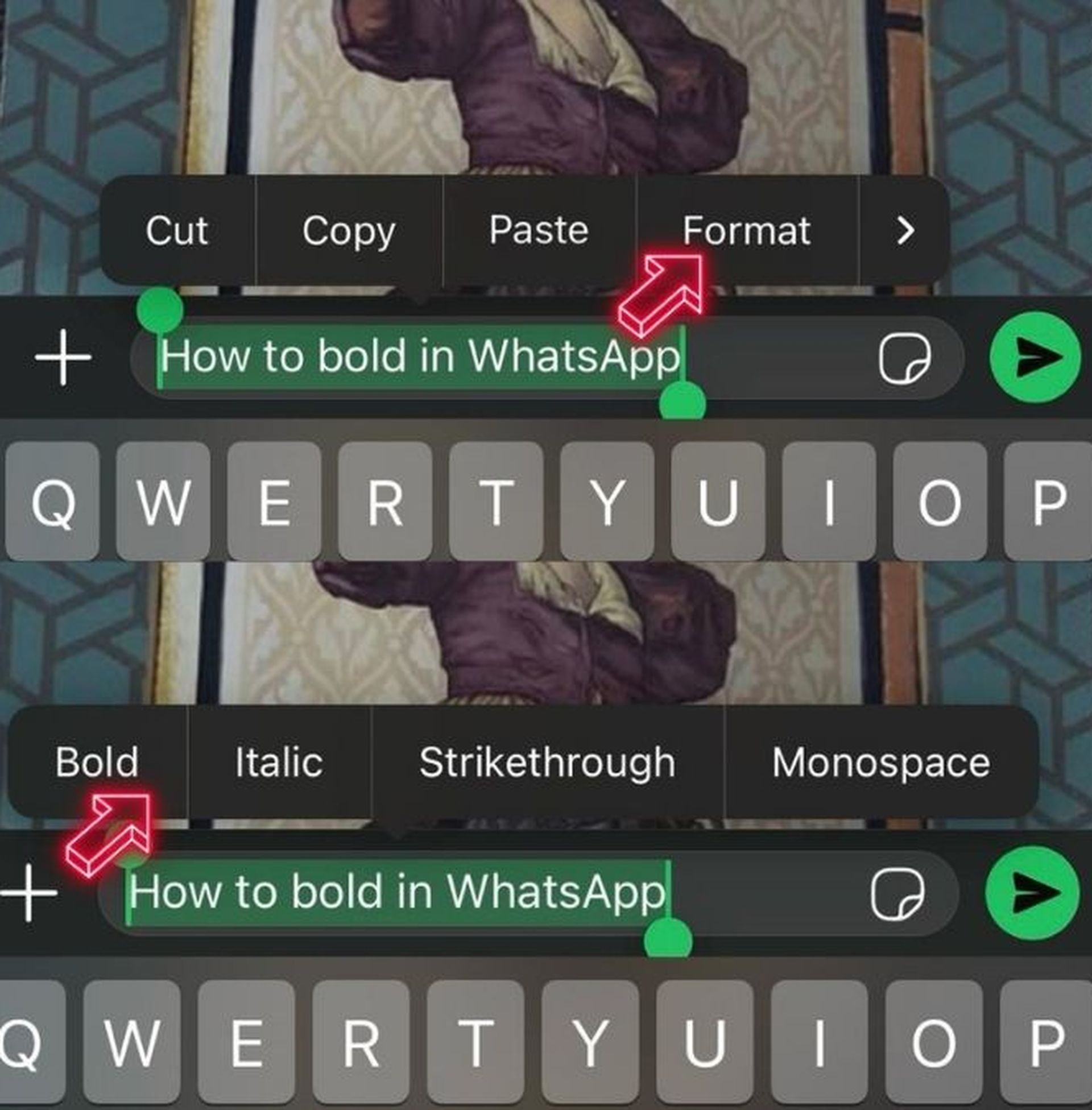
How to bold in Whatsapp: Easy text formating ways
WhatsApp text formatting ways
  • Voila! Your message is now bold, and you’re ready to hit send.

Express yourself as you want

Now, you know how to bold in Whatsapp. WhatsApp text formatting is not just about making words bold; it’s about expressing yourself in a more engaging and visually appealing way. So, the next time you want to make a statement, don’t hesitate to add a touch of formatting flair to your messages. After all, in the world of messaging, creativity knows no bounds.

Tags: formattextWhatsApp
ShareTweet
Eray Eliaçık

Eray Eliaçık

Meet Eray, a tech enthusiast passionate about AI, crypto, gaming, and more. Eray is always looking into new developments, exploring unique topics, and keeping up with the latest trends in the industry.

Related Posts

How to tell if your iPhone or Android phone is carrier unlocked

How to tell if your iPhone or Android phone is carrier unlocked

16 January 2026
How to apply screen protectors without air bubbles

How to apply screen protectors without air bubbles

16 January 2026
How to check if someone read your message on iPhone or iPad

How to check if someone read your message on iPhone or iPad

16 January 2026
A guide to viewing calculation history on iOS 18

A guide to viewing calculation history on iOS 18

16 January 2026

LATEST

OpenAI rockets $250 million into Altman’s Merge Labs brain-AI bridge

Bluesky opens “Live Now” badges to all users to lure Twitch creators

Capcom reveals Resident Evil: Requiem classic mode and ink ribbons

How to tell if your iPhone or Android phone is carrier unlocked

Paramount+ slams subscribers with first price hike since 2024

Ashley St. Clair sues xAI over Grok deepfakes

Samsung launches instant-play cloud streaming in Mobile Gaming Hub update

Netflix secures Sony Pictures first-to-stream rights

How to apply screen protectors without air bubbles

How to check if someone read your message on iPhone or iPad

TechBriefly

© 2021 TechBriefly is a Linkmedya brand.

  • Tech
  • Business
  • Science
  • Geek
  • How to
  • About
  • Privacy
  • Terms
  • Contact
  • | Network Sites |
  • Digital Report
  • LeaderGamer

Follow Us

No Result
View All Result
  • Tech
  • Business
  • Crypto
  • Science
  • Geek
  • How to
  • About
    • About TechBriefly
    • Terms and Conditions
    • Privacy Policy
    • Contact Us
    • Languages
      • 中文 (Chinese)
      • Dansk
      • Deutsch
      • Español
      • English
      • Français
      • Nederlands
      • Italiano
      • 日本语 (Japanese)
      • 한국인 (Korean)
      • Norsk
      • Polski
      • Português
      • Pусский (Russian)
      • Suomalainen
      • Svenska