

TechBriefly
  • Tech
  • Business
  • Crypto
  • Science
  • Geek
  • How to
  • About
    • About TechBriefly
    • Terms and Conditions
    • Privacy Policy
    • Contact Us
    • Languages
      • 中文 (Chinese)
      • Dansk
      • Deutsch
      • Español
      • English
      • Français
      • Nederlands
      • Italiano
      • 日本语 (Japanese)
      • 한국인 (Korean)
      • Norsk
      • Polski
      • Português
      • Pусский (Russian)
      • Suomalainen
      • Svenska
No Result
View All Result
TechBriefly
Home Tech Smartphones
MIUI 12 update brings a new shutdown menu and a volume panel

MIUI 12 update brings a new shutdown menu and a volume panel

Florian MaximilianobyFlorian Maximiliano
19 November 2020
in Smartphones, Software, Tech
Reading Time: 2 mins read
Share on FacebookShare on Twitter

Xiaomi’s mobile OS MIUI 12 has a new update that brings a new shutdown menu and volume panel to the smartphones that support it.

The global version of MIUI 12 was presented in May, introducing a series of new features that have been arriving to Xiaomi and Redmi mobiles in Spain. In these months, the brand continues to improve this new version of its interface with new features, such as a new camera app or multitasking on the phones.

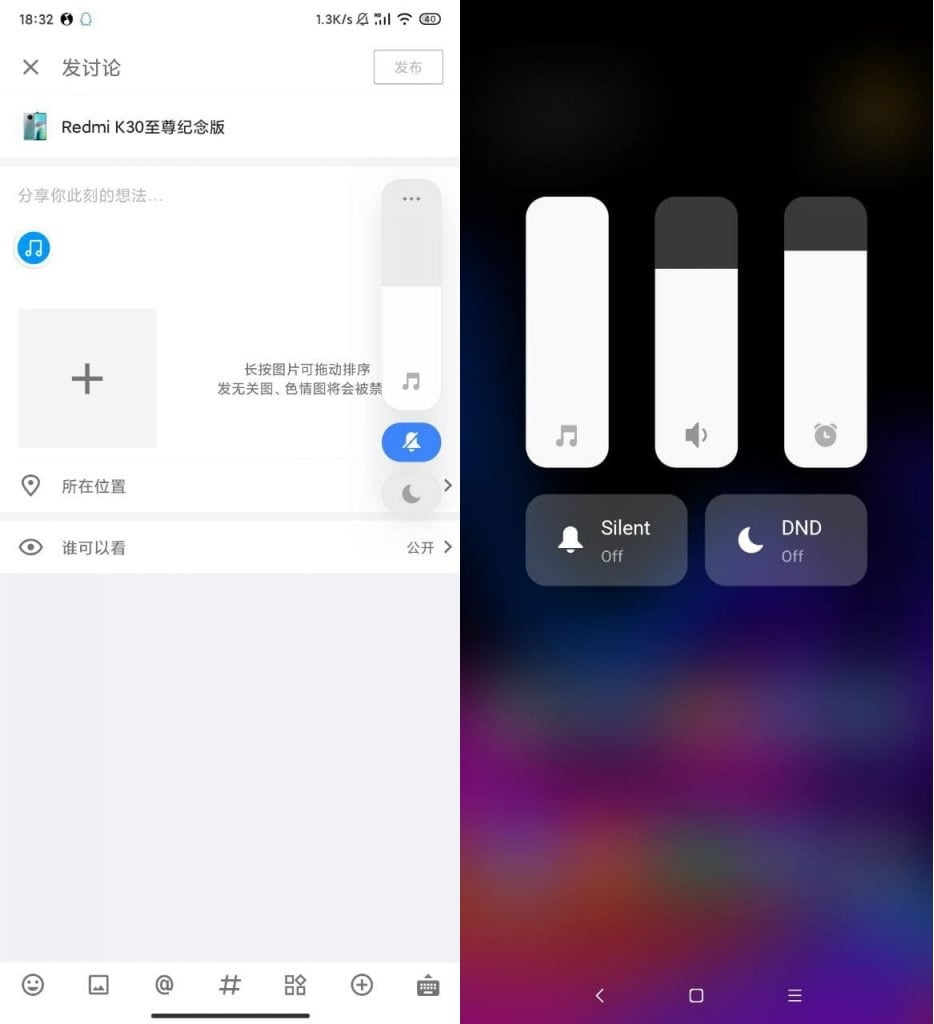
The manufacturer continues to work on new features for its interface, as seen in the new beta MIUI 12 based on Android 11. In this beta, the phone’s shutdown menu has been redesigned and a new volume panel has been introduced. The first images of these new features show us their changes.
The new shutdown menu of the MIUI 12 looks like the realme UI, the realme customization layer. In this case, we find a widget in the center of the screen, where we can slide to turn off or restart the phone. Depending on what we want to do, we will slide in one direction or another.
MIUI 12 update brings a new shutdown menu and a volume panel

This new Xiaomi shutdown menu also introduces new animations, as you can see in the video above. By moving the button to the off option, the colors change and the arrows give way to a shutdown icon. If the option to restart the phone is selected, the color changes to green and the arrows become a circle.

Also the volume panel of the MIUI 12 gets a face wash. This new panel has a wide slider with a three-point menu button at the top and the ringer and DND alternate below. The volume slider controls the ringer volume by default, but touching the three-point menu button opens additional volume controls. It is convenient to use this new volume menu.

  • 23 Xiaomi phones that will update to MIUI 12 in August
  • The list of Xiaomi phones that will get MIUI 12 Global

This new power off menu is only launched for phones using the MIUI 12 based on Android 11, so it is currently available for a few users. The new volume panel does not seem to have these limitations, so more users in the interface will have access to it in the next few days. For now, it is not known when it will reach all users of Xiaomi’s interface.

Tags: interfacemiMIUI 12mobileoperating systemredmiUIupdateXiaomi
ShareTweet
Florian Maximiliano

Florian Maximiliano

Related Posts

New WhatsApp update brings 2026 stickers and video call effects

New WhatsApp update brings 2026 stickers and video call effects

30 December 2025
Leaker reveals Xiaomi plans for high end eSIM device in 2026

Leaker reveals Xiaomi plans for high end eSIM device in 2026

30 December 2025
HP prepares OMEN OLED monitor reveal for CES 2026

HP prepares OMEN OLED monitor reveal for CES 2026

30 December 2025
High RAM costs from AI boom could delay next Xbox and PlayStation

High RAM costs from AI boom could delay next Xbox and PlayStation

30 December 2025
Please login to join discussion

LATEST

New WhatsApp update brings 2026 stickers and video call effects

Leaker reveals Xiaomi plans for high end eSIM device in 2026

HP prepares OMEN OLED monitor reveal for CES 2026

High RAM costs from AI boom could delay next Xbox and PlayStation

LG to unveil its Gallery TV at CES 2026

Bitcoin drops 3% to $87,300 as altcoins decline

How to install mods and custom content in The Sims 2

Running Python files and fixing path errors on Windows

How to boot your PC into Command Prompt for troubleshooting

How to delete a virus using Command Prompt

TechBriefly

© 2021 TechBriefly is a Linkmedya brand.

  • Tech
  • Business
  • Science
  • Geek
  • How to
  • About
  • Privacy
  • Terms
  • Contact
  • | Network Sites |
  • Digital Report
  • LeaderGamer

Follow Us

No Result
View All Result
  • Tech
  • Business
  • Crypto
  • Science
  • Geek
  • How to
  • About
    • About TechBriefly
    • Terms and Conditions
    • Privacy Policy
    • Contact Us
    • Languages
      • 中文 (Chinese)
      • Dansk
      • Deutsch
      • Español
      • English
      • Français
      • Nederlands
      • Italiano
      • 日本语 (Japanese)
      • 한국인 (Korean)
      • Norsk
      • Polski
      • Português
      • Pусский (Russian)
      • Suomalainen
      • Svenska
