
TechBriefly
  • Tech
  • Business
  • Crypto
  • Science
  • Geek
  • How to
  • About
    • About TechBriefly
    • Terms and Conditions
    • Privacy Policy
    • Contact Us
    • Languages
      • 中文 (Chinese)
      • Dansk
      • Deutsch
      • Español
      • English
      • Français
      • Nederlands
      • Italiano
      • 日本语 (Japanese)
      • 한국인 (Korean)
      • Norsk
      • Polski
      • Português
      • Pусский (Russian)
      • Suomalainen
      • Svenska
No Result
View All Result
TechBriefly
Home Tech Internet
New Uber Eats design allows new features

New Uber Eats design allows new features

Jawad WallacebyJawad Wallace
8 October 2020
in Internet, Tech
Reading Time: 2 mins read
Share on FacebookShare on Twitter

Uber Eats deploys a new design interface makes it easier to discover new restaurants. Uber is trying to simplify the experience.

Uber Eats is refreshing its interface. In a blog post, the developers of the application announce some new features to help users find something to order more easily.

Revamped design will bring tabs

Uber Eats is now separated into two tabs, “Shipping” and “Takeaway”. The first provides a list of restaurants, while the second takes the form of a map and helps you discover new stores near you. Another change is a bar of icons that allows you to quickly switch worlds, for example, to order groceries or flowers.
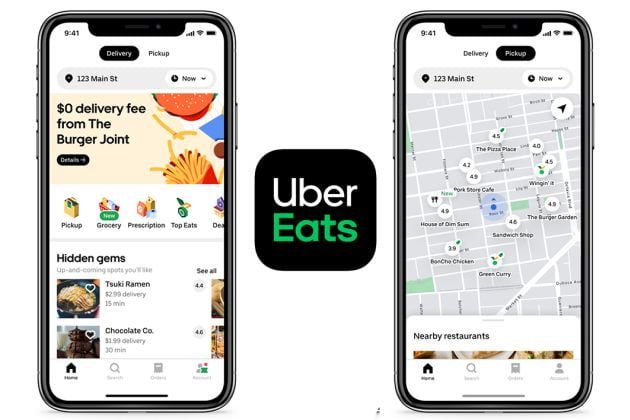
Uber Eats unveils a new design
  • Anthony Levandowski, a former Google engineer sentenced to 18 months

It will take multiple orders

One of the most interesting new features of this new application is the group control. Uber doesn’t say how, but explains that you won’t have to pass your phone to all your friends to place an order any more. We imagine that it will be possible to create a shared shopping cart and add products from several devices. In the end, there will only be one order.

Finally, an animated section in the new Uber Eats design allows you to see what your neighbors are ordering, anonymously of course.

Uber explained its new design for Eats app:

Visual shortcuts: With the new icons of your favorite kitchens and categories (called shortcuts), it will be possible to quickly find your favorite food and – where available – markets and other local businesses, such as florists, butchers, pet shops and more.

A new “To- Go ” experience: For those who prefer to fetch food directly from the establishment, the new navigation map contains more information and visual directions about nearby restaurants offering this option, as well as other interesting shops and local offers.

Sophisticated personalization: Tailored restaurants with more calibrated recommendations, according to the preferences of users who usually order at Uber Eats, so that they can repeat their favorites or discover new “gastronomic gems” hidden in the neighborhood. That way, they will spend less time choosing and more time enjoying their favorite dishes.

Convenience of ordering in several restaurants at the same time: Now, the Uber Eats user will be able to satisfy the wishes of his whole family in a single order made in different restaurants.
One click inspiration: The user will now be able to see what other people around them are asking for. You never know, maybe you could be the inspiration for an upcoming order!

Tags: appapplicationdesignfeaturedmobileuber
ShareTweet
Jawad Wallace

Jawad Wallace

Related Posts

New WhatsApp update brings 2026 stickers and video call effects

New WhatsApp update brings 2026 stickers and video call effects

30 December 2025
Leaker reveals Xiaomi plans for high end eSIM device in 2026

Leaker reveals Xiaomi plans for high end eSIM device in 2026

30 December 2025
HP prepares OMEN OLED monitor reveal for CES 2026

HP prepares OMEN OLED monitor reveal for CES 2026

30 December 2025
High RAM costs from AI boom could delay next Xbox and PlayStation

High RAM costs from AI boom could delay next Xbox and PlayStation

30 December 2025
Please login to join discussion

LATEST

New WhatsApp update brings 2026 stickers and video call effects

Leaker reveals Xiaomi plans for high end eSIM device in 2026

HP prepares OMEN OLED monitor reveal for CES 2026

High RAM costs from AI boom could delay next Xbox and PlayStation

LG to unveil its Gallery TV at CES 2026

Bitcoin drops 3% to $87,300 as altcoins decline

How to install mods and custom content in The Sims 2

Running Python files and fixing path errors on Windows

How to boot your PC into Command Prompt for troubleshooting

How to delete a virus using Command Prompt

TechBriefly

© 2021 TechBriefly is a Linkmedya brand.

  • Tech
  • Business
  • Science
  • Geek
  • How to
  • About
  • Privacy
  • Terms
  • Contact
  • | Network Sites |
  • Digital Report
  • LeaderGamer

Follow Us

No Result
View All Result
  • Tech
  • Business
  • Crypto
  • Science
  • Geek
  • How to
  • About
    • About TechBriefly
    • Terms and Conditions
    • Privacy Policy
    • Contact Us
    • Languages
      • 中文 (Chinese)
      • Dansk
      • Deutsch
      • Español
      • English
      • Français
      • Nederlands
      • Italiano
      • 日本语 (Japanese)
      • 한국인 (Korean)
      • Norsk
      • Polski
      • Português
      • Pусский (Russian)
      • Suomalainen
      • Svenska
