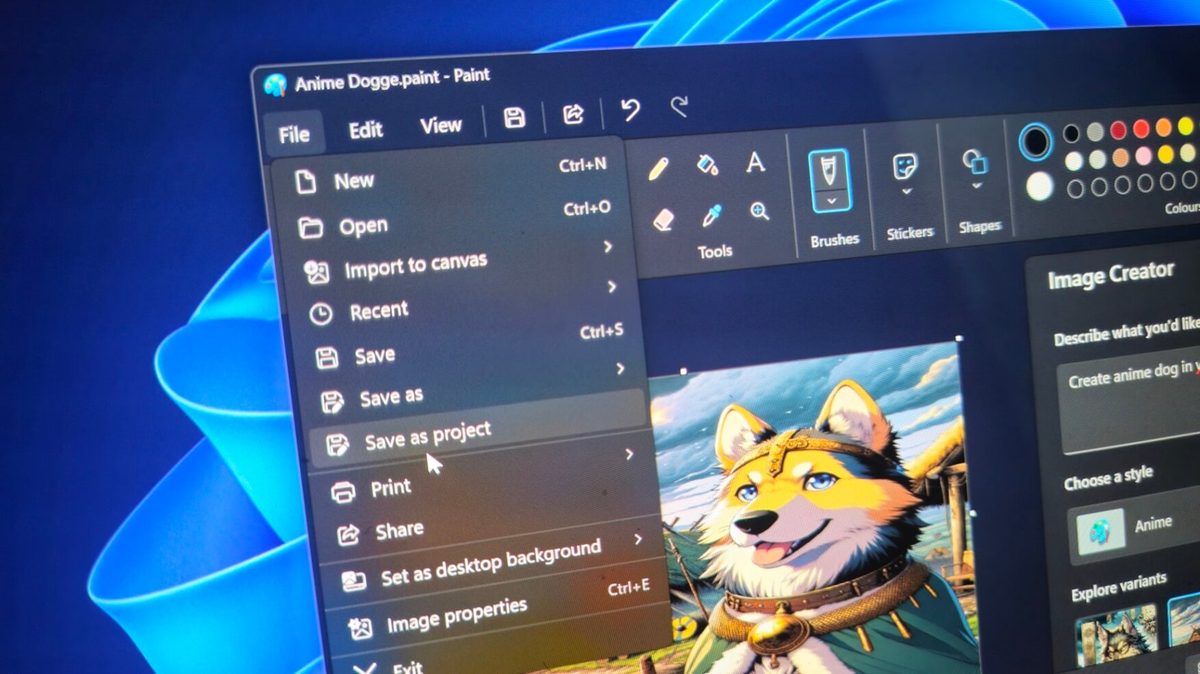

Microsoft continues to enhance its longstanding Paint application for Windows 11, introducing features that bring it closer to professional tools like Adobe Photoshop. The latest updates, announced on September 17, 2025, include the ability to save creations as editable project files and new opacity controls for drawing tools, alongside improvements to the Snipping Tool and Notepad.
At the forefront of these changes is the introduction of .paint project files, which allow users to preserve layers and other elements of their artwork for seamless resumption. Currently in testing with Windows Insiders in the Dev and Canary channels, this feature mirrors Photoshop’s .PSD format. “You can now save your creation as an editable Paint project file and seamlessly pick up where you left off,” said Dave Grochocki, principal product manager lead for Microsoft’s Windows inbox apps. These files store layers internally, enabling users to reopen them directly in Paint and continue editing from the exact point of interruption. “When you’re ready to return, simply open the file to launch it in Paint, right where you left off,” Grochocki added.
Complementing this, Paint now features opacity sliders for the pencil and brush tools, providing precise control over transparency. Users can access the slider on the left side of the canvas after selecting either tool, adjusting opacity to suit their creative needs. This addition builds on recent Paint enhancements, such as dark mode, layer support, transparency options, and AI-powered image creation tools, which have transformed the once-basic app into a more versatile digital canvas.
Microsoft is also upgrading the Snipping Tool with a quick markup feature designed to streamline screenshot annotations. The updated toolbar includes a highlighter, pen, and eraser, along with an intuitive re-crop option, making it easier for users to edit and share captures without switching applications.
Additionally, Notepad is gaining free AI capabilities for Copilot Plus PC users, including write, summarization, and rewrite functions. These tools leverage local models running on the device for privacy and performance, with the option to switch to cloud-based models as required. No Microsoft 365 subscription is necessary, broadening access to AI-assisted productivity. “You can seamlessly switch between local and cloud models based on your needs,” Grochocki noted.