
TechBriefly
  • Tech
  • Business
  • Crypto
  • Science
  • Geek
  • How to
  • About
    • About TechBriefly
    • Terms and Conditions
    • Privacy Policy
    • Contact Us
    • Languages
      • 中文 (Chinese)
      • Dansk
      • Deutsch
      • Español
      • English
      • Français
      • Nederlands
      • Italiano
      • 日本语 (Japanese)
      • 한국인 (Korean)
      • Norsk
      • Polski
      • Português
      • Pусский (Russian)
      • Suomalainen
      • Svenska
No Result
View All Result
TechBriefly
Home Tech AI
Microsoft integrates Copilot as default in Microsoft 365 subscriptions

Microsoft integrates Copilot as default in Microsoft 365 subscriptions

Emre ÇıtakbyEmre Çıtak
17 September 2025
in AI, Tech
Reading Time: 2 mins read
Share on FacebookShare on Twitter

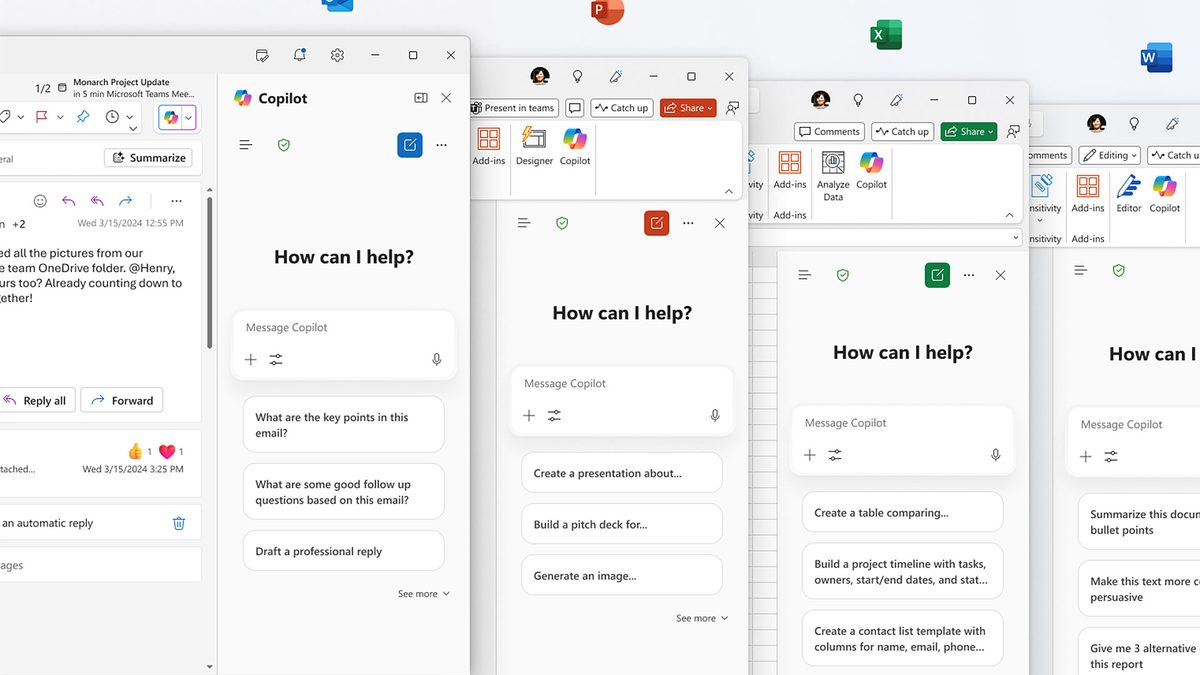
Microsoft is set to integrate its AI-powered Copilot chatbot as a default component of Microsoft 365 subscriptions starting in fall 2025, marking a significant push toward widespread adoption of the productivity tool. The company announced that the advanced deployment will install Copilot on Windows devices equipped with Microsoft 365 desktop client apps, occurring seamlessly in the background to avoid disrupting user workflows.

Copilot is designed to enhance productivity by serving as a unified gateway to exclusive features within the Microsoft 365 suite, including search, chat functionalities, and agent-based AI capabilities. Users will have multiple access options: a dedicated web application, desktop versions for Windows and Mac, and mobile apps for Android and iOS devices. This mandatory inclusion will embed Copilot into the core default installation, irrespective of individual user preferences, as part of Microsoft’s broader strategy to make the AI assistant ubiquitous across its ecosystem.

However, the rollout comes with caveats. Microsoft 365 customers in the European Economic Area (EEA) will remain unaffected and continue to receive a privacy-centric version of the service, aligning with regional data protection regulations. For users and administrators outside the EEA, options exist to opt out. They can revert to a Copilot-free setup by adjusting “Modern App Settings” in the M365 Apps Admin Center. Additionally, Windows 11 Pro users can disable the feature via the Group Policy Editor, while all Windows 11 editions support deactivation through Windows Registry modifications.

This development follows Microsoft’s recent enhancements to Copilot, such as the August introduction of AI features in Excel. At that time, the company issued a clear warning: Copilot can “hallucinate” and generate inaccurate results, underscoring the need for user caution with AI outputs.

The deployment may also tie into other Microsoft initiatives, including the SCOOBE nagging screen, a new prompt system aimed at reminding customers of impending subscription renewals or payments. While positioned as a productivity booster, the forced integration has sparked discussions about user choice and AI reliability in enterprise environments. Microsoft continues to expand Copilot’s footprint, reflecting the tech giant’s commitment to embedding artificial intelligence at the heart of its productivity tools.

Tags: copilotfeaturedMicrosoft
ShareTweet
Emre Çıtak

Emre Çıtak

Emre’s love for animals made him a veterinarian, and his passion for technology made him an editor. Making new discoveries in the field of editorial and journalism, Emre enjoys conveying information to a wide audience, which has always been a dream for him.

Related Posts

Narwal unveils Flow 2 with AI pet monitoring at CES 2026

Narwal unveils Flow 2 with AI pet monitoring at CES 2026

6 January 2026
Hyundai reveals Boston Dynamics and DeepMind alliance at CES 2026

Hyundai reveals Boston Dynamics and DeepMind alliance at CES 2026

6 January 2026
Intel unveils Core Ultra Series 3 at CES 2026

Intel unveils Core Ultra Series 3 at CES 2026

6 January 2026
Amazon takes Alexa to the web with launch of Alexa.com at CES 2026

Amazon takes Alexa to the web with launch of Alexa.com at CES 2026

6 January 2026

LATEST

How to download and migrate your content from Microsoft Stream

Easy ways to make a YouTube music video with just pictures

Easy steps to build your own music video for YouTube

How to add videos and movies to compatible iPod models easily

Narwal unveils Flow 2 with AI pet monitoring at CES 2026

Hyundai reveals Boston Dynamics and DeepMind alliance at CES 2026

Intel unveils Core Ultra Series 3 at CES 2026

Amazon takes Alexa to the web with launch of Alexa.com at CES 2026

Amazon enters lifestyle TV market with $899 Ember Artline

Google previews Gemini AI features for Google TV

TechBriefly

© 2021 TechBriefly is a Linkmedya brand.

  • Tech
  • Business
  • Science
  • Geek
  • How to
  • About
  • Privacy
  • Terms
  • Contact
  • | Network Sites |
  • Digital Report
  • LeaderGamer

Follow Us

No Result
View All Result
  • Tech
  • Business
  • Crypto
  • Science
  • Geek
  • How to
  • About
    • About TechBriefly
    • Terms and Conditions
    • Privacy Policy
    • Contact Us
    • Languages
      • 中文 (Chinese)
      • Dansk
      • Deutsch
      • Español
      • English
      • Français
      • Nederlands
      • Italiano
      • 日本语 (Japanese)
      • 한국인 (Korean)
      • Norsk
      • Polski
      • Português
      • Pусский (Russian)
      • Suomalainen
      • Svenska